
If your Amazon turnover has crossed £90,000 in any rolling 12-month period, you must register for VAT within 30 days. If you’re already registered, the more pressing issue is that Amazon has charged 20% VAT on seller fees since 1 August 2024, and unless you’re on standard VAT accounting, you cannot fully reclaim it. The next step is simple: check your rolling turnover now, then pull your VAT invoices from Seller Central.
TL;DR:
- Sellers on Flat Rate Scheme cannot reclaim the 20% VAT charged on Amazon fees, increasing costs by roughly £4,800 annually for a typical £2,000 monthly fee.
- Crossing the £90,000 turnover threshold depends on gross sales from all channels and applies based on a rolling 12-month period, not a calendar year.
- Amazon now invoices UK seller fees with VAT directly, which is broadly cash-flow neutral for VAT-registered sellers but costs unregistered and Flat Rate sellers more.
- Proper monthly reconciliation of Amazon invoices, payouts, and VAT codes can prevent errors, with automated tools like Osellpa simplifying the process.
- Immediate registration is required if a seller anticipates exceeding £90,000 in the next 30 days or on a cumulative basis, including off-platform income.
Table of Contents
- What changed: Amazon charging UK VAT on seller fees (and what that means)
- Do I need to register for VAT? The £90,000 threshold explained
- How VAT applies to your Amazon sales: marketplace and import rules
- Reclaiming VAT on Amazon fees: Box entries and MTD steps
- Practical checklist: register, upload VAT number, get invoices, and set up accounting
- When VAT becomes a real cost: unregistered and Flat Rate sellers
- Reducing VAT reconciliation errors with automation
- Author perspective: what UK Amazon sellers get wrong about VAT
- An easier way to stay on top of Amazon VAT reconciliation
- Sources
What changed: Amazon charging UK VAT on seller fees (and what that means)
From 1 August 2024, Amazon started adding 20% UK VAT to the fees it charges UK sellers, including referral fees, FBA fulfilment fees, and subscription charges. That’s a genuine shift in how the platform bills you, not a rate change dressed up as news.
The reason comes down to who is legally supplying the service. Amazon restructured its billing so that the entity invoicing UK sellers is now a UK branch, which brings the transaction within the scope of UK VAT under the VAT guide (VAT Notice 700). Previously, many sellers accounted for this under the reverse charge mechanism, effectively self-assessing the VAT rather than being billed for it directly. That workaround has gone.
Whether this costs you money depends entirely on your VAT status:
- Standard VAT-registered sellers reclaim the VAT on fees as input tax, so the change is broadly cash-flow neutral once you account for it correctly.
- Flat Rate Scheme users typically cannot reclaim this input VAT under their scheme’s rules, so the 20% often becomes a genuine added cost.
- Unregistered sellers have no mechanism to reclaim anything, meaning fees that used to cost £100 now cost £120, full stop.
You’ll find the actual VAT invoices in Seller Central’s Tax Document Library, usually issued monthly alongside your regular fee statements. Amazon’s VAT resources explain where these documents live and how they’re formatted, though the layout can differ slightly depending on your marketplace settings.
Pro Tip: Download your Tax Document Library invoices as soon as they appear each month rather than waiting until quarter-end. Amazon doesn’t always keep older statements easy to locate, and reconciling twelve months of missing invoices in one sitting is a miserable way to spend an afternoon.
Do I need to register for VAT? The £90,000 threshold explained
Registration in the UK isn’t optional once you cross a defined line, and that line is calculated two different ways depending on your circumstances.
The current mandatory registration threshold is £90,000 in taxable turnover within any rolling 12-month period, not a fixed calendar year. That distinction catches sellers out constantly. HMRC doesn’t reset the clock every January; it looks at the trailing 12 months on a continuous basis, so a strong Q4 combined with a decent Q1 can push you over the threshold in March even if your calendar-year total looks fine.
There’s a second, faster-acting test that matters just as much: the 30-day forward-looking rule. If you expect your turnover to exceed £90,000 in the next 30 days alone, you must register immediately, not wait for the rolling 12-month figure to catch up. This typically applies to sellers about to launch a high-volume product, run a major promotional push, or take on a large wholesale order that will clearly tip them over the line within the month.
Here’s how the two tests work in practice for an Amazon seller:
- Track total taxable turnover, not just Amazon payouts. The £90,000 threshold covers all your business’s taxable supplies, including eBay sales, a Shopify store, wholesale orders, or trade show sales, not just what lands in your Amazon disbursements. Sellers who only watch their Amazon Seller Central sales summary routinely miss this, because it’s easy to assume the platform figure is the whole business.
- Use gross sales, not net payouts, for the calculation. Amazon’s deposits already have fees, VAT on fees, and refunds netted out. HMRC wants your turnover based on the value of your taxable supplies, not the cash that actually hits your bank account, so you need your Amazon sales reports (gross sales) rather than your bank statement.
- Apply the rolling test every month, not annually. Run the sum of the trailing 12 months at the end of each month. A seller doing roughly £6,500 a month sits right on the edge of £90,000 within twelve months once a couple of stronger months push the average up.
- Watch the 30-day rule around seasonal spikes. If you’re heading into November and December and you can see, from historical data or confirmed wholesale orders, that you’ll clear £90,000 in the next 30 days, register now. Waiting for the rolling total to formally cross the line is too late; HMRC judges you on what you could reasonably have expected.
- Include off-platform income from day one. A seller running £70,000 through Amazon and £25,000 through a separate website is over the threshold the moment both are added together, even though neither individually looks close.
Non-UK established sellers face an additional layer, because VAT Notice 700/1 sets out registration obligations that can apply regardless of turnover if you’re supplying goods or services into the UK from overseas. If that’s your situation, the standard threshold simply doesn’t apply to you in the way it does to a UK-based sole trader.
How VAT applies to your Amazon sales: marketplace and import rules
Amazon isn’t always just a shop window for your listings. In certain scenarios, the platform itself becomes legally responsible for charging and collecting VAT on the sale, which is a completely separate issue from the VAT-on-fees change discussed earlier.
This is the “deemed supplier” rule, introduced as part of the post-Brexit e-commerce VAT reforms. In plain terms, when a marketplace is treated as the deemed supplier, Amazon (not you) charges the customer VAT at checkout and remits it to HMRC on your behalf. This happens most commonly in two scenarios:
- Imported goods valued at £135 or less, sold to a UK consumer through the Amazon Marketplace, where Amazon collects VAT at the point of sale rather than at the border.
- Non-UK established sellers holding stock in the UK (often via FBA) and selling to UK consumers, where Amazon again becomes responsible for the VAT charge on that specific transaction.
If neither of these applies, standard VAT rules kick in and you, as the seller, remain responsible for charging and accounting for VAT in the normal way.
The practical problem is that these facilitator sales look identical to your own sales in a basic export, but they must be treated differently on your VAT return. If Amazon already collected and remitted VAT on a transaction, you cannot also declare output VAT on it, or you’ll overstate your liability and potentially trigger an HMRC query when the figures don’t reconcile against Amazon’s own reporting.
Watch for these common pitfalls:
- Commingled inventory creates a real headache when FBA mixes your stock with identical products from other sellers, since it becomes harder to trace which specific unit sold, and under what VAT treatment, at reconciliation time.
- Incorrect VAT coding in bookkeeping software happens when facilitator sales get logged as standard sales, inflating declared output VAT and misrepresenting your true liability.
- Missing the marketplace transaction reports that Amazon provides specifically to identify which sales it acted as deemed supplier for, meaning sellers who skip this report often can’t separate the two categories at all.
Running a monthly reconciliation between your Amazon Sales Tax Report and your bookkeeping entries catches most of these before they compound into a bigger problem at year-end.
Reclaiming VAT on Amazon fees: Box entries and MTD steps
Getting the bookkeeping right on Amazon fee VAT isn’t complicated once you know the mechanics, but the entries have to land in the correct boxes or your VAT return will be wrong even if your maths is right.
If you’re on standard VAT accounting, here’s the sequence:
- Record the net fee amount in Box 7 (total value of purchases, excluding VAT) on your VAT return, treating Amazon’s fees as a normal business purchase.
- Reclaim the VAT charged on those fees in Box 4 (VAT reclaimed on purchases), using the VAT invoice Amazon issued via the Tax Document Library as your supporting evidence.
- Keep the actual VAT invoice on file, not just the fee summary, because HMRC’s VAT guidance requires a valid VAT invoice to support any input tax claim, and Amazon’s basic transaction reports don’t always count as one.
- Stop applying reverse charge entries for Amazon fees from August 2024 onward. If your bookkeeping template still has a reverse charge line for Amazon fees left over from before the change, you’re double-handling VAT that Amazon is now charging you directly.
Flat Rate Scheme sellers face a different reality. Under the scheme, you pay a fixed percentage of your gross turnover to HMRC and generally can’t reclaim input VAT on day-to-day expenses, including Amazon fees. That’s the mechanism behind the cash-flow difference between standard and Flat Rate sellers: one group absorbs the fee VAT as a cost, the other reclaims it.
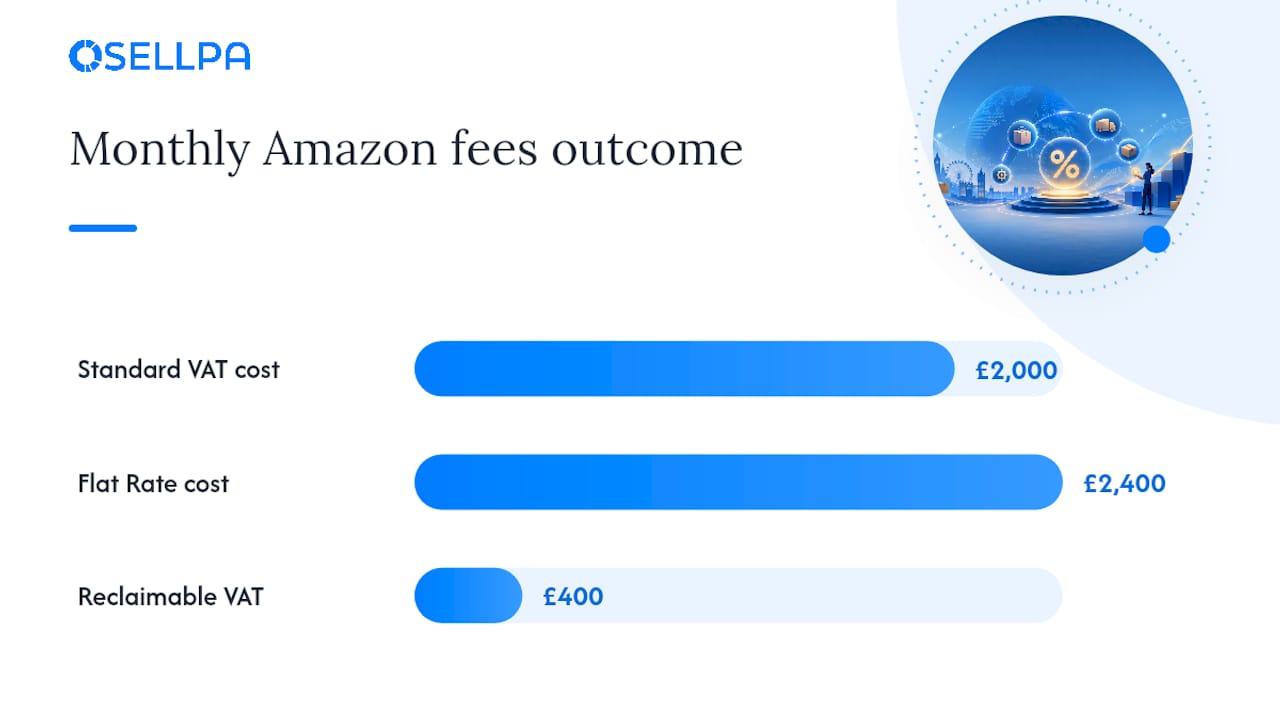
Worked example: A seller pays £2,000 a month in Amazon fees before VAT. From August 2024, that’s £2,400 including VAT. A standard VAT-registered seller reclaims the £400, so the real cost stays £2,000. A Flat Rate Scheme seller pays the full £2,400, with no mechanism to claw back the £400, an extra £4,800 a year that simply erodes margin.
On Making Tax Digital, the rule is straightforward: if you’re VAT-registered, you must keep digital records and submit returns through MTD-compatible software, not manually through the HMRC portal. Each month, reconcile three things against each other: your Amazon Date Range Reports, your VAT invoices from the Tax Document Library, and the VAT boxes your software generates. Drift between any two of these is usually the first sign something’s been miscoded.
Practical checklist: register, upload VAT number, get invoices, and set up accounting
Turning all of this into action doesn’t need to take more than a week if you work through it in order.
- Confirm your rolling 12-month turnover today, using gross sales figures across every sales channel, not just Amazon. Give yourself an honest number before deciding whether registration is mandatory or optional.
- Register online via GOV.UK if you’ve crossed the threshold or expect to within 30 days, choosing your effective registration date carefully since this determines when your VAT obligations formally begin.
- Add your VAT number to Seller Central once HMRC confirms it, typically found under your account’s tax settings, so Amazon’s invoicing and reporting reflect your registered status correctly.
- Download your VAT invoices from the Tax Document Library for every month since 1 August 2024 if you haven’t already, filling any gaps before they become harder to trace.
- Match Amazon’s Date Range Transaction Reports against your VAT invoices monthly, checking that fee totals, VAT amounts, and marketplace facilitator sales all tie together correctly.
- Set up MTD-compatible software if you haven’t already, connecting it to your bank feed and, ideally, an Amazon integration that pulls sales and fee data automatically rather than requiring manual entry.
- Retain records for at least six years, which is HMRC’s standard requirement for VAT records, covering invoices, returns, and any correspondence about your VAT status.
Pro Tip: Set a recurring monthly calendar reminder for the same date your Amazon disbursement period closes. Reconciling little and often takes twenty minutes a month; leaving it until your VAT return deadline usually means a stressful weekend chasing down three months of missing documents.
Getting inventory tracking right also matters here, particularly if you hold stock in multiple fulfilment centres. Osellpa’s guide on Amazon inventory management covers how stock location affects your VAT reporting obligations, which is worth reading alongside your VAT setup if you run FBA across several product lines.
When VAT becomes a real cost: unregistered and Flat Rate sellers
Not every seller feels the fee VAT change the same way, and the gap between registration statuses is bigger than most people expect.
An unregistered seller effectively pays 20% more on every Amazon fee from August 2024 onward, with no way to claim any of it back. There’s no offsetting mechanism available to a business outside the VAT system, so the extra cost drops straight onto the bottom line.
Flat Rate Scheme sellers sit in an awkward middle ground. The scheme’s flat percentage structure is designed to simplify VAT accounting, not to let you reclaim input tax on expenses like Amazon fees, so most Flat Rate users absorb the fee VAT as a genuine cost increase, just like unregistered sellers.
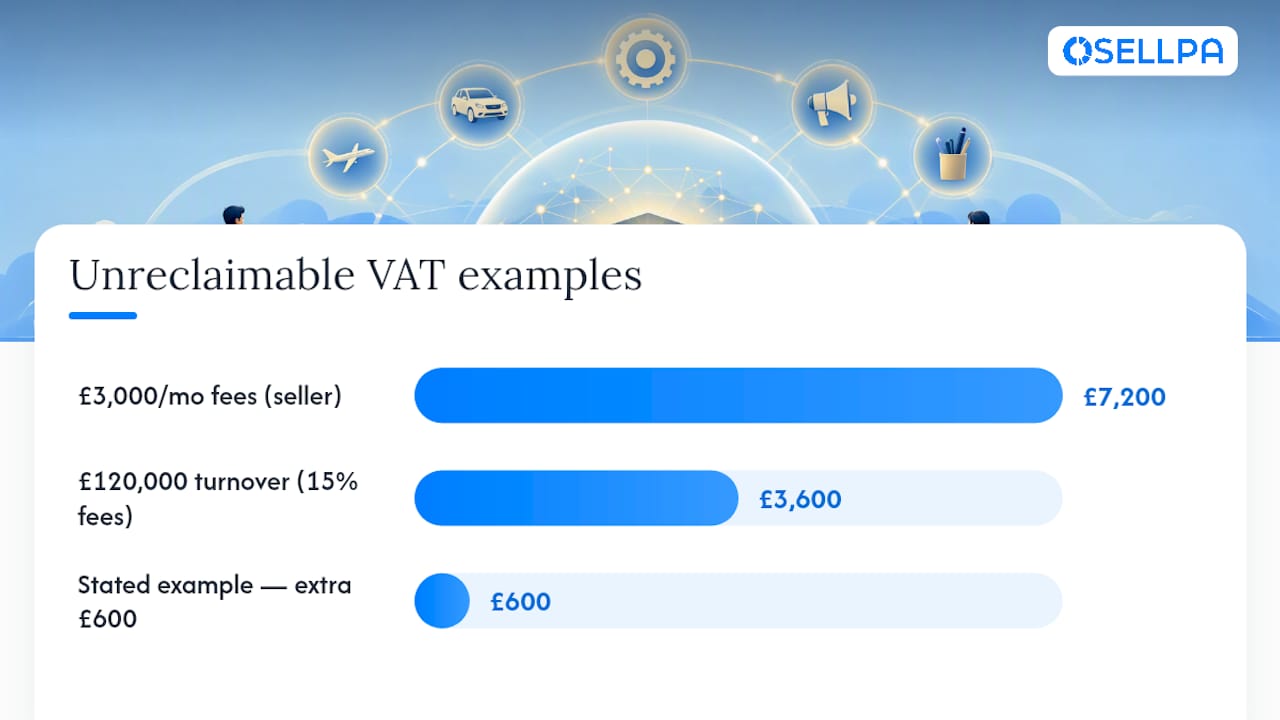
- A seller paying £3,000 a month in fees now effectively pays £600 more a year in fee VAT they can’t reclaim if they’re on Flat Rate or unregistered, roughly £7,200 annually.
- A seller doing £120,000 turnover a year with 15% average fees pays around £18,000 in fees; the VAT difference between reclaiming and not reclaiming is £3,600 a year, which is a meaningful dent in net profit for a smaller operation.
If you’re close to the registration threshold or currently on Flat Rate and unsure whether switching to standard accounting would save money, that’s exactly the point to speak to an accountant rather than guess. The maths depends heavily on your specific fee levels and product mix, and a qualified adviser can model both scenarios against your actual numbers in under an hour.
Reducing VAT reconciliation errors with automation
Manually cross-checking Amazon fee invoices, marketplace facilitator sales, and VAT returns every month is exactly the kind of repetitive task where small errors compound over a year. A missed invoice in March looks trivial until it’s one of six missing months by the time you’re preparing your annual return.
Automated tools that connect directly to the Amazon API can flag some of the most common failure points before they reach your bookkeeper:
- Missing VAT invoices, flagged automatically when a month’s Tax Document Library entry hasn’t been pulled through, rather than discovered at return time.
- Fee VAT shown as a distinct input tax line in profit and loss reports, so you can see the reclaimable amount without manually separating it from gross fees.
- Reconciliation between payouts and invoiced fees, catching discrepancies between what Amazon charged and what actually left your account.
Osellpa connects directly to Amazon’s API to pull profit tracking and fee data automatically, which is the same underlying principle behind reducing the manual reconciliation drift that often triggers HMRC enquiries. Software handles the repetitive matching well; it’s not a substitute for an accountant when your VAT position is genuinely complex, such as multi-country FBA stock or mixed facilitator and standard sales in the same month.
Author perspective: what UK Amazon sellers get wrong about VAT
Most sellers treat VAT registration as a compliance chore they’ll deal with “when they’re bigger.” That’s backwards. The bigger risk isn’t registering too early, it’s discovering you crossed £90,000 three months ago because nobody was tracking off-platform sales alongside Amazon payouts.
The second mistake I see constantly is Flat Rate sellers assuming the scheme still works in their favour after August 2024 without actually running the numbers. It might. It might not. Nobody should be on Flat Rate purely out of habit when fee VAT reclaim is now a live consideration.
If you’re a micro seller doing under £50,000 a year, your priority is simply watching the threshold. Mid-size sellers should reconcile fee invoices monthly, not quarterly. Larger sellers with mixed marketplace and standard sales need proper facilitator-sale coding before their next return, not after HMRC asks questions about it.
— Harry
An easier way to stay on top of Amazon VAT reconciliation
Chasing missing Tax Document Library invoices and manually matching them against payout reports is the kind of task that eats an afternoon every month, and it’s exactly where errors creep into a VAT return. Osellpa is built to remove that friction, connecting directly to Amazon’s API so your fees, payouts, and profit figures sit in one place instead of scattered across separate reports you have to stitch together yourself.
The profit and loss software shows VAT-relevant fee lines clearly alongside your actual margin, so you can see at a glance what’s reclaimable and what’s eating into profit, rather than reconstructing it from scratch each quarter. It doesn’t replace your accountant for complex cross-border VAT questions, but it does the groundwork that makes their job faster and your monthly reconciliation far less painful. Sellers using Osellpa’s tools have reported sales increases of up to 20% once profit visibility improves decision-making across the board.
If reconciling Amazon fees and VAT invoices by hand has become a monthly headache, try Osellpa’s dashboard and see your fee VAT, payouts, and profit lined up automatically.


