
Amazon pays sellers on a bi‑weekly cycle, but your money doesn’t move the moment a customer clicks “buy.” The Delivery Date Based Reserve (DD+7) holds each order’s funds until seven calendar days after delivery, and once Amazon releases your disbursement, the bank transfer itself takes roughly 3–5 business days to land. Check the exact date and amount in your Payments Dashboard, not a spreadsheet estimate.
TL;DR:
- Payouts occur after a seven-day delivery window (DD+7), plus an additional 3 to 5 business days for bank transfers to land.
- Disbursements depend on your account balance, verified bank details, and absence of holds from refunds, chargebacks, or account issues.
- Orders are eligible for payouts roughly 9 to 13 days after delivery, with high-volume sellers seeing a continuous stream rather than one lump sum.
- Checking the Payments Dashboard provides precise disbursement timing, current funds available, holds, and reason for any delays.
- Building a cash buffer of three to four weeks helps mitigate delayed payments caused by hold periods, refunds, or account verification issues.
Table of Contents
- How Amazon’s payout schedule actually works
- From sale to bank deposit: a realistic timeline
- Checking your exact disbursement date in Seller Central
- Why payments get delayed or reduced, and how to fix it fast
- Can you get paid faster than the standard cycle?
- Cash flow habits that keep sellers out of trouble
- Reconcile every settlement without opening a spreadsheet
- Where to verify the details yourself
- Sources
How Amazon’s payout schedule actually works
Amazon doesn’t just add up your sales and send you the total. Every disbursement runs through a settlement calculation that starts with your beginning balance and adjusts it for everything that’s happened since the last payout.
The formula looks like this:
- Beginning balance (whatever carried over from the last cycle)
- Plus eligible sales revenue
- Minus referral fees, FBA fulfilment fees, and storage costs
- Minus refunds and chargebacks processed during the period
- Minus advertising spend (PPC campaigns draw directly from your balance)
- Minus reserves held for pending returns or investigations
What’s left is your available balance, the figure that actually gets disbursed. Anything held back under DD+7 doesn’t vanish. It simply rolls forward and becomes part of your beginning balance for the next cycle, once the seven-day window has passed.
Two prerequisites determine whether a payout happens at all. Your account balance must be positive or zero. And Amazon needs valid, verified bank account details on file. Miss either condition and the scheduled date on your dashboard becomes meaningless. This is also where FBA fees quietly do the most damage to sellers who only track top-line revenue.
From sale to bank deposit: a realistic timeline
Picture two orders placed on the same Monday, one fulfilled by Amazon (FBA), one by the seller directly (FBM). Their paths to your bank account diverge fast.
- Day 0 – Customer places the order. For FBA, Amazon ships from its warehouse network almost immediately; for FBM, dispatch depends on how quickly you pack and hand it to a carrier.
- Day 1 to 3 – FBA delivery typically completes within one to three days for Prime-eligible listings. FBM delivery often takes longer, particularly with standard shipping.
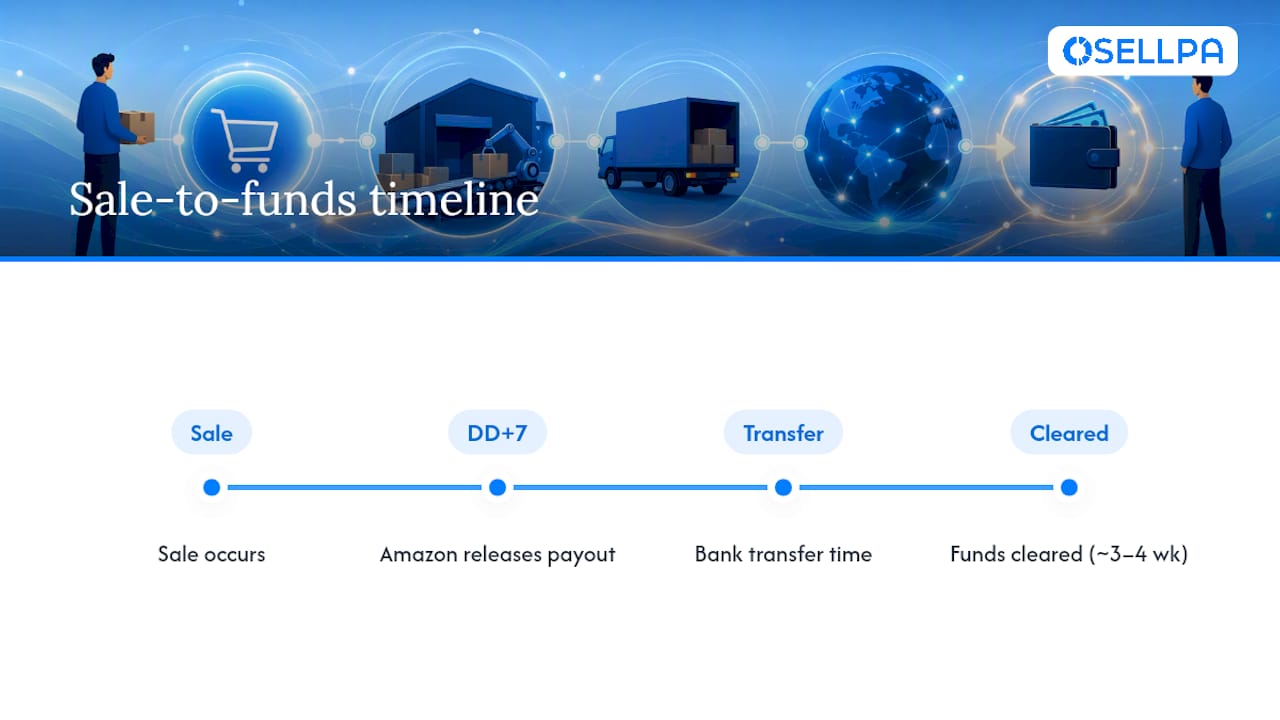
- Delivery + 7 days – The DD+7 reserve clock starts only once delivery is confirmed. An FBA order delivered on day 2 becomes eligible for disbursement around day 9. An FBM order delivered on day 6 doesn’t clear until day 13.
- Next scheduled sweep – Once funds are eligible, they join the next 14-day disbursement cycle rather than triggering an instant payment.
- Disbursement initiated – Amazon releases the batch according to your account’s fixed schedule.
- Bank arrival, 3 to 5 business days later – The transfer clears through your bank’s own processing time.
High-volume sellers rarely experience this as a single lump sum. Because orders deliver on different days, DD+7 windows close continuously, feeding a rolling stream of eligible funds into each disbursement rather than one dramatic release every fortnight. That’s worth knowing if you’re trying to forecast: the combined effect of DD+7, the 14-day cadence, and bank transfer time typically produces a real-world wait of 14 to 21 days for FBA sales, and longer for FBM depending on shipping speed.
Checking your exact disbursement date in Seller Central
Guesswork has no place here when Amazon publishes the actual figures. The Payments Dashboard is the only source worth trusting, and it takes under a minute to check.
Head to Seller Central, open Reports, then Payments, and select Statement View. From there, click into the Disbursements tab to see your payout history and what’s coming next.
Four fields matter more than the rest:
- Available balance – funds cleared and ready to disburse right now.
- Beginning balance – what carried over from the previous settlement period.
- Pending – revenue still moving through DD+7 or other holds.
- Reserve – amounts specifically withheld against returns or investigations.
Status lines tell you exactly where a payout sits in the pipeline: scheduled means it hasn’t been triggered yet, processing means Amazon has initiated the transfer, and sent means it’s now down to your bank’s own clearing time. Each disbursement carries a trace ID, useful if you ever need to query a missing payment with your bank or with Amazon support directly.
Why payments get delayed or reduced, and how to fix it fast
Most payout problems trace back to one of a handful of causes, and nearly all of them are fixable without a support ticket.
- Negative or zero balance – if refunds, chargebacks, or ad spend outpace your sales revenue, Amazon carries the deficit into the next cycle rather than disbursing anything.
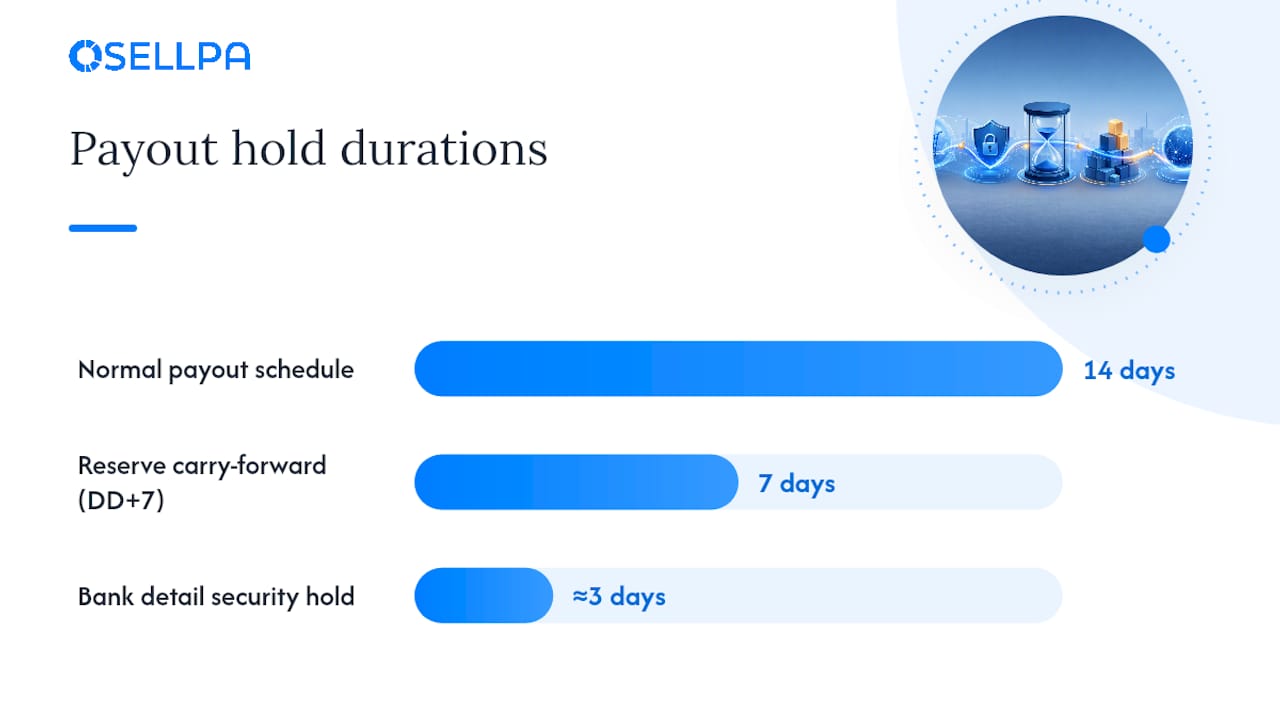
- Bank detail changes – updating your account information triggers an automatic security hold, commonly around three days, independent of your normal 14-day schedule.
- Missing tax or verification information – incomplete W-8/W-9 forms or unresolved identity checks can freeze disbursements until resolved.
- A-to-Z claims and account health reviews – open claims or a flagged account can place a broader hold across your balance while Amazon investigates.
- Reserve carry-forward – funds still sitting inside their DD+7 window simply aren’t eligible yet, which isn’t a delay so much as the system working as designed.
Before contacting Amazon support, check the Payments Dashboard for a specific hold reason, confirm your bank details match your legal business name exactly, and gather any relevant order IDs if you’re disputing a reserve. Support moves faster when you arrive with a trace ID and a clear description of what you’re missing, rather than a general “I haven’t been paid” message.
Pro Tip: Keep a running log of every bank detail change with the date attached. If a hold appears three days later, you’ll immediately know the cause instead of escalating a ticket for something that resolves itself on its own.
Can you get paid faster than the standard cycle?
Two legitimate routes exist outside the normal 14-day rhythm, though neither is universally available.
- Request transfer (Disburse on Demand) – some sellers see an option in their dashboard to trigger an early disbursement of their current available balance, outside the fixed schedule.
- Express Payout – a faster settlement option Amazon extends by invitation, generally tied to account history and standing rather than something you can simply switch on.
- Third-party cash-flow products – some sellers use external financing or advance-based services to bridge gaps, though these sit outside Amazon’s own payment system and carry their own separate cost structures.
Neither Amazon feature is guaranteed to appear on every account, and eligibility criteria aren’t publicly detailed. Treat the standard cycle as your baseline and any faster option as a bonus, not a plan.
Cash flow habits that keep sellers out of trouble
Most payout anxiety comes down to poor forecasting, not Amazon’s schedule itself. Build a cash buffer covering at least three to four weeks of operating costs, since that’s roughly the gap between a sale happening and funds clearing your bank once DD+7 and transfer time are both factored in.
Reconcile every settlement against a proper profit and loss line rather than glancing at the headline disbursement figure. Advertising spend in particular gets missed constantly, because it’s deducted continuously rather than appearing as a single visible charge.
Check your dashboard on a fixed weekly cadence rather than only when you’re worried about money, and never change bank details in the days before a scheduled disbursement unless you’re prepared for the resulting hold.
— Harry
Reconcile every settlement without opening a spreadsheet
Chasing down why a disbursement came in lower than expected usually means cross-referencing fees, refunds, ad spend, and reserves by hand, a task most sellers put off until it’s a real problem. Osellpa’s performance dashboard pulls your settlement data directly from Amazon’s API and breaks it down into a clear profit and loss view, so you can see exactly which fees, refunds, or PPC campaigns shrank your payout before the money even lands. It flags reserve amounts still sitting in DD+7 and lets you simulate upcoming cash flow based on pending sales, rather than waiting for the dashboard to tell you after the fact. Connect your Amazon account and see your next disbursement broken down to the line.
Where to verify the details yourself
For anything time-sensitive, go straight to Amazon’s own documentation rather than relying on forum guesswork.
- How Amazon seller payments work covers the Payments Dashboard and standard disbursement mechanics.
- The Amazon Pay disbursements help page explains bank transfer timing and security holds triggered by account changes.
- KDP’s payment help page details royalty timing for authors, which runs on a separate monthly cycle.
- Amazon Associates’ payment help sets out affiliate commission timing for UK-based accounts.
- Wise’s explainer on Amazon seller payouts walks through the practical cash flow implications for UK sellers specifically.
- For broader bookkeeping options beyond Amazon’s own tools, TradeTally’s guide to UK accounting software is worth a look if you’re still reconciling manually.
This article is general information, not a substitute for advice from a qualified financial advisor. Consult a qualified financial professional about your own circumstances before acting on anything here.


