
Pull your Search Term Report, sort by spend, and flag every term that has spent money without generating an order. Pause those terms and add them to a negative keyword list today. That single move typically reclaims the largest chunk of wasted ad spend Amazon sellers carry, and it takes under fifteen minutes once you know where to look. Everything after that is about making sure it doesn’t happen again.
TL;DR:
- Most wasted ad spend occurs on search terms with high clicks but no sales after exceeding a conversion rate-based threshold, often with significant share of budget.
- Running a thorough audit involves pulling specific reports, flagging high-spend zero-sale terms, and shifting converting terms into dedicated campaigns to reduce overlap and inefficiency.
- Applying negative keywords, adjusting bids based on break-even ACoS, and refining placement strategies can cut waste quickly, especially on auto and broad campaigns.
- Automated tools like Osellpa can monitor TACoS, ACoS, and inventory status to maintain ongoing optimization without manual weekly checks.
- Regular review and disciplined campaign management can recover 20 to 40 percent of wasted spend per audit, preventing waste from building up over time.
Table of Contents
- How to recognise wasted ad spend: the KPIs and red flags
- A step-by-step Amazon PPC audit: reports to pull and decisions to make
- Tactical fixes you can apply now: negatives, bids, placements and budgets
- How to measure success: ACoS, TACoS, break-even ACoS and validation windows
- A compact weekly workflow and automation safeguards to keep waste down
- Osellpa evidence and what the platform automates in an audit
- Common mistakes and the discipline that preserves margin
- Osellpa as an automation option: the practical next step
- Primary sources, tools and partner pages referenced
- Sources
- FAQ
How to recognise wasted ad spend: the KPIs and red flags
Wasted ad spend on Amazon rarely announces itself. It hides inside campaigns that look “fine” on the surface, with ACoS within range, sales ticking over, while a chunk of the budget quietly funds clicks that were never going to convert. The trick is knowing which numbers to check first.
Start with the Search Term Report. Any term with several clicks and £0 in sales is dead weight. The threshold for “several” depends on your typical conversion rate, but a common rule is to wait until a term has taken two to three times the clicks your conversion rate would predict before you negate it. Cut too early and you risk killing a keyword that simply hadn’t converted yet.
Next, look at ACoS versus TACoS. Advertising Cost of Sale tells you how efficient a single campaign is, but Total Advertising Cost of Sale shows what your ad spend is doing to the whole business, organic sales included. A campaign can post a healthy ACoS while your TACoS creeps upward, which usually means ads are cannibalising sales you’d have made anyway. Our TACoS versus ACoS breakdown covers how to track that shift over a 90-day window.
Other signals worth checking weekly:
- Budget pacing that hits the daily cap before midday, a sign spend is front loading into low quality traffic.
- CTR strong but conversion rate weak, which often points to a listing or pricing mismatch rather than a keyword problem.
- Match type spend splits skewed heavily towards auto or broad, since these are built for discovery, not efficiency.
- Add to cart rate lagging click volume, suggesting the audience is curious but not convinced.
- Inventory or listing suppression, where ads keep running on an ASIN that’s out of stock or buy box suppressed, burning pure loss clicks.
Non-converting clicks alone can consume 20 to 30% of a typical Amazon PPC budget, which puts a number on why this first pass matters more than any bid tweak you’ll make later.
A step-by-step Amazon PPC audit: reports to pull and decisions to make
Running a proper audit isn’t about staring at the dashboard longer. It’s about pulling the right reports in the right order and making a decision at each step, rather than just noting a problem and moving on.
- Export three reports: the Search Term Report, the Advertised Product Report, and a campaign-level spend breakdown by match type. These three together show you where money goes, what it buys, and whether the product itself is capable of converting that traffic.
- Sort search terms by spend, not clicks. A term with 40 clicks and one sale might be fine; a term with 15 clicks and zero sales at a high CPC is the one bleeding you. Flag anything above your break-even click threshold with no orders.
- Harvest the winners. Any search term converting well inside an auto or broad campaign should move into its own phrase or exact match campaign, then get negated inside the original auto or broad campaign so you stop paying twice for the same click.
- Separate branded from non-branded terms. Branded searches convert at a different rate and usually deserve their own campaign and budget, isolated from generic discovery spend.
- Check for campaign overlap. If two of your own campaigns are bidding against each other for the same search term, you’re inflating your own CPC. Consolidate overlapping campaigns or apply negatives so only one campaign can win that auction.
- Confirm retail readiness. Pull a stock status report and cross-reference it against active campaigns. Ads running on an out-of-stock or suppressed ASIN are the purest form of wasted spend because every click is a guaranteed loss.
- Prioritise five ASINs for a full rebuild. Pick the five ASINs with the highest wasted spend identified in steps two through six and rebuild their campaign structure from scratch rather than patching it.
- Set a 30/60 day measurement window before judging the results. PPC data is noisy in week one; give changes time to settle before deciding whether they worked.
Agency case notes on first-time audits are strikingly consistent: auto campaigns often account for 50 to 70% of total spend in unaudited accounts, with almost no negative keyword coverage in place. Fixing that alone in week one often recovers 20 to 40% of wasted spend before you’ve touched a single bid.
Pro Tip: Don’t negate a search term the moment it hits one click with no sale. Wait until the click count reasonably exceeds what your conversion rate would predict, otherwise you’ll strangle keywords that were about to start converting.
Our step-by-step audit checklist walks through this same sequence with report templates if you want a repeatable version to run monthly.
Tactical fixes you can apply now: negatives, bids, placements and budgets
Once the audit has identified the leaks, the fixes themselves are mechanical. Here’s where to apply pressure first.
Negative keyword playbook. Build a set of structural negatives at campaign launch, covering obviously irrelevant terms for your category (a phone case seller negates “phone repair”, “phone charger” and similar adjacent searches from day one). Beyond that, ongoing negation should follow the click threshold described earlier rather than a fixed number, since it varies by expected conversion rate. Our guide on negative keywords on Amazon covers building both structural and ongoing lists properly.
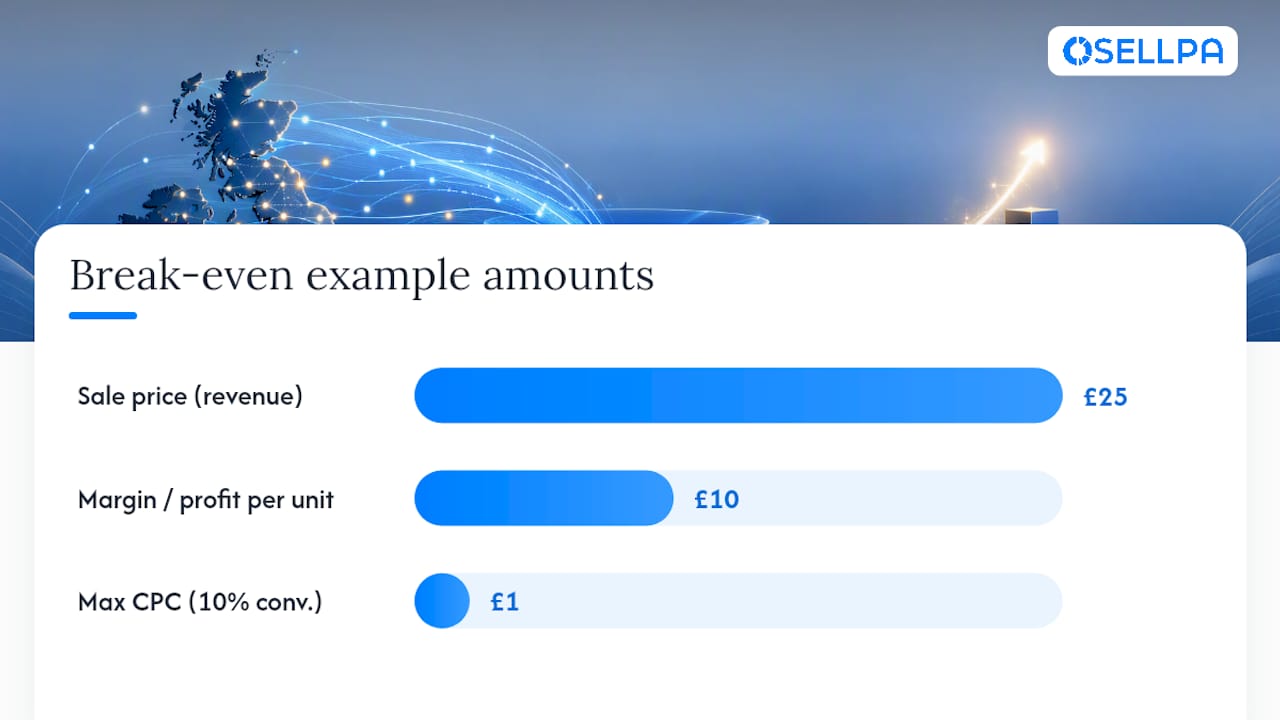
Bid setting from break-even ACoS. If your product sells at £25 with a 40% margin (£10 profit per unit) and your organic conversion rate on a given term is 10%, your break-even ACoS is 40%. At a 10% conversion rate, you can afford a maximum CPC of £1.00 (10% of £10) before that keyword stops being profitable. Set bids below that ceiling, not at whatever the suggested bid range shows.
Placement modifiers. Most sellers never touch these, yet reducing Rest of Search or Top of Search modifiers by 40 to 60% on underperforming campaigns has recovered meaningful chunks of monthly spend in practitioner reports. If a placement is driving impressions but not sales, cut the premium rather than the whole campaign.
Sponsored Display and ASIN targeting. Start with low validation bids on any new product targeting campaign before scaling. Remarketing lookback windows should match your typical purchase cycle, not the platform default, and be aware that consent frameworks affecting cross-site tracking can weaken audience signal quality, so treat Sponsored Display results as directional rather than exact.
Budget discipline matters as much as bid discipline:
- Cap discovery campaigns (broad and auto) at 10 to 20% of total PPC spend, with the rest concentrated on proven exact match terms.
- Cap any new experiment with a fixed daily budget and a review date, never let it run open-ended.
- Run a quick conversion diagnostics pass on the listing itself, checking main image, price positioning against competitors, and review count, since no amount of bid tuning fixes a listing that isn’t converting.
Pro Tip: If CTR is healthy but conversions are weak across every campaign feeding an ASIN, stop optimising the ads and fix the listing first. You’re paying to send traffic to a page that isn’t doing its job.
How to measure success: ACoS, TACoS, break-even ACoS and validation windows
Three numbers decide whether an audit actually worked. ACoS is ad spend divided by ad-attributed sales. TACoS is ad spend divided by total sales, organic included, and it’s the number that tells you whether advertising is genuinely growing the business rather than just shuffling which channel gets credit. Break-even ACoS is your margin percentage before advertising costs, the ceiling above which every sale funded by that keyword loses money.
| Lifecycle stage | Typical ACoS range | What TACoS should be doing |
|---|---|---|
| Launch | Higher, often above break-even short term | Rising, as ads carry most sales |
| Growth | Approaching break-even ACoS | Flattening as organic rank builds |
| Mature | Well below break-even ACoS | Falling steadily |
A blind ACoS target (“keep it under 25%”) ignores margin entirely. Track per-ASIN ROAS and orders-per-click alongside impressions-versus-orders to catch leaks that a single blended ACoS figure hides.
Don’t declare a fix successful after three days. Give changes a 30 to 60 day validation window and enough click volume to be statistically meaningful before adjusting again, otherwise you’re reacting to noise rather than signal.
A compact weekly workflow and automation safeguards to keep waste down
An audit fixes the past. A weekly routine stops the waste coming back. Set aside sixty minutes each week for four checks: review new search term spend against zero-order terms, confirm budget pacing hasn’t hit caps mid-day, scan placement performance for creeping Rest of Search waste, and sanity-check bids against break-even ACoS on your top ten ASINs by spend.
- Automate what’s repetitive and low-risk: TACoS anomaly alerts, daily burn alerts when a campaign spends unusually fast, and inventory triggers that pause ads the moment stock runs low.
- Keep manual: bid changes tied to margin shifts, new campaign structure decisions, and anything involving a pricing or promotion change.
- Set a scaling rule: once a discovery term converts consistently across a meaningful sample, move it to its own exact match campaign and reallocate its former auto/broad budget rather than adding fresh spend on top.
Our search term discovery guide covers exactly when a term has earned that promotion.
Osellpa evidence and what the platform automates in an audit
Osellpa connects directly to Amazon’s API, which means profit tracking, PPC monitoring and alerts update from live account data rather than a spreadsheet you update by hand. Some sellers have reported sales increases after implementing similar tools, outcomes often tied to catching waste and reallocating budget faster than manual review allows.
What the platform automates:
- TACoS and ACoS monitoring against your own break-even targets, flagged automatically rather than calculated by hand each week.
- Bid optimisation reports that surface underperforming keywords and placements without exporting a single report.
- Alerts for budget pacing issues, stockouts on advertised ASINs, and unusual spend spikes.
What stays manual: strategic decisions on new market entry, promotional pricing, and judgement calls on borderline search terms still benefit from a human reading the context.
Common mistakes and the discipline that preserves margin
Most sellers reach for the blunt instrument first, slashing budgets across the board, when surgical negation would have preserved the winning keywords while cutting the dead ones. Blunt cuts punish good and bad spend equally.
The bigger failure isn’t technical, it’s cultural. Waste creeps back because nobody owns the weekly check. Whether you run this yourself or brief someone to do it, give them a fixed cadence and a clear negation threshold, not a vague instruction to “keep an eye on ads.”
— Harry
Osellpa as an automation option: the practical next step
Manually rebuilding Search Term Reports every week works, until your catalogue grows past a dozen ASINs and the spreadsheet stops keeping up. Osellpa is built for exactly that point: it automates the alerts, bid reports and TACoS tracking this guide describes, so the audit runs continuously in the background rather than once a quarter when you finally find the time.
What you get inside the platform:
- Live profit tracking pulled directly from Amazon’s API, no manual spreadsheet updates.
- Automated and manual PPC optimisation with bid suggestions anchored to your own margins.
- Budget pacing and inventory alerts that catch stockout waste before it burns another day of spend.
If you want a concrete first step, run the free Amazon PPC bid optimisation report against your own account and see what it flags. From there, plans start at £10 per month or £96 per year on the Launch tier, scaling up to Scale and Advanced for larger catalogues.
Primary sources, tools and partner pages referenced
- Optmyzr’s step-by-step audit guide for structural audit methodology.
- Ad Badger on non-converting clicks for recovery benchmarks.
- Amazon SEO fundamentals for listing and conversion context.
- Shopify audit frameworks for broader CRO thinking.
Sources
FAQ
Who said “half my advertising spend is wasted, I just don’t know which half”?
The quote is widely attributed to department store pioneer John Wanamaker, though no verified original source confirms he said it in those exact words. It endures because it captures a real problem: without a Search Term Report analysis, sellers genuinely can’t tell which clicks paid off.
Why is my ad active but not spending?
Usually because your bid is too low to win auctions at current CPCs, your daily budget has already been exhausted earlier in the day, or the targeted ASIN is out of stock or suppressed. Check inventory status and bid competitiveness first, since both are quick to diagnose.
How much does Amazon make from advertising?
Amazon’s advertising business generated $56.2 billion in 2025, with average sponsored products CPC rising to $1.47 that year. That upward CPC pressure is precisely why a regular audit habit matters more now than it did a few years ago.
Is Amazon profitable or losing money?
Amazon as a whole is profitable, with advertising now one of its highest margin divisions alongside cloud services. That’s relevant to sellers because Amazon has limited incentive to lower CPCs, which makes controlling your own wasted spend the more reliable lever than waiting for cheaper clicks.
What’s a reasonable target for wasted ad spend recovery?
Most first-time audits recover 20 to 40% of wasted spend within the first week simply by fixing negative keyword gaps and pausing zero-order terms. Ongoing weekly review typically keeps that waste from reaccumulating.


