
Amazon gives you three ways to bid on Sponsored Products: dynamic bids down only, dynamic bids up and down, and fixed bids. Use down only for new or unproven campaigns, up and down for winners you want to scale, and fixed bids when brand defence needs predictable spend. The catch: up-and-down increases stack with placement modifiers, so a small setting change can raise your effective cost per click far more than sellers expect, due to compounding from placement and dynamic bid adjustments.
TL;DR:
- Dynamic bids up and down can cause effective costs three times higher than base bids when stacking placement modifiers and bid uplifts.
- Campaigns should be evaluated for switching strategies only after approximately 30 days or 50 conversions to ensure stable data.
- Small incremental adjustments and a 14-day review period are recommended to prevent wasted budget and rising ACoS.
- Using automation tools can help manage bid calculations and prevent costly mistakes caused by stacking or premature strategy changes.
- Fixed bids are best suited for branded defense campaigns requiring predictable spend, while bidding strategies should match campaign maturity and goals.
Table of Contents
- What is dynamic bidding on Amazon, and what are the three options?
- How do bid caps and placement multipliers compound?
- Which bidding strategy fits which campaign, and when do you switch?
- How do you monitor performance after choosing a strategy?
- What mistakes cause wasted spend, and how do you avoid them?
- How Osellpa helps you apply these rules without the spreadsheet work
- Author perspective: measured scaling beats aggressive defaults
- Get a clear read on your bidding before you scale
- Sources
- FAQ
What is dynamic bidding on Amazon, and what are the three options?
Dynamic bidding is Amazon’s system for automatically adjusting the bid you set at auction time, based on how likely a click is to convert. Your base bid stays the reference point. What changes is whether Amazon is allowed to move away from it, and in which direction.
There are three settings inside every Sponsored Products campaign:
- Dynamic bids, down only: Amazon lowers your bid in real time when a click looks unlikely to convert. It never bids above your base bid, which makes this the lowest-risk option for campaigns without a conversion track record.
- Dynamic bids, up and down: Amazon can lower your bid the same way, but it can also raise it when a click looks highly likely to convert, within documented caps of up to 100% for top-of-search placements and up to 50% for other placements.
- Fixed bids: Amazon uses exactly the bid you set, with no automatic adjustment either way. This is the setting to reach for when predictability matters more than squeezing out marginal conversions, typically on branded defence campaigns.
The difference between these three isn’t cosmetic. Down-only caps your downside. Up-and-down removes that cap on one side of the equation, trading control for reach. Fixed removes automation altogether, trading efficiency for certainty.
How do bid caps and placement multipliers compound?
Amazon’s own documentation is specific: up-and-down bidding can raise your bid by up to 100% at top-of-search and up to 50% at other placements. That’s the ceiling on the dynamic uplift itself. It is not the ceiling on what you’ll actually pay.
Placement modifiers sit on top of that ceiling, not underneath it. You can set separate bid adjustments for top of search, rest of search, and product pages, and those modifiers stack with dynamic up-and-down increases rather than replacing them. The two levers compound.
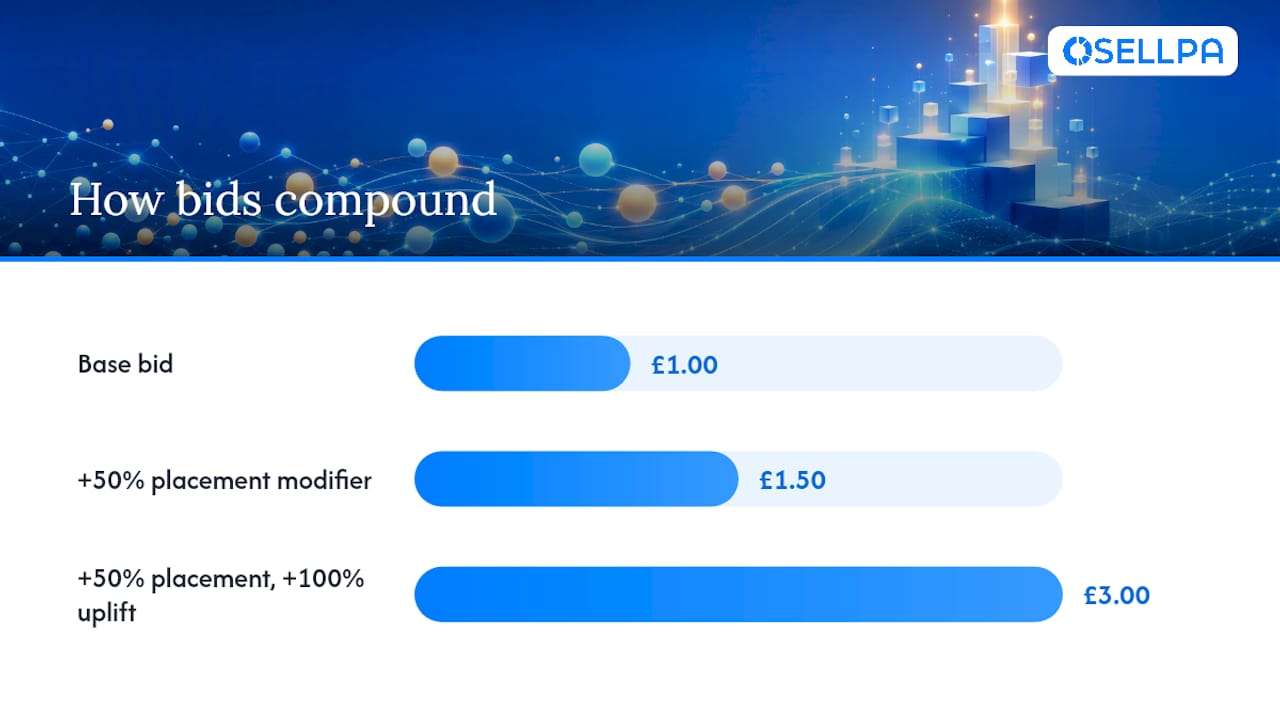
Pro Tip: Before switching a campaign to up-and-down, calculate your worst-case effective bid using: base bid × (1 + placement modifier) × (1 + dynamic uplift). If that number would erase your margin, don’t flip the switch yet.
Here’s the maths in practice:
- You set a base bid of £1.00.
- You add a 50% placement modifier for top-of-search, taking the bid to £1.50.
- Amazon’s up-and-down setting then applies its own uplift of up to 100% for that same placement, pushing your effective bid toward £3.00, nearly triple your original figure.
That is the scenario worth memorising: a £1.00 base bid can behave like a £3.00 bid without you ever manually raising it. Sellers who don’t run this calculation before switching strategies are the ones who discover the damage in their ACoS report a fortnight later.
Which bidding strategy fits which campaign, and when do you switch?
Matching the strategy to the job the campaign is doing matters more than picking a “best” setting, because there isn’t one. The right choice depends entirely on how much conversion history the campaign has and what it’s meant to achieve.
- Launch, auto, and discovery campaigns: use dynamic bids down only. These campaigns are still gathering data on which search terms convert, and Amazon’s model has nothing reliable to bid up against yet.
- Mature, non-branded campaigns with a proven conversion pattern: dynamic bids up and down, once the data supports it. This is where the strategy earns its keep, scaling spend toward the clicks most likely to convert.
- Branded defence campaigns: fixed bids. You already know these convert; what you need is predictable cost per click, not automated bidding you have to double-check.
- Conquest campaigns targeting competitor ASINs: usually down only, since conversion rates here are typically lower and less predictable than on your own branded terms.
Campaign structure decides most of this before you ever touch a bidding toggle, which is why the matrix above works better as a starting checklist than a rulebook.
On timing, the consensus among practitioner guides is consistent: give a campaign roughly 30 days of stable data, or around 50 conversions, before considering the move to up-and-down. Flip earlier than that and Amazon’s algorithm is bidding on too little signal, which tends to produce inefficient spend rather than smarter spend.
When you do switch, do it in stages. Move placement modifiers in small increments rather than large jumps, watch the campaign for 14 days, and have a rollback rule ready, if ACoS rises past an agreed threshold, drop the modifier back down immediately rather than waiting out the week.
How do you monitor performance after choosing a strategy?
Set a cadence and stick to it. Check placement and targeting performance weekly while a campaign is still in its learning window, and give any bidding change a full 14-day review before judging it, in line with Amazon’s own guidance on isolating one variable at a time.
Four reports do most of the work:
- Placement report: shows where conversions actually happen, so placement modifiers get set on data rather than guesswork.
- Search term or targeting report: flags which queries are earning spend without earning sales.
- Campaign ACoS and conversion rate: your early warning system for a strategy that’s drifting.
- TACoS: ties ad spend back to total sales, catching problems a campaign-level view can miss.
To calculate your effective bid at any moment, use base bid × (1 + placement modifier) × (1 + dynamic uplift):
Set alert thresholds before you need them, not after. A sudden ACoS jump, an unexplained CPC spike, or a conversion rate that drops without warning are all signs to check the placement report immediately, not next week.
What mistakes cause wasted spend, and how do you avoid them?
The recurring error isn’t picking the wrong strategy outright, it’s applying up-and-down too early or stacking large placement modifiers without checking the compounded bid first. Industry audits put the typical cost of this kind of misapplied strategy at wasting 15 to 30% of ad spend on campaigns that never needed the aggressive setting in the first place.
Watch for these warning signs: a sharp ACoS increase, a falling conversion rate, or CPC spikes with no obvious cause.
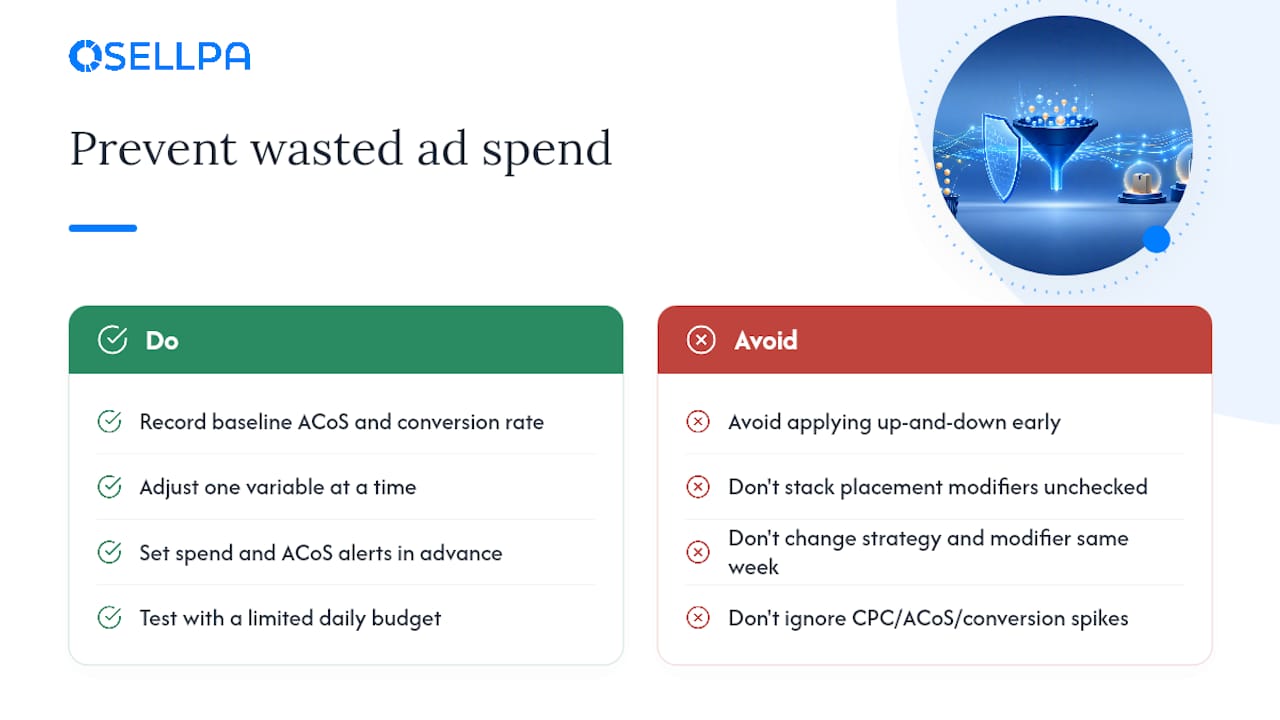
Pro Tip: Change one lever at a time. If you adjust the bidding strategy and a placement modifier in the same week, you won’t know which one moved the needle when ACoS shifts.
A short safety checklist covers most of the risk: record baseline ACoS and conversion rate before any change, adjust one variable at a time, set spend and ACoS alert thresholds in advance, and test with a limited daily budget before rolling a change out account wide.
How Osellpa helps you apply these rules without the spreadsheet work
Running the effective-bid maths and the 14-day review cycle manually across dozens of campaigns is where most sellers lose the thread. Osellpa’s advertising tools connect directly to Amazon’s API and actively manage campaigns against the rules covered above, cutting the wasted spend that comes from stacked modifiers and premature strategy switches. Some sellers report increases in sales after using automation tools designed to manage these advertising settings, similar to the agency-level Google Ads management: search, PMax, shopping services used in other paid media campaigns.
If you want a starting point before committing to anything, the free Amazon PPC Bid Optimisation Report shows you exactly where your current bids and placement modifiers are compounding against you.
Author perspective: measured scaling beats aggressive defaults
The sellers who get burned by dynamic bidding aren’t careless, they’re impatient. They match ambition to campaign potential, not campaign maturity. Read the placement report before touching a modifier, move in small increments, and let ACoS tell you when you’re wrong before your bank balance does.
— Harry
Get a clear read on your bidding before you scale
There are other ways to figure out whether your placement modifiers are compounding against you, spreadsheet formulas, manual weekly audits, trial and error across campaigns. Osellpa replaces that guesswork with automation that connects directly to your Amazon account and manages the exact levers covered above, base bid, placement modifier, dynamic uplift, without you rebuilding the maths every fortnight. Start with the free Amazon PPC Bid Optimisation Report to see where your current campaigns stand, then check the provider’s pricing plans if ongoing automation seems appropriate for your account. The advertising tool suite handles the monitoring cadence this article describes automatically, so nothing slips between your weekly checks.
Sources
For the official caps and mechanics, read Amazon’s own guide to dynamic bidding up and down. For practical worked examples on placement stacking, see Capconvert’s breakdown of bid strategies by placement, and for campaign-type recommendations, Salesduo’s 2026 bidding strategy guide and Velocity Sellers’ analysis of switching thresholds are worth reading in full.
FAQ
What is dynamic bidding on Amazon?
It’s Amazon’s system for automatically adjusting your Sponsored Products bid at auction time based on how likely a click is to convert, either only downward or in both directions, depending on the setting you choose.
How does Amazon bidding work across placements?
Amazon lets you set a base bid, then layer placement modifiers for top-of-search, rest-of-search, and product pages, and those modifiers stack with any dynamic bidding adjustment rather than replacing it.
Which is the best Amazon bidding strategy?
There isn’t a single best strategy, it depends on the campaign. Down-only suits new or unproven campaigns, up-and-down suits proven ones you’re scaling, and fixed bids suit branded defence where predictable spend matters most.
Can you bid for items on Amazon like an auction?
Sponsored Products ads run on an auction model where your bid, combined with any dynamic or placement adjustments, competes for ad placement, but this is advertising bidding rather than bidding to purchase a listed item.
When should I switch a campaign to dynamic bids up and down?
Wait until the campaign has roughly 30 days of stable data or around 50 conversions before switching, then move in small increments and review performance after 14 days.


