
The fastest way to uncover Amazon competitor keywords is a multi-ASIN reverse ASIN comparison followed by a gap analysis against your own listing. Pull the inferred keyword sets from a few comparable ASINs, combine them, and see what your competitors rank for that you don’t. Autocomplete and manual listing mining give you free, quick wins while you set that up. Neither replaces the final step: validating every candidate keyword with Search Query Performance data or a short PPC test before you touch your listing.
TL;DR:
- Comparing multiple competitors’ ASINs reveals core niche keywords that are essential for visibility and can be identified by consistent ranking across four or more listings.
- Combining reverse ASIN data and filtering by search volume, rank position, and competitor count pinpoints high-value gap keywords worth prioritizing for listing optimization or PPC testing.
- Validating keywords with Amazon’s search query performance and short PPC experiments ensures that only high-converting, relevant terms are added to listings or campaigns.
- Ongoing keyword tracking automated through software allows real-time alerts on rank shifts, new competitors, and seasonal keyword changes, maintaining an up-to-date strategy.
- Simply copying top-ranking competitor phrases without validation risks wasting ad spend and effort on low-converting or irrelevant keywords.
Table of Contents
- Four ways to find competitor keywords amazon sellers actually use
- Reverse ASIN research: the multi-ASIN workflow that builds a gap list
- How do I use Amazon autocomplete to find keywords?
- What keywords are my competitors bidding on?
- Gap analysis: which competitor keywords are worth chasing?
- Validate and test: SQP metrics and short PPC experiments
- Turning competitor keyword tracking into an ongoing advantage
- Why one-off keyword research always falls short
- Get the reverse ASIN workflow running without the manual grind
- Sources
- FAQ
Four ways to find competitor keywords amazon sellers actually use
Every method for finding competitor keywords on Amazon sits somewhere on a scale between free-and-shallow and paid-and-deep. Picking the right one depends on your budget, whether you have Brand Registry access, and how fast you need results.
- Autocomplete and listing mining: free, manual, and immediate. Type seed phrases into the Amazon search bar and read competitor titles, bullets, Q&A and reviews for the exact words shoppers use.
- Reverse ASIN lookup: paid tools infer the keyword set a competitor’s ASIN ranks for by analysing its organic and sponsored positions. This is where reverse ASIN keyword research earns its reputation as the highest-leverage method.
- PPC and search-term analysis: your own advertising reports show which keywords convert for you, and sponsored-rank tools reveal what competitors are bidding on.
- Manual listing review: reading a competitor’s full listing top to bottom, including A+ content, catches phrasing and structural choices that keyword tools miss entirely.
The first two methods generate the raw keyword pool. The second two help you decide which of those keywords are worth fighting for.
Reverse ASIN research: the multi-ASIN workflow that builds a gap list
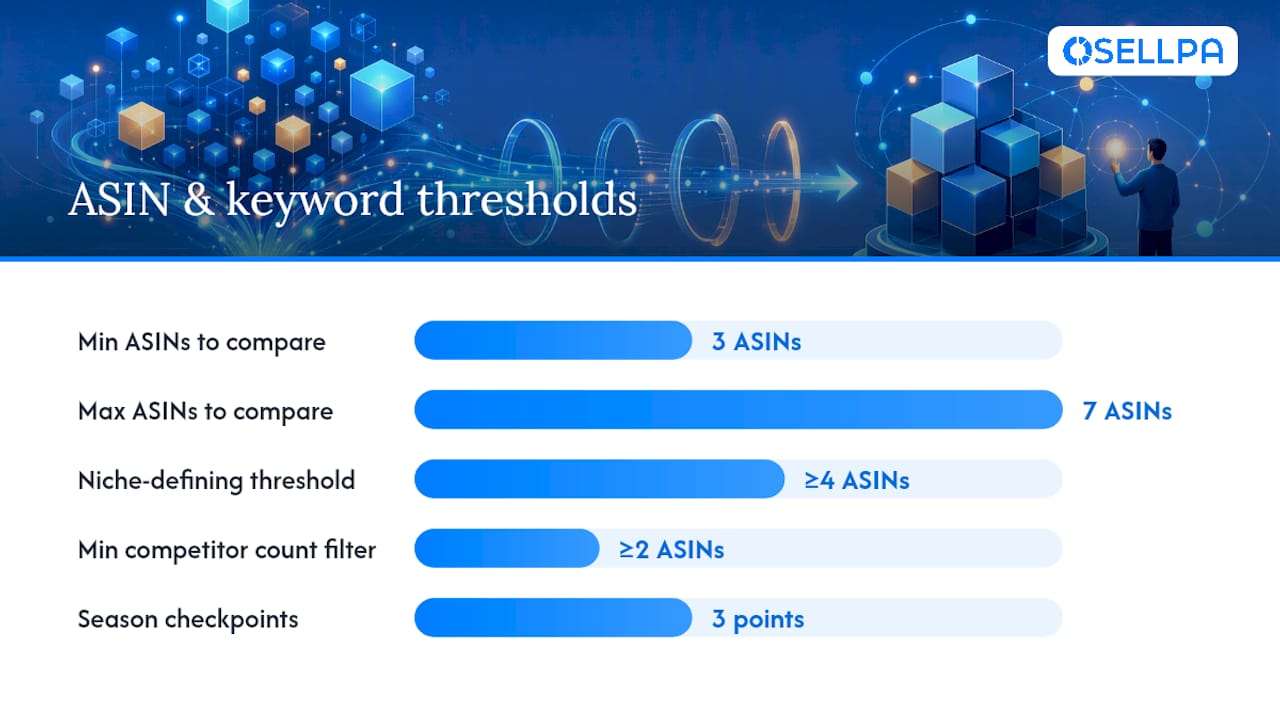
Single-ASIN reverse lookups tell you what one competitor ranks for. That’s useful but thin. Comparing three to seven relevant ASINs at once tells you which terms define the niche, because a keyword that four or more competitors rank for is rarely optional for visibility, according to Ainfluencer’s reverse ASIN research. A single lookup can’t show you that pattern.
Here’s the sequence that produces a usable gap list:
- Select 3 to 7 comparable ASINs at a similar price point and feature set. Avoid mega-brand listings that skew the pool with brand-specific searches.
- Run reverse ASIN lookups on each ASIN individually and export the keyword data.
- Combine and de-duplicate the lists into one master spreadsheet, tagging which ASIN each term came from.
- Apply filters: minimum search volume, an organic rank window (say, top 20), and a minimum competitor count so you’re only looking at terms two or more ASINs rank for.
- Subtract your own ranking keywords from the combined list. What remains is your gap list, ranked by how many competitors hold that term.
Terms only visible in sponsored placements, rather than organic rank, deserve a second look too. If competitors are paying to appear for a phrase rather than ranking for it naturally, that’s often a hidden opportunity: rank organically there yourself and you gain a lasting cost advantage over sellers still paying for the same clicks.
Pro Tip: Run the same ASIN set through reverse ASIN at three points in a season, pre-peak, peak, and post-peak, to spot which keywords competitors add or drop as demand shifts. That pattern tells you when to rotate your own listing copy and PPC spend ahead of time.
How do I use Amazon autocomplete to find keywords?
Type a seed phrase into Amazon’s search bar and read what it suggests before you finish typing. Those suggestions are drawn from real shopper queries, which makes Amazon autocomplete one of the cheapest sources of long-tail language available. Type “stainless steel water bottle” and you’ll likely see modifiers like “with straw,” “insulated,” or “for kids” appended automatically. Every one of those is a phrase real buyers type.
Manual listing mining extends the same idea to competitor pages themselves:
- Scan titles and bullet points for descriptive modifiers you haven’t used (“leak-proof,” “wide-mouth,” “24 oz”).
- Read the Q&A section for the exact problems and use cases shoppers mention.
- Check reviews for language buyers use to describe the product in their own words, which often differs from marketing copy.
- Note any A+ content phrasing that reappears across multiple listings in the niche.
Turn what you find into backend search terms, working phrases into bullets, and candidate PPC targets. The limitation is scale: this method surfaces phrases one at a time and tells you nothing about search volume or how many competitors actually rank for a term. Once you’ve harvested what manual mining can give you, move to reverse ASIN for the volume and competitive-density data autocomplete simply doesn’t provide.
What keywords are my competitors bidding on?
Your own advertising reports are one of the most underused sources of competitor intelligence you already have access to. Search-term reports show exactly which queries triggered your ads and which of those converted, and that same sponsored-placement data reveals what rivals are actively bidding for when you search those terms yourself.
- Pull your advertising search-term report and sort by conversions, not just clicks, to separate real intent from browsing.
- When you search a candidate keyword manually, note which competitor ASINs appear in sponsored slots versus organic results.
- A term where competitors only appear as sponsored ads, never organically, is often underexploited territory worth testing for organic rank.
- Prioritise PPC tests around phrases showing consistent sponsored competition, since that’s a signal buyers are actively searching and converting on that exact language.
Pro Tip: A phrase with heavy sponsored competition but thin organic competition is usually the best short-term PPC target and the best medium-term SEO target, because you’re fighting fewer sellers for the organic win. Reading these reports properly is covered in more depth in Osellpa’s guide to PPC search-term discovery.
Gap analysis: which competitor keywords are worth chasing?
Not every gap keyword deserves action. Run each candidate through four gates before it goes anywhere near your listing or ad campaigns.
- Relevance: does the term actually describe your product, or is it adjacent noise picked up from a loosely comparable ASIN?
- Intent: does the phrasing suggest a buyer ready to purchase, or a browser researching a category?
- Winnability: how many competitors currently rank for it, and how established are they? A term four established brands dominate is a harder climb than one held by two smaller sellers.
- Proof: does the term show measurable search volume, or is it a one-off phrase with no real demand behind it?
Apply numeric filters at this stage rather than relying on gut feeling: a minimum search volume threshold, an organic rank window of roughly top 20, and a requirement that at least two competitors rank for the term organically. Terms that clear all four gates and show high competitor overlap go straight to a listing edit. Terms that are relevant and high-intent but heavily contested go to PPC testing first, where you can measure conversion before committing backend space or bullet real estate to them.
Validate and test: SQP metrics and short PPC experiments
Editing a listing based on an unvalidated keyword wastes time if the term never converts. Amazon’s Search Query Performance data and a short exact-match PPC test both give you evidence before you commit.
- Check SQP metrics for the candidate term: click share, conversion share, and purchase share tell you whether shoppers searching that phrase actually buy, and whether they buy from you or a competitor. Search Query Performance data is Amazon’s own funnel view, which makes it more reliable than third-party volume estimates alone.
- Design a short exact-match campaign around the term, timeboxed to roughly one to two weeks with a fixed daily budget, and set a clear conversion-rate threshold before you start rather than judging results after the fact.
- Read the outcome against that threshold. A term that clears it earns a spot in your title, bullets, or backend search terms. A term that doesn’t gets dropped or retested later once seasonality shifts.
The most common pitfall is judging a test too early, before enough impressions have accumulated to trust the conversion rate. The second is treating every gap keyword as equally urgent when only a handful will ever move the needle on sales.
Turning competitor keyword tracking into an ongoing advantage
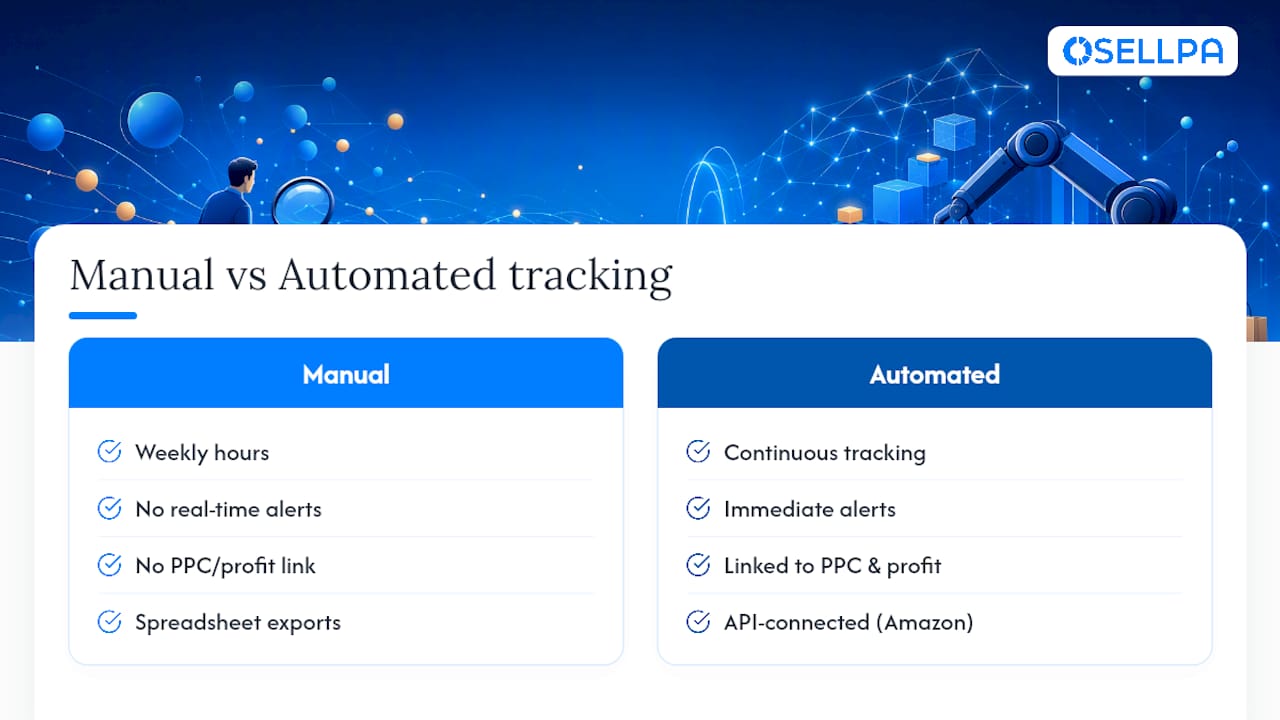
A one-off reverse ASIN pull goes stale the moment a competitor updates their listing or a season shifts demand. Ongoing tracking should watch four things continuously: ASIN rank drift for your priority terms, changes in sponsored appearances, newly emerging keywords entering the niche, and seasonal keyword patterns that repeat year over year.
Doing that manually across dozens of terms and multiple competitor ASINs is where most sellers give up, not because the method fails but because the maintenance overhead is too high; using AI for e-commerce product copy at catalog scale can help automate and scale this process efficiently. Automation is what closes that gap.
- Track keyword rank movement and competitor appearance changes without re-running manual lookups every week.
- Get alerted when a tracked keyword’s sponsored competition shifts or a new competitor enters the top ranks for a term you care about.
- Feed validated keywords directly into PPC bid management so budget follows the terms actually converting, rather than sitting on ones that stopped performing.
- Keep profit visibility connected to keyword performance so you can see which terms are worth the ad spend and which aren’t.
Pro Tip: Set your alert threshold around a meaningful rank shift, not every single position change, or you’ll drown in noise within a week. Osellpa’s keyword tracker is built for exactly this kind of continuous monitoring, pairing rank data with the advertising and profit reports that tell you whether a keyword shift is actually worth acting on. Checking weekly is usually enough outside peak season; during a seasonal ramp, daily checks catch competitor moves before they cost you rank.
Why one-off keyword research always falls short
Most sellers treat competitor keyword research as a task to finish, not a habit to keep. That’s the wrong frame. A reverse ASIN pull captures a snapshot, and snapshots age fast once a competitor refreshes their title or a new entrant starts stealing sponsored slots.
The behavioural trap worth naming is blind copying: lifting a competitor’s exact phrasing because their listing appears higher, without checking whether that term actually converts for anyone. Validate with SQP or a short PPC test first, always. Give listing edits two to four weeks to show a rank or conversion shift before judging them, and treat any single test result with caution until you’ve seen it hold across at least one full pricing or seasonal cycle. Overconfidence after one good week is the second trap, and it’s the one that burns the most ad budget.
— Harry
Get the reverse ASIN workflow running without the manual grind
Everything in this guide, reverse ASIN comparisons, gap analysis, SQP validation, and seasonal tracking, works. It also takes real hours to run by hand every week across multiple competitor ASINs. This software automates the part sellers dread most: continuous competitor keyword tracking paired directly with PPC and profit data, so a rank shift or a new competitor entering your top terms shows up as an alert, not something you find three weeks late while manually checking listings.
That matters most for sellers already running PPC campaigns who need keyword decisions tied to actual profit, not just search volume. Instead of exporting spreadsheets from a separate tool, this software connects tracked keywords straight to advertising reports and bid decisions through Amazon’s own API. Start with the keyword tracker to see how your priority competitor terms are moving right now.
Sources
For deeper detail on the methods above: Ainfluencer’s reverse ASIN guide covers multi-ASIN filter settings in full; GrowithAmazon’s discover-reveal-validate framework explains the three-layer workflow this article follows; Keyword Tool’s Amazon autocomplete page is a quick way to test seed phrases directly.
- Research keywords using Amazon autocomplete — Keyword Tool
FAQ
What are Amazon competitor keywords?
They’re the search terms a rival’s listing ranks for organically or bids on through PPC, revealed indirectly through reverse ASIN tools, autocomplete suggestions, and advertising search-term reports rather than any direct backend access.
What keywords are my competitors using?
You can’t see their backend search terms directly, but reverse ASIN tools infer the terms a competitor’s ASIN ranks for by analysing its organic and sponsored positions, which is accurate enough to build a strategy around when treated as directional evidence.
What are the most popular keywords on Amazon?
Popularity varies entirely by category and season, so there’s no fixed universal list. The most reliable way to find the popular terms in your own niche is a multi-ASIN reverse ASIN comparison across three to seven comparable competitors.
What are the best tools for reverse ASIN keyword research?
Look for a tool that supports multi-ASIN comparison, exports search-volume and rank data, and shows sponsored placements alongside organic rank. Osellpa’s keyword tracker covers ongoing tracking of that data once you’ve identified which competitor keywords matter most.


