
The fastest way to lower ACOS is to stop paying for clicks that never convert, promote your proven search terms into exact match, right-size bids based on real performance data, and fix the listing elements that turn clicks into orders. Most sellers see measurable ACOS drops within 7 to 14 days from the negative keyword sweep alone, with structural gains from campaign restructuring and listing tests compounding over 30 to 60 days. Break-even ACOS is your guardrail throughout: every decision gets measured against it, not against an arbitrary target.
TL;DR:
- Negative keyword sweeps and bid right-sizing can recover a significant portion of wasted ad spend within the first week and improve ACOS over time.
- Campaign structure segmentation by match type and SKU-specific targets is essential to control waste and better monitor product profitability.
- Improving listing relevance, especially main images, titles, and A+ content, can increase conversion rates and meaningfully lower ACOS.
- Using automation tools for routine negative keyword updates, bid adjustments, and campaign monitoring supports sustained optimization at scale.
- Monitoring TACOS along with ACOS reveals the true effectiveness of upper-funnel campaigns and prevents misjudging campaign value based solely on last-touch ACOS.
Table of Contents
- How do you calculate break-even ACOS before optimising?
- Quick wins you can implement this week
- Restructure campaigns for control: match types, SKU grouping and placement
- Improve listing conversion rate so every click converts better
- Advanced tactics: dayparting, product targeting and placement bidding
- 30-day workflow: weekly checklist and KPIs to sustain improvements
- Tools and automation to scale daily optimisation
- Adjusting negative keywords proactively beyond immediate search term reports
- Strategies for improving Quality Score/Relevance in Amazon PPC to reduce ACOS
- Analysing and optimising attribution models and multi-touch campaigns
- Use of Amazon Sponsored Display and Video Ads to complement Sponsored Products for ACOS reduction
- What actually separates ACOS wins from ACOS regressions
- Automate the routine work, keep the strategic decisions
- Sources
- FAQ
How do you calculate break-even ACOS before optimising?
You cannot reduce ACOS intelligently until you know what ACOS you can actually afford. ACOS is your ad spend divided by ad-attributed revenue, expressed as a percentage, and break-even ACOS equals your product’s pre-ad profit margin. If a product sells for £25 and carries £8 of profit before advertising costs (after Amazon fees, cost of goods, and shipping), that is your break-even ACOS. Spend beyond that and you are funding sales at a loss.
Work this out per SKU, not per account. A £40 product with £15 margin can sustain a very different ACOS than a £12 accessory with £3 margin, and blending them into one “target ACOS” for the whole catalogue hides where the real damage is happening.
Once you know your number, pull the Search Term Report from Campaign Manager and sort it three ways: by spend (highest first), by clicks, and by conversions. This single report tells you more about where your money is leaking than any dashboard summary.
Look for these patterns:
- Search terms with 15 to 20 or more clicks and zero conversions. These are near-certain candidates for negation.
- Terms converting well below your account average CVR but still absorbing meaningful spend.
- High-spend terms that are converting fine but at a CPC that pushes their individual ACOS above break-even.
- Terms triggering from broad or auto campaigns that have nothing to do with your product (a classic sign of poor match-type control).
Resist the urge to obsess over the account-level ACOS number alone. Conversion rate and per-SKU economics matter more than any single percentage you see on the dashboard.
Quick wins you can implement this week
These moves are non-destructive. They remove waste rather than cut reach, which means you get ACOS improvement without the collateral damage of losing organic rank on terms that matter.
- Run the negative keyword sweep. Export your Search Term Report weekly and add exact-match negatives for terms with clicks but no sales, and phrase-match negatives for entire irrelevant query patterns (wrong colour, wrong use case, wrong brand searches). Negation alone often recovers a significant portion of wasted spend within the first cycle.
- Right-size bids against the suggested bid range. Where a keyword’s actual CPC sits well above Amazon’s suggested range and it is not converting, cut the bid by 10 to 40%. Do this in increments, not one brutal slash, and monitor for 3 to 5 days before adjusting again. Amazon’s auction resets daily; overnight changes take a few days to show their real effect.
- Graduate your winners. Any search term converting well inside auto or broad campaigns should move into its own exact-match campaign, where you control the bid precisely. Add that same term as a negative exact in the auto/broad campaign it came from, so you are not paying twice for the same customer intent.
- Pause zombie campaigns. A campaign running for an extended period, sitting above twice your target ACOS, with no improving trend across three consecutive weeks, is not going to fix itself. Pause it and reallocate that budget to what is already working.
- Measure before and after, not just after. Compare a full 7 day window against the prior 7 day window, not a single day against another single day. Amazon’s attribution and reporting can lag, and daily figures swing enough to mislead you into a false verdict.
Pro Tip: Before you cut any bid by more than 20% in one move, check whether that keyword also drives meaningful organic rank. A sharp bid cut on a top-converting term can quietly cost you search position even while your ACOS number improves, because Amazon’s organic algorithm still weights recent sales velocity from that keyword.
The order matters. Sweep negatives first, because that is pure waste removal with zero downside. Only then touch bids, because bid cuts on terms that are still contributing to sales velocity can dent organic visibility if you are not careful. A weekly search term report routine built into your calendar, rather than an occasional deep dive, is what actually sustains these gains.
Restructure campaigns for control: match types, SKU grouping and placement
Wasted spend often has less to do with any single bad keyword and more to do with campaign architecture that makes waste invisible. If your exact, phrase, and broad match keywords all live in the same campaign, you cannot tell which match type is actually driving your ACOS problem, and you cannot set budgets that reflect intent.
Separate them:
- Exact match campaigns hold your proven, converting terms. These deserve the biggest share of budget because they carry the lowest risk per pound spent.
- Phrase match campaigns act as a discovery layer with tighter guardrails, feeding new candidate terms up into exact match once they prove themselves.
- Broad match and auto campaigns stay small, capped, and reviewed weekly. Their job is to surface search terms you have not thought of, not to drive volume.
Isolating research budgets from harvest budgets this way stops your best-performing exact match terms from competing for budget against speculative broad match tests, which is one of the most common ways accounts bleed spend without anyone noticing until the monthly report lands.
Grouping by SKU or parent ASIN matters just as much. A catalogue-wide target ACOS is a blunt instrument when your products carry different margins. Set a target ACOS per SKU based on its individual break-even calculation, then structure campaigns so each product’s spend and performance are visible without digging through blended reports. This also makes it far easier to spot which products are ready to scale and which need a pause.
Placement modifiers deserve a similar discipline. Amazon reports performance separately for top-of-search, rest-of-search, and product pages, and these figures should guide placement bidding rather than blanket percentage increases. Top-of-search commonly converts significantly better than other placements, but at a meaningfully higher CPC, so defending that placement only makes sense when the conversion lift actually justifies the extra cost per click. Pull the placement report before adjusting modifiers, not after a gut feeling about where your ads “should” be showing.
Clean structure pays off beyond the immediate ACOS number too. When exact, phrase, and broad live in separate campaigns with per-SKU targets, your weekly reporting tells you exactly where to intervene instead of forcing you to average across a mess of blended data.
Improve listing conversion rate so every click converts better
Every pound spent driving traffic to a listing that converts poorly is a pound wasted regardless of how well your keywords are targeted. Bid optimisation has a ceiling. Conversion rate does not.
The priority order for listing fixes:
- Main image. This is the single highest-leverage element on the page. Test contrast against Amazon’s white background, product angle, and whether a lifestyle context helps or clutters.
- Title relevance. A title stuffed with irrelevant keywords can win the click but lose the sale the moment the shopper realises the product does not match their search.
- Benefit-led bullets. Feature lists that do not translate into a reason to buy get skimmed past. Rewrite bullets around the outcome, not the specification.
- Price positioning. Compare against the top three competitors in your category page, not against your own margin target in isolation.
- Reviews and star rating. A listing under 4 stars or under roughly 15 to 20 reviews will underperform regardless of how good your ads are.
- A+ Content. Adding structured A+ modules, especially comparison charts and lifestyle imagery, consistently lifts conversion on listings that previously had none.
A useful rule of thumb: a 1 percentage point lift in conversion rate often produces roughly 3 to 5 percentage points of ACOS improvement, because the same ad spend now closes more of the clicks it is already paying for. That leverage is why listing work should come before another round of bid cuts, not after.
Pro Tip: If your CVR has been flat for three or more weeks despite bid changes, stop touching bids entirely. You are optimising the wrong lever. Fix the listing first, then return to bids once conversion has actually moved.
Fast experiments worth running: swap the main image and hold everything else steady for at least two weeks, test a 5 to 10% price adjustment against your best competitor, and add A+ content to any listing currently running without it. Refining organic elements like title structure and backend relevance also feeds directly into ad relevance, since Amazon’s ad algorithm draws on the same signals that drive organic search matching.
Advanced tactics: dayparting, product targeting and placement bidding
Once your negatives are clean and your campaign structure is sound, a second tier of levers can shave further points off ACOS, but they need volume to work properly.
Dayparting means adjusting bids by hour or day based on when conversions actually happen, rather than when clicks happen. Pull your hourly performance report over a full fortnight and look for windows where clicks are high but conversions lag, typically late evening browsing versus weekday lunchtime buying. Lower bids in the low-conversion windows and hold or raise them in the high-conversion ones.
Product targeting on competitor ASINs lowers ACOS when your listing has a genuine competitive edge, whether that is price, reviews, or a Prime badge advantage the competitor lacks. Target ASINs in your own subcategory with review counts and pricing close enough to yours that a shopper comparing both would plausibly switch. Targeting a market leader with ten times your review count rarely converts and mostly wastes spend.
Placement-aware bidding means checking the placement report before deciding where to compete. Top-of-search commands the highest CPC and the highest conversion in most categories, but rest-of-search and product page placements can convert nearly as well at a fraction of the cost for certain product types, particularly impulse-purchase accessories.
None of these tactics work well on thin data. A rule worth following:
- Wait until a campaign has at least 100 clicks before trusting its conversion data enough to act on it.
- Do not dayparting a campaign averaging fewer than 10 clicks a day; the hourly breakdown will be statistical noise.
- Hold off on competitor ASIN targeting until your own listing conversion rate is stable and above category average.
30-day workflow: weekly checklist and KPIs to sustain improvements
Sustainable ACOS reduction comes from cadence, not one heroic overhaul. A structured cycle of weekly search-term reviews and iterative bid adjustments consistently outperforms sporadic panic-driven cuts.
- Week 1: Run the full negative keyword sweep and apply initial bid corrections against suggested bid ranges. This is your biggest single ACOS movement.
- Week 2: Graduate proven search terms into dedicated exact-match campaigns and restructure any blended campaigns by match type.
- Weeks 3 to 4: Run listing experiments (image, price, A+ content) and begin scaling budget on campaigns showing ACOS at or below your break-even target.
- Every week, without exception: review the Search Term Report, adjust bids on underperformers, reallocate budget from paused or capped campaigns toward winners, and check whether any listing test needs another two weeks before a verdict.
Track five numbers weekly: ACOS, TACOS (total advertising cost of sales against total revenue, not just ad revenue), conversion rate, CPC, and spend split by match type. TACOS matters because ACOS alone can look great on a shrinking ad budget while total sales quietly fall, a pattern that hides real damage behind a good-looking ad metric.
Expect quick wins within 7 to 14 days from the negative sweep and initial bid work. Expect the structural gains from campaign restructuring and listing improvements to land over 30 to 60 days. Anyone promising a dramatic ACOS drop overnight, without touching either negatives or listing conversion, is usually describing a bid cut that will cost you rank within a month.
Tools and automation to scale daily optimisation
Manual optimisation works well on a handful of campaigns. It breaks down once you are running dozens of SKUs with daily bid fluctuations across thousands of search terms, because the sweep that takes an hour a week on one product takes a full day across fifty.
Automation earns its place on specific, repeatable tasks:
- Running daily negative keyword sweeps rather than weekly ones, catching wasted clicks faster
- Applying rule-based bid changes (cut bids when ACOS exceeds target for three consecutive days, raise them when a term is converting well below break-even)
- Monitoring placement performance and flagging shifts before they compound into wasted spend
- Alerting you to campaigns crossing the zombie-campaign threshold automatically
Osellpa states that its platform integrates directly with Amazon’s advertising API to run these rule-based adjustments and profit tracking without manual exports, according to the company. That kind of automation is worth considering once your catalogue passes roughly 15 to 20 active SKUs, your daily ad spend makes hourly manual review impractical, or you simply run out of hours in the week to keep the discipline going. Automation should handle the repetitive sweeps and bid rules; the strategic calls, listing tests, and campaign restructuring still benefit from a human looking at the bigger picture.
Adjusting negative keywords proactively beyond immediate search term reports
A weekly Search Term Report sweep catches waste that has already happened. Proactive negation catches waste before it accumulates, and the two together produce a noticeably tighter account than either alone.
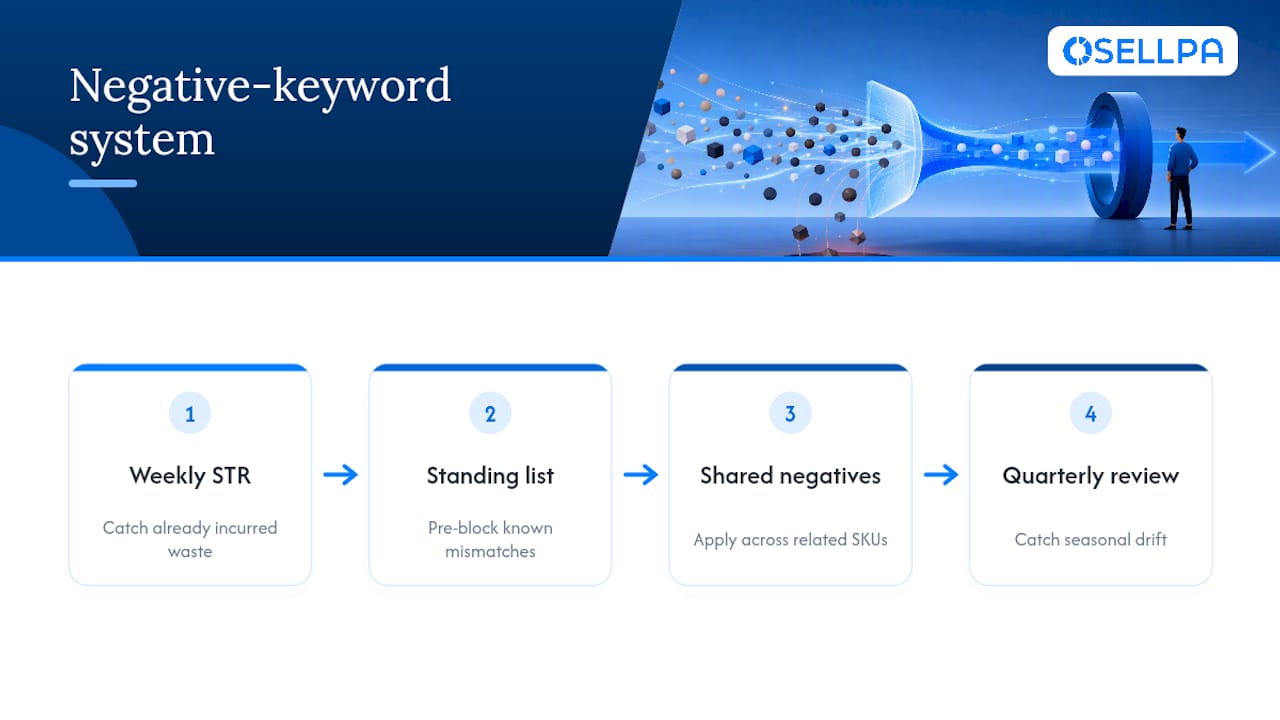
Build a standing negative keyword list from patterns you already know do not fit your product, rather than waiting for each one to individually rack up wasted clicks. If you sell a premium kitchen product, add negatives for “cheap,” “budget,” and “discount” variants before they ever appear in a report, because shoppers searching those terms are unlikely to convert regardless of how relevant your listing otherwise is.
Cross-reference negatives across your whole catalogue too. If a search term proved irrelevant for one SKU in a category, it is very likely irrelevant for related SKUs in the same category, and adding it as a shared negative across those campaigns saves you from rediscovering the same waste product by product.
Watch for seasonal drift as well. Terms that converted acceptably during a peak buying period can turn into dead weight once that season ends, and a proactive quarterly review of seasonal keywords catches this before an entire month of reduced-relevance spend shows up in your ACOS.
The mindset shift matters more than any specific list: treat the Search Term Report as confirmation of your negation strategy, not the sole source of it. Sellers who only react to the report are always one week behind the waste; sellers who anticipate it stay ahead.
Strategies for improving Quality Score/Relevance in Amazon PPC to reduce ACOS
Amazon does not publish a single visible “Quality Score” the way some other ad platforms do, but relevance between your keyword, your listing, and the shopper’s intent drives your effective cost per click just as strongly. A highly relevant match tends to win auctions at a lower bid than a loosely related one competing for the same placement.

Keyword-to-listing relevance starts with your title, bullets, and backend search terms genuinely reflecting what the product is and does. A listing padded with tangentially related keywords to “catch more traffic” often ends up paying more per click for lower-intent shoppers, because Amazon’s matching systems reward tight alignment between search term, listing content, and actual purchase behaviour.
Click-through rate and conversion rate on a given keyword feed back into how efficiently that keyword performs over time. A term generating clicks but few sales signals weak relevance even when the keyword itself looks correct on paper; that is exactly the pattern the Search Term Report sweep is designed to catch.
Practical moves that improve relevance signals: align your backend search terms with your actual bullet and title language rather than treating them as a separate keyword dump, remove keywords from campaigns that clearly do not match buyer intent even if they generate volume, and keep your A+ Content and listing copy consistent with the exact terms you are bidding on. Consistency between what you say and what you bid on is what keeps your effective cost per click down over time.
Analysing and optimising attribution models and multi-touch campaigns
ACOS as Amazon reports it is a last-touch metric within its own attribution window, typically crediting the ad that led directly to a sale within 7 days for Sponsored Products. That understates the role ads play earlier in a shopper’s path, particularly for considered purchases where a shopper sees a Sponsored Brands or Sponsored Display ad, browses, and buys days later through an organic search.
This matters practically because a campaign showing a mediocre standalone ACOS might still be doing valuable work introducing shoppers to your brand, work that a later purchase (attributed to a different ad or to organic search) does not credit back to it. Judging every campaign purely on its individual ACOS risks cutting a campaign that is actually feeding your funnel.
TACOS helps correct for this at the account level, since it measures total revenue against total ad spend regardless of which specific ad gets attribution credit. If TACOS is falling while individual campaign ACOS numbers look flat or slightly worse, your upper-funnel activity is likely doing its job even though no single campaign report shows it directly.
Practically, this means reviewing Sponsored Brands and Sponsored Display campaigns with a longer patience window than Sponsored Products, since their contribution often shows up in organic sales and branded search volume rather than in their own attributed ACOS. Cutting an upper-funnel campaign purely because its standalone ACOS looks weak, without checking what happened to branded search volume and TACOS over the following weeks, is a common way sellers accidentally remove a campaign that was quietly supporting the whole account.
Use of Amazon Sponsored Display and Video Ads to complement Sponsored Products for ACOS reduction
Sponsored Products should carry the majority of your budget because it captures existing purchase intent directly on search results. But relying on it exclusively leaves gaps that Sponsored Display and Sponsored Video can fill in ways that indirectly support a lower blended ACOS.
Sponsored Display’s audience retargeting reaches shoppers who viewed your listing but did not buy, both on and off Amazon. These shoppers already have demonstrated interest, which typically means a lower cost per click to reconvert them than the cost of winning a fresh Sponsored Products click from someone who has never seen your listing. Running a modest, always-on retargeting campaign alongside your core Sponsored Products campaigns often recovers sales that would otherwise be lost entirely.
Sponsored Video and Sponsored Brands Video place your product in front of shoppers browsing category pages and search results with richer creative than a static Sponsored Products ad. These formats generally carry a standalone ACOS that looks less efficient than Sponsored Products on paper, because video ad formats tend to serve an awareness role rather than a direct-response one. Judge them over a longer window and watch branded search and TACOS, not the campaign’s own attributed ACOS in isolation.
The practical structure: keep Sponsored Products as your primary demand-capture engine with tight negative and bid discipline, run Sponsored Display retargeting as a small, consistent supplement, and treat Sponsored Video as a longer-term brand investment reviewed monthly rather than weekly. Together they widen the funnel that Sponsored Products alone cannot reach, which shows up eventually in your account-level TACOS even when it does not show up in any single campaign’s ACOS.
What actually separates ACOS wins from ACOS regressions
The sellers who genuinely fix their ACOS problem and the ones who chase it for months doing the same thing on repeat differ in one habit: the first group treats bid cuts as a last resort, not a first response. Panic-cutting budgets the moment ACOS spikes for a week protects nothing. It just as often tanks the organic rank that took months to build, because Amazon’s algorithm still reads recent sales velocity, and a starved campaign produces fewer sales regardless of what the ACOS percentage says afterwards.
Watch for one specific red flag above all others: ACOS dropping while TACOS also falls and organic rank slips at the same time. That combination almost always means you cut spend on a keyword that was doing real work for your visibility, and the improved ACOS number is masking a genuine loss in total revenue and market position.
The weekly discipline outlined through this article, sweep, graduate, right-size, test the listing, is unglamorous compared to a dramatic account overhaul, but it is what actually compounds. A 30 day cycle run consistently beats a frantic one-day audit every time.
— Harry
Automate the routine work, keep the strategic decisions
Everything covered here, the negative sweeps, the bid right-sizing, the campaign graduation, the placement checks, works. It also takes real weekly hours once your catalogue grows past a handful of SKUs. Osellpa is built specifically to run those repeatable Amazon PPC tasks automatically, tracking profit per SKU against your actual break-even ACOS and applying rule-based bid adjustments through Amazon’s own advertising API, according to the company, so you are not exporting spreadsheets every Monday morning to do what a system can run daily.
If you want to see where your account currently loses money before committing to anything, request a free Amazon PPC bid optimisation report and get a clear picture of wasted spend across your campaigns. If you are ready to put automation to work directly, the Launch plan starts at £96 per year, with Scale and Advanced tiers available as your catalogue and ad spend grow.
Sources
FAQ
What should my ACOS be on Amazon?
There is no single correct ACOS for every seller. Your target should sit at or below your product’s break-even ACOS, which equals your pre-ad profit margin, so a product with a 30% margin can typically sustain an ACOS up to roughly 30% before losing money on that sale.
Should ACOS be high or low?
Lower is generally better, but only relative to your own break-even number, not as an absolute rule. A 40% ACOS is unhealthy on a thin-margin product and perfectly fine on a high-margin one, so judge it against your specific product economics rather than a generic benchmark.
What ROAS is a 25% ACOS?
ACOS and ROAS (return on ad spend) are inverses expressed differently: ROAS equals 1 divided by ACOS. A 25% ACOS translates to a ROAS of 4, meaning £4 in ad-attributed revenue for every £1 spent on ads.
What does ACOS stand for?
ACOS stands for Advertising Cost of Sales, the percentage of ad-attributed revenue that went towards advertising spend. It is calculated as ad spend divided by ad-attributed sales, and it remains the primary efficiency metric Amazon sellers use to judge Sponsored Products performance.


