
Sponsored Products defaults to a 7‑day click window for Seller Central accounts and a 14‑day click window for Vendor Central. Sponsored Brands, Sponsored Display and Amazon Attribution generally run on 14‑day click windows. Since 1 January 2026, view credit for certain in‑store placements no longer uses a fixed 14‑day view window. It now runs on an ML‑enhanced, shopping‑signal last‑touch model, though legacy “all views” metrics stay in your reports for comparison.
TL;DR:
- View attribution for in-store placements now uses a shopping-signal last-touch model instead of a fixed 14-day window, reducing the number of credits assigned.
- Sponsored Products on Seller Central have a 7-day click window, while Vendor Central and most other products operate on a 14-day window, requiring careful comparison normalization.
- Retina attribution metrics differ between sales originating on Amazon and external channels, with legacy “all views” remaining in reports for continuity checks.
- Drops in view-attributed ROAS after January 2026 may reflect measurement shifts rather than actual performance declines, especially if “all views” metrics stay constant.
- Automating attribution and bid management with tools like Osellpa helps avoid manual errors, ensuring measurement consistency and maintaining margin-focused bidding strategies.
Table of Contents
- What is the standard attribution window for Amazon ads?
- How does view attribution differ from click attribution?
- What is Amazon Attribution and how does it work?
- Do Seller and Vendor accounts use different windows?
- How do you read Amazon attribution reports without getting misled?
- What bidding rules should sellers apply after the 2026 changes?
- How should advertisers prioritise over the next 12 months?
- Get attribution‑aware reporting without the spreadsheet work
- Sources
- FAQ
What is the standard attribution window for Amazon ads?
Every Amazon ad product carries its own default click window, and mixing them up is the fastest way to misread a dashboard. Before you compare two campaigns, know exactly which window each one runs on.
- Sponsored Products: 7‑day click for Seller Central accounts; 14‑day click for Vendor Central.
- Sponsored Brands: 14‑day click, regardless of account type.
- Sponsored Display: 14‑day click in most placements, aligned with Sponsored Brands.
- Amazon Attribution: 14‑day, last‑touch click window for measuring traffic from outside Amazon.
- DSP (offsite): commonly 14‑day click and 14‑day view, largely unaffected by the 2026 update.
View credit history varies by product. Sponsored Display and DSP have historically carried view‑through credit; Sponsored Products has not. DSP’s offsite inventory still holds onto its 14‑day click and view window in most cases, while in‑store placements are the ones affected by January’s change.
Before you pull any comparison report, write down which window applies to each campaign type and account. It sounds basic, but it is the single most common source of “why did my numbers change” confusion sellers bring to their agencies.
How does view attribution differ from click attribution?
Click attribution, or last‑click, credits a sale to the last ad a shopper clicked before buying, within a defined lookback window. View attribution (view‑through) credits a sale to an ad the shopper saw but never clicked, on the logic that the impression still influenced the purchase.
Amazon has used both for years, but view credit has always been the looser, more generous metric of the two. That changed on 1 January 2026. Amazon introduced a shopping‑signal enhanced last‑touch model for view attribution on select in‑store placements, replacing the old static 14‑day view window with something that weighs actual shopping behaviour rather than simply counting any purchase inside a fortnight.
What this means in practice:
- The new model is tighter. Fewer purchases will qualify for view credit than under the old 14‑day rule.
- Legacy “all views” metrics remain in your reports specifically so you can check continuity against pre‑2026 figures.
- Your view‑attributed ROAS can fall under the new model even when actual sales volume hasn’t moved at all.
Pro Tip: If your view‑attributed ROAS drops after January 2026, check the parallel “all views” field before touching a single bid. A falling number in one column and a flat number in the other tells you it’s a measurement shift, not a performance problem.
What is Amazon Attribution and how does it work?
Amazon Attribution measures traffic you send to Amazon listings from channels Amazon doesn’t control: your own site, email, social ads, influencer links. It runs on a 14‑day, last‑touch click window, crediting a sale if the purchase happens within 14 days of someone clicking a tagged link.
Setting it up follows a fairly simple sequence:
- Create a tagged attribution link for each external campaign or placement inside the Amazon Ads console.
- Drive traffic through that tagged link from your chosen off‑Amazon channel.
- Amazon tracks the shopper’s journey and reports detail page views, add‑to‑cart events, purchases, units sold, product sales, and new‑to‑brand metrics against that specific link.
- Pull the results from the console or a downloadable report once the 14‑day window has closed.
Use Amazon Attribution when you’re testing external traffic sources and need to know whether they’re actually converting on Amazon. Stick with on‑Amazon reporting (Sponsored Products, Sponsored Brands, Sponsored Display) for anything happening entirely within Amazon’s own ad inventory, since attribution logic and reporting fields differ between the two systems.
Do Seller and Vendor accounts use different windows?
Yes, and this is where a lot of benchmarking goes wrong. Seller Central Sponsored Products campaigns default to a 7‑day click window, while Vendor Central defaults to 14 days. A 14‑day window simply has more time to catch delayed purchases, so a Vendor campaign can look more effective than an identical Seller campaign purely because of the reporting window, not the ad itself.
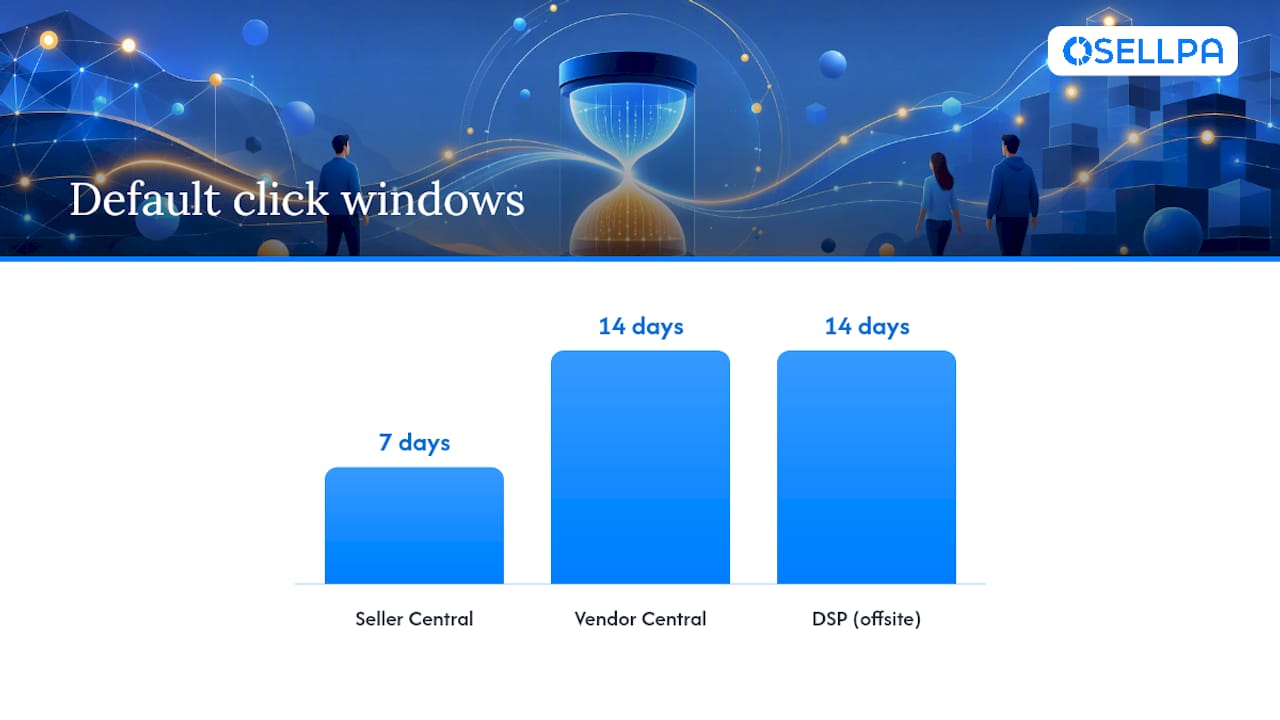
DSP adds another layer. Offsite DSP placements generally keep their 14‑day click and view windows intact. In‑store DSP placements, by contrast, fall under the new 2026 view model and will show tighter, more conservative view credit going forward.
Before comparing any two campaigns:
- Confirm the account type (Seller or Vendor) behind each one.
- Check whether the placement is in‑store or offsite for DSP.
- Normalise for window length rather than assuming identical reporting logic across accounts.
How do you read Amazon attribution reports without getting misled?
Amazon’s reports distinguish between promoted conversions (sales directly attributed to the ad you’re viewing) and halo, or brand‑level, conversions (sales of other products in your catalogue that the same ad indirectly influenced). Totals that include halo sales will always look higher than promoted‑only figures, and confusing the two is a common way sellers overstate a campaign’s true efficiency.
A second trap is reacting too fast to a falling view‑attributed ROAS. If your numbers dip after a measurement change, don’t assume the campaign broke.
- Check the “all views” legacy field first. If it’s flat while the new view metric has dropped, you’re looking at a reporting change, not a performance one.
- Wait for the full click lookback window to close before judging any campaign. Amazon’s own documentation confirms attribution data stays incomplete until the lookback period ends.
- Compare like‑for‑like: same account type, same ad product, same window length, same time period length.
- Watch your time‑to‑conversion data. A sudden shift there often explains a ROAS change better than the ad itself does.
Pro Tip: Keep a simple internal note of which “attribution gluing” logic your reports use, especially if you run both on‑Amazon and off‑Amazon campaigns side by side. Mismatched windows across channels are the single most common cause of ROAS discrepancies sellers escalate to support, and most of them are avoidable with one written reference sheet.
What bidding rules should sellers apply after the 2026 changes?
Attribution reporting only matters if it feeds a bid that actually protects your margin. A workable framework, drawn from established PPC practitioner guidance, starts with unit economics rather than Amazon’s suggested bid range:
- Target ACoS = gross margin minus your desired net margin. If your gross margin is 45% and you want a 15% net margin, your Target ACoS is 30%.
- Max CPC = Target ACoS × average order value. A 30% Target ACoS on a £40 AOV gives you a £12 ceiling per click.
- Build your bidding rules around that ceiling, adjusting for attribution window and account type rather than gut feel.
Then apply an operational checklist: wait for the full lookback window before judging any change, lean on “all views” metrics for continuity, harvest converting search terms into their own campaigns, negate high‑spend non‑converters, and use dayparting to cut wasted spend during low‑conversion hours. Track TACoS alongside ACoS too. When attribution reporting shifts, TACoS helps you spot organic rank movement that PPC metrics alone can hide.
Pro Tip: Treat Max CPC as a hard ceiling, not a target. Bidding right up to it on every keyword erodes margin fast; the number exists to stop you overpaying, not to tell you what to pay.
How should advertisers prioritise over the next 12 months?
Don’t pause upper‑funnel campaigns just because view‑attributed ROAS has fallen under the new model. That number measuring conservatively doesn’t mean the campaign stopped working.
Reset your ROAS targets to the new baseline, and keep “all views” metrics running in parallel for year‑on‑year comparisons rather than benchmarking against pre‑2026 figures directly. Discovery activity still builds the sales your last‑click metrics eventually capture, even when the credit for it becomes harder to measure precisely.
— Harry
Get attribution‑aware reporting without the spreadsheet work
Manually cross‑referencing “all views” fields against the new view model, recalculating Max CPC every time your margins shift, and remembering to check lookback windows before touching a bid is exactly the kind of work that eats a seller’s week. Osellpa automates that layer directly through Amazon’s own API: profit tracking that reflects real margin rather than raw ACoS, PPC optimisation that applies unit‑economics bidding rules automatically, and dayparting plus search term harvesting and negation running in the background without you opening a single spreadsheet.
Every feature maps straight onto the checks this article walks through, so the reporting cadence and bid discipline happen automatically rather than manually. Plans start at the Launch tier from £10 a month, scaling up to Scale and Advanced as your account grows. Check current pricing and start a plan on the Osellpa pricing page.
Sources
For primary detail, see Amazon’s own Attribution guide, the Ads Support Centre on campaign attribution, and the view attribution update announcement. For technical implementation, 121 Group’s marketing attribution guidance covers closed‑loop measurement in more depth.
FAQ
What is the standard attribution window for Amazon DSP?
DSP offsite placements commonly use a 14‑day click and 14‑day view window. In‑store DSP placements now follow the January 2026 shopping‑signal last‑touch model for view credit, so the two behave differently within the same account.
What does “7‑day click, 1‑day view” mean?
It means a sale counts toward the ad if the shopper clicked within 7 days of purchase, or viewed the ad (without clicking) within 1 day of purchase. Amazon uses variations of this pattern across products, though Sponsored Products for Seller Central typically runs on a 7‑day click window without a matching view component.
What is an attribution window in Amazon advertising?
It’s the timeframe after a click or view during which a purchase still counts as caused by that ad. Windows range from 7 to 14 days depending on the ad type and account, and Amazon’s own documentation notes that conversion data stays incomplete until the lookback window closes.
How do I get an Amazon Attribution link?
You create one inside the Amazon Ads console by setting up an Attribution campaign for the external channel you’re tracking, such as your website or an email link. Amazon then generates a tagged URL that reports detail page views, add‑to‑cart events, and purchases tied to that specific link over its 14‑day window.
What does Osellpa cost for tracking attribution‑driven performance?
Osellpa’s plans start at Launch for £10 a month or £96 a year, with Scale and Advanced tiers available as your sales volume grows. Full pricing details sit on the Osellpa pricing page.


