
Dayparting your Amazon ads concentrates spend into the hours that actually convert, so each pound works harder. The verdict: if your campaigns regularly exhaust their daily budget before midnight, or if your category has a clear buying window (think home office supplies peaking mid-morning, or gifts spiking on weekend evenings), ad scheduling is worth testing. Here is where to start within the next hour.
- Pull your Campaign Performance report from the Amazon Advertising console, filtered to the last 60 days, and export it with hour-of-day and day-of-week columns enabled.
- Apply one safe default rule immediately: use a schedule-based budget rule to increase your campaign budget by 20% between 10:00 and 20:00 on your highest-spend campaigns.
- Run the test for at least 21 days before drawing conclusions, and note that Amazon’s shopping-signal enhanced last-touch attribution model, effective 1 January 2026, can shift reported conversions in short windows.
UK timezone note: Amazon Advertising operates in UTC. UK sellers must account for GMT (UTC+0, October to March) and BST (UTC+1, April to September) when setting time windows. A rule set for 09:00 UTC fires at 10:00 BST in summer. Always convert your target hours to UTC before saving any rule.
Key takeaways
Dayparting Amazon ads pays off when your data shows a clear hourly CVR pattern with sufficient click volume to trust it, and when tested against a matched baseline over multiple weeks.
| Point | Details |
|---|---|
| Pull 60–90 days of data first | Fewer than 30 days of hourly data produces patterns too sensitive to single events to act on reliably. |
| Use the 30-click threshold | Only flag an hour as a winner or loser when it has at least 30 clicks in the analysis period. |
| Native rules increase budgets only | Amazon’s schedule-based budget rules cannot reduce bids by hour; bulk files or automation are needed for spend reduction. |
| Test for at least 21 days | Shorter tests are distorted by weekly seasonality and Amazon’s attribution lag, especially post the January 2026 model update. |
| Osellpa automates safely at scale | Osellpa’s API integration and configurable guardrails handle hour-by-hour adjustments without manual file uploads. |
Table of Contents
- What does dayparting mean for Amazon ads?
- Why dayparting can improve your ACoS and protect your budget
- Which Amazon reports give you hourly and daily performance data?
- How to identify your best and worst performing time windows
- How to put dayparting into action on Amazon
- How to design a valid dayparting test
- When should you automate dayparting?
- Common dayparting mistakes that hurt performance
- Your 30-day dayparting action plan
- The pragmatic case for dayparting (and when to skip it)
- Osellpa makes dayparting safer and more precise
- Sources
What does dayparting mean for Amazon ads?
Ad scheduling, the industry’s standard term, means restricting or adjusting your ad activity to specific hours or days of the week. In Amazon PPC, the informal term “dayparting” describes the same practice: concentrating budget or bids into windows when your shoppers are most likely to convert, and pulling back during low-value hours.
The key difference from Google Ads or Meta is control granularity. Google lets you set bid modifiers by hour at the keyword level. Amazon’s native console offers schedule-based budget rules that can raise a campaign’s budget during a defined window, but they cannot reduce bids by hour natively. To cut spend during off-peak hours, you need bulk operation files or a third-party tool connected to the Amazon Ads API.
For UK sellers, the practical implications are:
- UTC conversion is mandatory. Every rule you set in the console runs on UTC. Check whether you are in GMT or BST before saving.
- Multi-marketplace accounts targeting both amazon.co.uk and amazon.de need separate rules per marketplace, because consumer behaviour peaks differ by country.
- Attribution windows on amazon.co.uk follow the same 7-day click, 1-day view defaults as other Amazon stores, but the 2026 attribution update means short-window tests may show different conversion counts than you saw in 2025.
Pro Tip: Set a recurring calendar reminder each time the UK clocks change (last Sunday of March and last Sunday of October) to audit and update your UTC offsets in every active scheduling rule.
Why dayparting can improve your ACoS and protect your budget
The commercial case for ad scheduling rests on a simple observation: conversion rate, cost-per-click, and return on ad spend are not flat across 24 hours. They move, sometimes sharply. Agency audits across 38 accounts found that dayparting produced consistent, repeatable gains in three specific scenarios, and was effectively noise for most other accounts.
The three cases where it reliably pays:
- Budget-capped campaigns. If your daily budget runs out by early afternoon, you are missing evening traffic. A schedule rule that increases budget for the 10:00–20:00 window, or that front-loads spend into your peak hours, directly recovers lost impressions.
- Categories with clear buying windows. Gardening tools, school supplies, and seasonal gifting categories often show conversion rate spikes tied to specific days or times. Concentrating spend there and reducing it at 02:00 lowers ACoS without sacrificing volume.
- High-CPC categories with a late-night CVR collapse. In competitive categories (electronics accessories, supplements), clicks keep arriving at midnight but conversion rate drops sharply. Paying the same CPC for a click that converts at half the rate destroys ROAS. Reducing bids or pausing campaigns during those hours protects margin.
For many other accounts, dayparting produces flat or slightly negative results. Amazon’s own pacing algorithm already smooths spend across the day, and if your sample is small, hourly patterns are often statistical noise rather than genuine signal. The honest answer is that you will not know which camp you are in until you pull the data.
Secondary benefits worth tracking alongside ACoS and ROAS: improved TACoS via sales velocity (more conversions in peak windows can lift organic rank), and more predictable daily budget pacing, which makes forecasting easier.
Which Amazon reports give you hourly and daily performance data?
Before you test any dayparting strategy, you need the right data. Here are the exact reports to pull from the Amazon Advertising console and what to include in each.
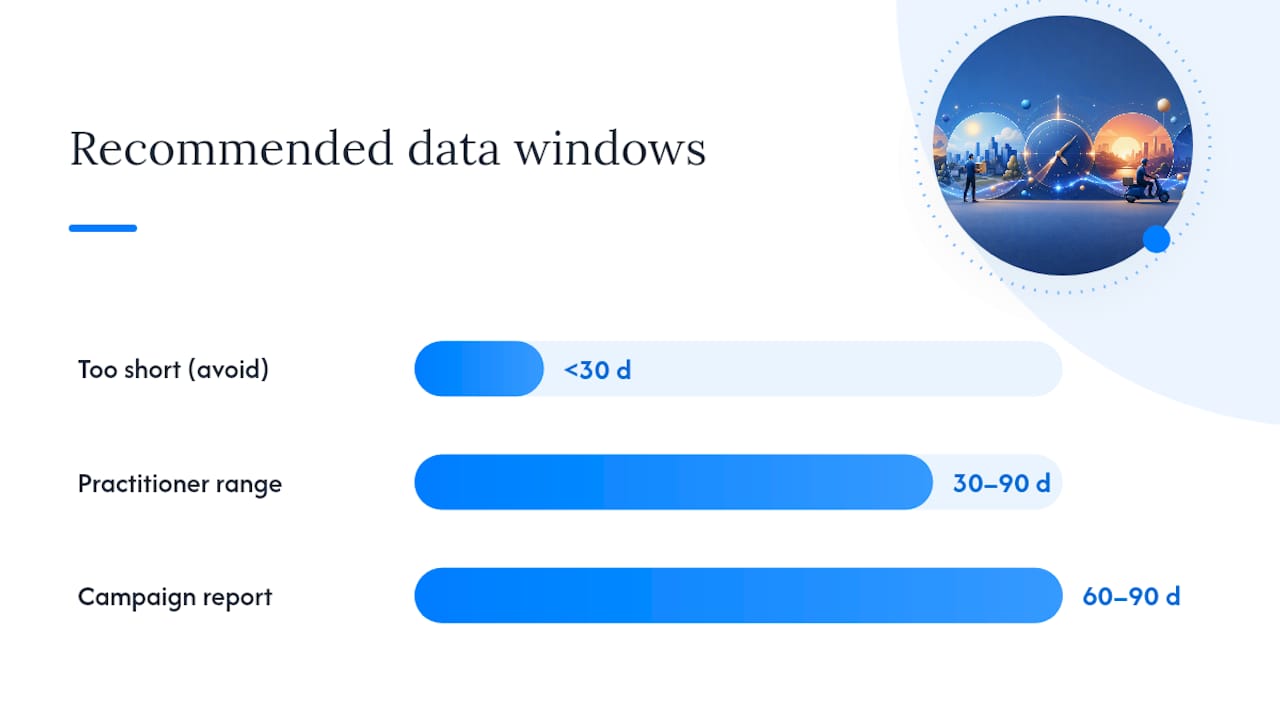
- Campaign Performance report (Sponsored Products, Sponsored Brands, Sponsored Display): set the date range to 60–90 days. This is your primary source for spend, impressions, clicks, CPC, attributed sales, and ACoS at campaign level.
- Search Term report: pulls keyword-level data including conversion rate and attributed purchases. Useful for identifying whether low-converting hours are category-wide or keyword-specific.
- Placement report: breaks performance by top-of-search, rest-of-search, and product pages. Top-of-search placement often has a different hourly CVR curve than product-page placements.
- Amazon Marketing Stream (via API): the only native source for true hourly data feeds. It streams impression, click, spend, and purchase signals in near real-time, enabling automated tools to act within the same hour.
Key fields to include in every export:
- Hour of day and day of week (available in Marketing Stream; approximated in console reports via date-range slicing)
- Impressions, clicks, spend
- CPC (cost per click)
- Attributed purchases (7-day click window)
- Attributed sales (revenue)
- ACoS and ROAS
- Conversion rate (orders ÷ clicks)
- Placement type
Practitioner guidance recommends pulling 30–90 days of hourly Sponsored Products data, with 60 or more days preferred for stable, reliable rules. Fewer than 30 days produces patterns that are too sensitive to a single promotional event or a stock-out.
Pro Tip: If you do not have API access to Amazon Marketing Stream, approximate hourly data by exporting daily reports for each individual day across 60 days, then pivot by day-of-week in a spreadsheet. It is slower but produces the same analytical output.
How to identify your best and worst performing time windows
Once you have your 60-day export, the analysis follows a clear sequence.
- Build an hourly pivot table. Rows = hours (00–23), columns = impressions, clicks, spend, attributed purchases, attributed sales, ACoS, conversion rate (CVR), and revenue per click (RPC = attributed sales ÷ clicks).
- Calculate your baseline. Average CVR and RPC across all hours. These are your benchmarks.
- Flag winning hours. Mark any hour where CVR exceeds the baseline by 15% or more AND has at least 30 clicks in the period. The click threshold matters: an hour with 3 clicks and 2 purchases looks like a 67% CVR but is statistically meaningless.
- Flag losing hours. Mark any hour where CVR falls more than 20% below baseline AND has at least 30 clicks. These are your reduction candidates.
- Check day-of-week overlays. Repeat the same pivot by day of week. Some accounts show a Monday-to-Friday pattern; others peak on Saturday. Layer this onto the hourly view to find your strongest daypart combinations (e.g., weekday 10:00–14:00 UTC).
A simple spreadsheet layout that works:
In this example, 10:00 and 14:00 UTC are clear winners; 00:00 and 23:00 are reduction candidates. For a more rigorous check, calculate the standard deviation of CVR across all hours and flag any hour that sits more than one standard deviation from the mean.
Pro Tip: *Use a free fee and profit calculator like BeanHawk alongside your hourly CVR data to translate RPC improvements into actual margin gains.
How to put dayparting into action on Amazon
There are three routes to implementation, each with different capabilities and trade-offs.
Native schedule-based budget rules
In the Amazon Advertising console, go to Rules and create a schedule-based budget rule. You can set a specific time window and a percentage increase to your campaign’s daily budget. This is the simplest option and requires no external tools.
Limits to know:
- Rules can only increase budgets, not decrease them.
- You cannot set bid-level adjustments by hour natively.
- Rules apply at campaign level, not ad group or keyword level.
This approach works well for budget-capped campaigns where you simply need more spend available during peak hours.
Bulk operation files
For bid reductions during off-peak hours, bulk files are the native workaround. The process:
- Download the bulk file for your target campaigns from the console.
- Edit the default bid column for the relevant ad groups or keywords.
- Upload the modified file to apply lower bids.
- Schedule a second upload (or a manual check) to restore bids at the start of your peak window.
This is manual and does not scale beyond a handful of campaigns. It also carries timing risk: if you forget to restore bids, you run reduced spend through your peak hours.
Third-party and API-based automation
When you manage more than 10–15 campaigns, or when you need bid-level control rather than budget-level control, automation via the Amazon Marketing Stream API is the practical answer. Automated tools ingest hourly signals and apply bid modifiers or campaign pauses within the same hour, without manual file uploads.
Safe rule patterns to start with:
- Reduce bids by 30% between 01:00 and 06:00 UTC (low-traffic overnight window for most UK categories).
- Increase campaign budget by 20% between 10:00 and 20:00 UTC for any campaign that regularly hits its daily cap.
- Pause campaigns entirely between 02:00 and 05:00 UTC only if CVR data shows near-zero conversion in that window across at least 60 days of data.
Pro Tip: Never hard-pause a campaign during a window without first checking your inventory status. A pause during a low-CVR window is sensible; a pause during a low-CVR window when you are also running low on stock can trigger an organic rank drop that takes weeks to recover. Check FBA inventory timing guidance before setting any pause rules.
How to design a valid dayparting test
A poorly designed test will tell you nothing useful. Here is a blueprint that avoids the most common mistakes.
- Set a matched baseline period. Before changing anything, record your ACoS, ROAS, CVR, revenue per click, and daily budget pacing for the 21–28 days immediately prior to the test. Use the same campaigns, same keywords, same bids.
- Run the test for at least 21 days. Shorter windows are too sensitive to weekly seasonality cycles and the Amazon attribution lag. Twenty-eight days is better.
- Change one variable at a time. If you add a budget rule and also adjust bids in the same period, you cannot attribute any change to dayparting specifically.
- Define your decision rules before you start. A 10% improvement in ACoS with no revenue decline is a keeper. A 5% ACoS improvement with a 15% revenue drop is a rollback. Write these down before the test begins.
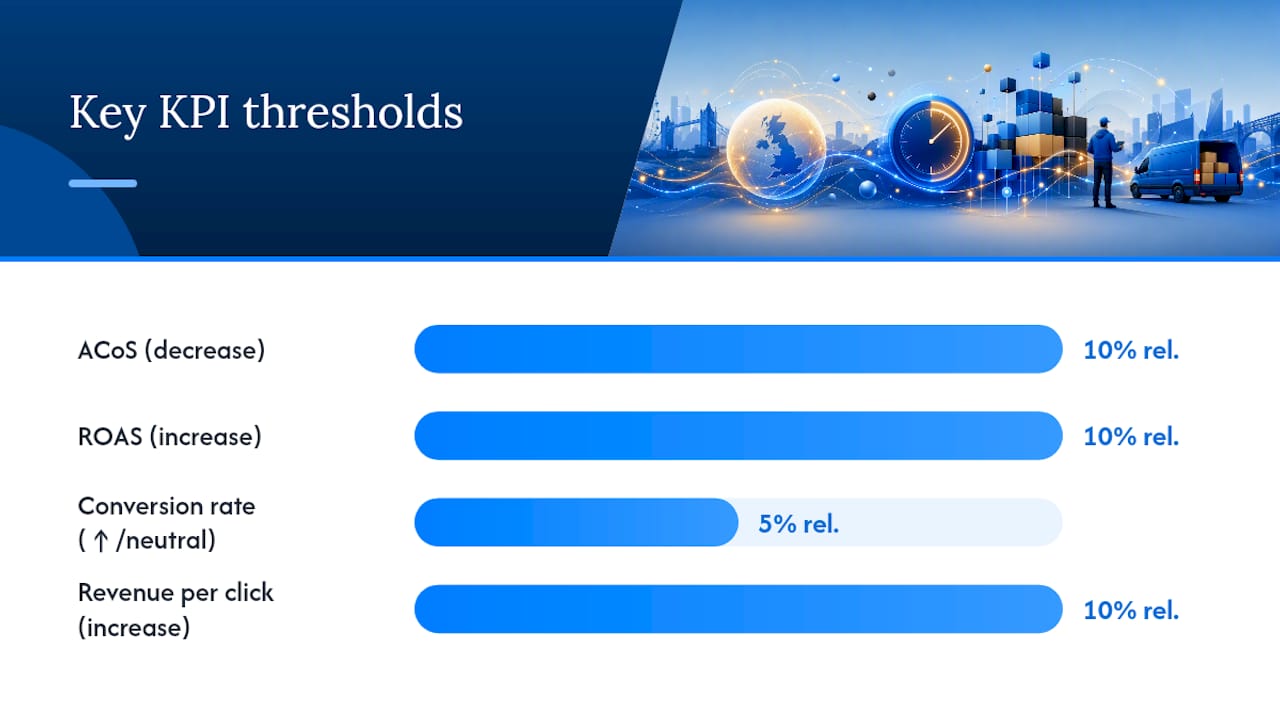
Primary KPIs to watch:
| KPI | Target direction | Minimum meaningful change |
|---|---|---|
| ACoS | Decrease | 10% relative improvement |
| ROAS | Increase | 10% relative improvement |
| Conversion rate | Increase or neutral | 5% relative improvement |
| Revenue per click | Increase | 10% relative improvement |
| Daily budget pacing | More even distribution | Subjective, but no early exhaustion |
Secondary signals: TACoS (total advertising cost of sale, including organic), organic rank for your primary keywords, and session-to-order rate from the Business Reports tab.
Decision rules: if primary KPIs improve and secondary signals are neutral or positive after 28 days, keep the rule. If primary KPIs are flat but secondary signals are negative (organic rank dropping), roll back. If results are mixed, extend the test by 14 days before deciding.
Pro Tip: Note the Amazon attribution update effective 1 January 2026: the shopping-signal enhanced last-touch model can shift conversion counts in short windows. If your test straddles a reporting period boundary, compare like-for-like attribution windows rather than raw purchase counts.
When should you automate dayparting?
Manual bulk file edits work for a small account. Once you are managing 20 or more campaigns across multiple ASINs, the manual approach breaks down: you miss timing windows, forget to restore bids, and spend more time on file management than on strategy.
The signals that justify moving to automation:
- More than 15 active campaigns with meaningful daily spend.
- Rapid inventory changes that affect which ASINs should be active at any given hour.
- Categories where CVR shifts within the same hour (electronics, fast-moving consumables) and where a 30-minute lag in bid adjustment costs real money.
Automated systems work by connecting to the Amazon Marketing Stream, ingesting near-real-time hourly signals, and applying pre-set rules: bid modifiers up or down, budget increases, or campaign pauses. The critical requirement is guardrails. Without them, an automated system can over-react to a single noisy hour and crater a campaign’s spend for the rest of the day.
What to look for in an automation vendor:
- Direct Amazon API integration (not screen-scraping or workarounds).
- Configurable guardrails: minimum and maximum bid floors, daily spend caps, and rule-override controls.
- Hourly reporting visibility so you can see what the system changed and why.
- Rollback capability: the ability to revert a rule change within minutes if performance drops.
Osellpa’s PPC automation connects directly to Amazon’s API and applies bid and budget adjustments based on your hourly performance data, with configurable guardrails that prevent over-correction.
Pro Tip: Before handing any campaign to an automation tool, run it manually for at least 28 days and document your baseline KPIs. Automation amplifies your strategy, good or bad. A well-defined baseline makes it far easier to confirm the tool is adding value.
Common dayparting mistakes that hurt performance
Most dayparting failures share the same root cause: acting on insufficient data. Here are the specific errors to avoid.
- Small-sample curve-fitting. Flagging an hour as a “winner” based on 8 clicks and 3 purchases is not analysis; it is noise. Apply the 30-click minimum threshold before acting on any hourly pattern.
- Breaking Amazon’s pacing algorithm. Amazon’s delivery system smooths spend across the day. Aggressive pausing during off-peak hours can confuse the algorithm and lead to erratic spend distribution even during your active windows.
- Pausing during demand spikes. Practitioners consistently flag major sale events (Prime Day, Black Friday, Cyber Monday) as periods where normal hourly CVR curves flatten or invert. A rule that pauses campaigns at 02:00 UTC on a normal Tuesday will miss a genuine demand spike at the same hour during a flash sale. Pause your dayparting rules for the duration of major events.
- Ignoring inventory and seasonality. A daypart rule built on summer data may be wrong in December. UK consumer behaviour shifts significantly around Christmas, school holidays, and major sporting events. Rebuild your hourly pivot at least quarterly.
Red flags to watch in your reports:
- Organic rank dropping for primary keywords during your active daypart window: a sign that reduced ad visibility is hurting organic performance.
- Erratic daily spend: the campaign exhausts budget at unpredictable times, suggesting the pacing algorithm is struggling with your rules.
- Conversions shifting without a sales uplift: more conversions appearing in your peak window but total weekly revenue is flat, which means you are cannibalising conversions rather than adding new ones.
Pro Tip: Set a weekly 15-minute check on your Business Reports session-to-order rate alongside your ad reports. A drop in session-to-order rate during your active daypart window is an early warning that something is wrong, often before ACoS deteriorates.
Your 30-day dayparting action plan
Follow this week-by-week plan to move from zero to a tested, defensible daypart strategy.
Week 0 (days 1–3): data pull and baseline
- Export 60–90 days of Campaign Performance data from the Amazon Advertising console.
- Build your hourly pivot table (CVR, RPC, ACoS by hour and day of week).
- Record your current 28-day baseline: ACoS, ROAS, CVR, daily budget pacing, and TACoS.
- Identify your top three candidate dayparts: your two best hours and your two worst hours, each with 30+ clicks.
Weeks 1–2: test setup and first rule
- Apply one schedule-based budget rule: increase budget by 20% between 10:00 and 20:00 UTC on your highest-spend, budget-capped campaigns.
- If you have bulk file access, apply a 30% bid reduction between 01:00 and 06:00 UTC on the same campaigns.
- Do not change anything else: same keywords, same match types, same bids outside the daypart windows.
Weeks 3–4: monitoring and iteration
- Check primary KPIs every three days: ACoS, ROAS, CVR, and daily pacing.
- At day 21, compare against your baseline. Apply your pre-defined decision rules.
- If results are positive, extend the rule to additional campaigns. If flat or negative, roll back and revisit your hourly data.
Copy/paste safe defaults for bulk files:
- Reduce keyword bids by 30% for hours 01:00–06:00 UTC.
- Increase campaign budget by 20% for hours 10:00–20:00 UTC (budget-capped campaigns only).
- For weekend-heavy categories: increase budget by 15% on Saturday and Sunday between 09:00 and 21:00 UTC.
Pro Tip: Keep a simple change log: date, rule applied, campaign affected, and baseline KPI at the time of change. When you review results at day 28, you will know exactly what changed and when, which makes attribution of any performance shift straightforward.
The pragmatic case for dayparting (and when to skip it)
The most common mistake I see sellers make with ad scheduling is treating it as a universal fix rather than a targeted tool. Dayparting is not a substitute for keyword hygiene, negative keyword lists, or bid optimisation at the match-type level. Those levers move the needle for almost every account. Dayparting moves it for a specific subset.
The accounts where it genuinely earns its place are the ones where the data shows a clear, repeatable pattern: a category that goes quiet after 22:00 UTC, a campaign that runs out of budget by 14:00, or a product that converts at twice the rate on weekday mornings compared to weekend nights. When the pattern is that clear, acting on it is straightforward.
Where I would not bother: accounts with fewer than 30 clicks per hour in their busiest windows, categories with flat CVR curves across the day, and any campaign currently struggling with keyword relevance. Fix the fundamentals first. Dayparting a poorly structured campaign does not fix the underlying problem; it just adds complexity.
If you cannot find that pattern in 60 days of data, dayparting is not your priority right now.
Osellpa makes dayparting safer and more precise
Running dayparting rules manually across multiple campaigns is time-consuming and error-prone. Osellpa connects directly to Amazon’s API to apply bid and budget adjustments automatically, based on your real hourly performance data, with guardrails that prevent over-correction during noisy periods.
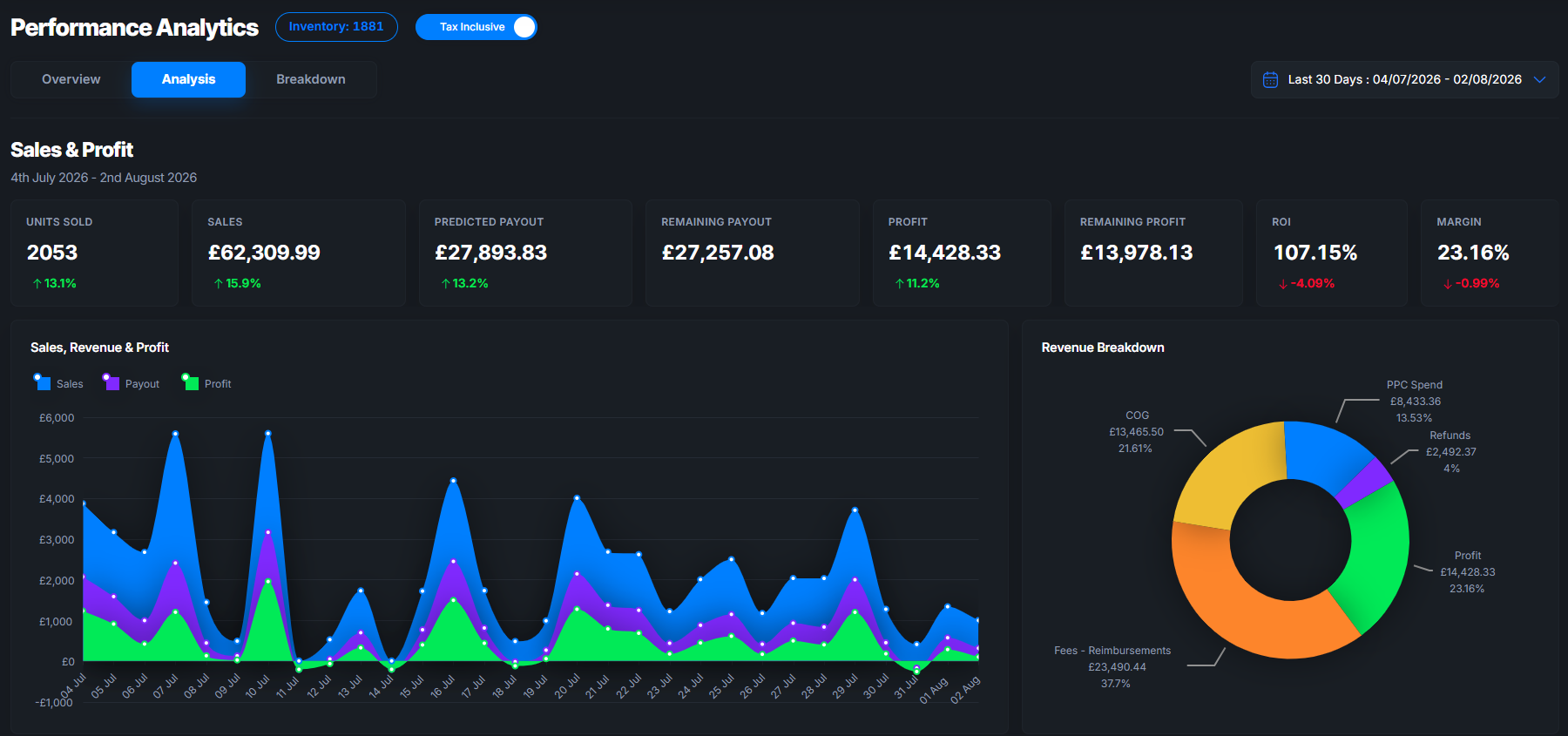
The platform gives you full visibility into what each rule changed and why, so you stay in control even as the system handles the hour-by-hour adjustments. Three features that matter most for dayparting:
- Direct API integration with Amazon Marketing Stream for near-real-time hourly data ingestion.
- Configurable guardrails: set minimum bid floors, maximum budget caps, and rule-override controls to prevent runaway adjustments.
- Transparent reporting: every automated change is logged with the signal that triggered it, so you can audit and refine rules over time.
Start a trial at Osellpa and connect your Amazon account in minutes.
Sources
The recommendations in this guide draw on the following primary sources. Each is worth reading in full for technical detail beyond what a single article can cover.
- Amazon Ads Advanced Tools Center
- Amazon Dayparting in 2026: When ad scheduling pays off and when it’s just noise - Velocity Sellers
- Amazon dayparting: Ad scheduling strategy to cut ACoS & maximise ROAS - CaptenAMZ
Attribution note: Amazon’s January 2026 attribution update means that any test run across a reporting boundary may show a step-change in conversion counts that is a reporting artefact, not a genuine performance shift. When comparing pre- and post-test periods, confirm both windows use the same attribution model settings in your reporting view before drawing conclusions.