
Good Amazon inventory management means keeping the right units in the right fulfilment state at all times, which directly protects your cash flow, buy box eligibility, and IPI score. Start here:
- Check now: Open your Inventory Performance Index dashboard in Seller Central and note your IPI score, then pull the Inventory Age report to identify any units approaching 180 days in storage.
- Change this week: Use the FBA Restock tool to set or update reorder quantities for your top 10 SKUs, and open a removal order for any units already past 270 days to avoid long-term storage fees.
Pro Tip: Set a recurring calendar reminder every Monday morning to check your IPI score and stranded inventory count before you do anything else. Catching a drop early costs minutes; catching it late costs margin.
Key takeaways
Effective Amazon inventory management protects your IPI score, reduces storage fees, and keeps your best-selling SKUs in stock, which directly supports buy box eligibility and cash flow.
| Point | Details |
|---|---|
| IPI score is your early warning system | Keep your score at 450 or above; investigate any drop below 400 before capacity restrictions apply. |
| Reorder point formula prevents stockouts | Calculate reorder point as (average daily sales × lead time) plus safety stock, and update it before every peak season. |
| Inventory Age report is your most financially important report | Review it monthly and act on units crossing 120 days to avoid long-term storage fees at 365 days. |
| FBA Restock tool needs your input to work well | Always cross-reference its recommendations against your actual supplier lead times before placing orders. |
| Osellpa automates the reconciliation and visibility work | Its direct Amazon API integration surfaces ageing stock, reimbursement opportunities, and margin data without manual exports. |
Table of Contents
- Why does Amazon inventory management matter for UK sellers?
- Which fulfilment model is right for each of your SKUs?
- What metrics and reports should you monitor in Seller Central?
- How to build a practical day-to-day inventory workflow
- How do you forecast demand and plan replenishment on Amazon?
- What causes common inventory problems and how do you fix them?
- How do Amazon storage fees affect your margins?
- How to use Seller Central inventory tools effectively
- How do you choose the right inventory software for your Amazon business?
- When does investing in automation actually make sense?
- FBA preparation and shipping: what UK sellers need to know
- Your daily and monthly inventory checklist
- What most sellers get wrong about inventory (and the fastest fixes)
- Osellpa gives you clearer inventory visibility without the spreadsheet overhead
- Sources
Why does Amazon inventory management matter for UK sellers?
At its core, Amazon inventory management is the practice of tracking every unit you own across its entire lifecycle: from the moment it arrives at your prep facility or fulfilment centre, through storage, picking, packing, and despatch, to replenishment. For Amazon sellers, this is not a back-office concern. It sits at the centre of three things that directly affect your profitability.
Cash flow is the most immediate pressure. Stock you cannot sell is cash you cannot reinvest. Every unit sitting in an Amazon fulfilment centre costs you monthly storage fees, and units held past 365 days attract long-term storage fees that can exceed the product’s value.
Buy box eligibility depends partly on your ability to fulfil orders reliably. A seller who runs out of stock loses the buy box to a competitor and, in some categories, can take weeks to recover ranking momentum.
Your IPI score ties everything together. Amazon uses the Inventory Performance Index to measure how efficiently you manage FBA stock. A score below Amazon’s threshold can result in storage capacity restrictions, which then limits how much you can send in. The core operational cycle that underpins all of this is straightforward:
- Receive stock and complete quality checks
- Prep and label units to Amazon’s requirements
- Send to FBA or manage as FBM
- Monitor sell-through, age, and inventory states
- Replenish before you hit a stockout
Pro Tip: The three signals to watch every week are your sell-through rate, your days of inventory on hand, and your stranded inventory count. If any of these moves in the wrong direction, you have an early warning before it becomes a fee or a ranking problem.
Which fulfilment model is right for each of your SKUs?
Amazon offers three primary fulfilment models, and the right choice often varies by SKU rather than by seller. Understanding the trade-offs is the first step to making cost-effective decisions.
Fulfilment by Amazon (FBA)
Amazon stores, picks, packs, and ships your products. Your listings become Prime-eligible, which typically improves conversion rates. The trade-off is that you pay monthly storage fees and fulfilment fees per unit, and you surrender physical control of your stock. FBA suits high-velocity, standard-sized products where Prime eligibility drives enough additional sales to justify the fee structure.
Fulfilled by Merchant (FBM)
You store and ship orders yourself, or use a third-party logistics provider. FBM gives you full control over packaging, quality, and despatch speed, but you are responsible for meeting Amazon’s shipping performance metrics. It works well for oversized or heavy items where FBA fulfilment fees would be prohibitive, for products with high return rates where you want to inspect returns before restocking, and for sellers with existing warehouse infrastructure.

Multichannel Fulfilment (MCF)
MCF lets you use your pooled FBA inventory to fulfil orders from other sales channels, including your own website, eBay, or Shopify. Amazon picks, packs, and ships the order, but the packaging is unbranded. MCF suits sellers who want a single inventory pool across channels without managing multiple 3PLs.
Decision rules at the SKU level:
- Seasonal items: Consider FBM or a 3PL for peak-season overflow to avoid excess storage fees during slow periods.
- Fragile or high-value goods: FBM or MCF with your own packaging controls reduces damage claims.
- Expiry-dated products: FBA handles FEFO (first expired, first out) picking, but you must monitor age closely to avoid removal costs.
- Fast-moving, standard-sized SKUs: FBA almost always wins on conversion and operational simplicity.
| Factor | FBA | FBM | MCF |
|---|---|---|---|
| Prime eligibility | Yes | Seller Fulfilled Prime (if approved) | No |
| Storage cost | Monthly fee to Amazon | Your own warehouse cost | Monthly fee to Amazon |
| Fulfilment control | Amazon | You or 3PL | Amazon |
| Multi-channel use | Amazon orders only | Any channel | Any channel |
| Best for | High-velocity, standard-sized SKUs | Oversized, high-return, or controlled items | Multi-channel sellers with pooled FBA stock |
What metrics and reports should you monitor in Seller Central?
Tracking the right numbers turns a reactive operation into a proactive one. These are the reports and metrics that matter most, and what to do when they move.
Inventory Performance Index (IPI)
Your IPI score is a composite measure of excess inventory, sell-through rate, stranded inventory, and in-stock rate. Amazon’s current threshold for unrestricted storage is a score of 400 or above. Below that, Amazon may impose storage capacity limits. Check it weekly, not monthly.

Sell-through rate
This is the ratio of units sold and shipped over the past 90 days to the average number of units on hand during that period. A low sell-through rate is the earliest signal that a SKU is accumulating excess stock. The fix is usually a price reduction, a promotional coupon, or a removal order before fees compound.
Inventory Age report
Found under Inventory > Manage FBA Inventory > Inventory Age, this report shows how long each unit has been in a fulfilment centre. Units approaching 180 days need a plan: either sell them down with a promotion or remove them before the long-term storage fee threshold.
FBA inventory states
The FBA Inventory API exposes precise inventory states across Amazon’s regions, including Europe. Understanding these states helps you reconcile what Seller Central shows against what is actually available to customers:
- Fulfillable: Units available for customer orders.
- Inbound: Units in transit to a fulfilment centre.
- Reserved: Units allocated to pending orders or being transferred between centres.
- Unfulfillable: Damaged or defective units that cannot be sold.
- Researching: Units Amazon is investigating, often after a discrepancy.
Key reports and where to find them:
| Report | Location in Seller Central | Primary action |
|---|---|---|
| Inventory Performance Index | Inventory > Inventory Planning | Investigate excess stock or stranded ASINs if score drops |
| Inventory Age report | Inventory > Manage FBA Inventory > Inventory Age | Remove or promote units approaching 180/365 days |
| FBA Restock tool | Inventory > Restock Inventory | Review and act on reorder recommendations |
| Stranded Inventory report | Inventory > Fix Stranded Inventory | Relist or remove stranded units within 48 hours |
| Reserved Inventory report | Inventory > Manage FBA Inventory | Investigate units stuck in Reserved state for over 7 days |
Worked example: reorder point and safety stock
Suppose you sell 50 units per day of a product, your supplier lead time is 14 days, and you want 7 days of safety stock.
- Safety stock: 50 × 7 = 350 units
- Reorder point: (50 × 14) + 350 = 700 + 350 = 1,050 units
When your available stock drops to 1,050 units, place your next purchase order. Adjust the safety stock multiplier upward during peak seasons.
Pro Tip: Use the FBA Inventory API states to build a reconciliation view outside Seller Central. Units stuck in “Researching” for more than 30 days are often eligible for a reimbursement claim. Pulling this data via API makes the audit far faster than manual checking.
How to build a practical day-to-day inventory workflow
A consistent routine is what separates sellers who react to problems from those who prevent them. The workflow below maps to the standard receive → stock → fulfil → replenish cycle that Amazon’s own seller guidance recommends.
Daily tasks
- Check your stranded inventory count in Seller Central and relist or remove any newly stranded ASINs.
- Review inbound shipment status for any shipments showing “Receiving” for more than 3 business days.
- Check low-stock alerts for your top 20 SKUs and compare against current sell velocity.
- Scan the Unfulfillable inventory count for any overnight spikes that might indicate a fulfilment centre issue.
Weekly tasks
- Pull the Inventory Age report and flag any units crossing the 120-day mark (giving you 60 days to act before the 180-day threshold).
- Review the FBA Restock tool recommendations and cross-reference against your own lead time data before placing orders.
- Run a sell-through rate check across your catalogue and identify the bottom 10% of performers.
- Review your IPI score trend and note which sub-metric is dragging it down.
Receiving and sending to FBA: step-by-step
- Receive stock at your prep facility and count units against the purchase order.
- Inspect quality and set aside any damaged units before they enter your inventory count.
- Apply FNSKU labels to each unit (or confirm that your supplier has done so correctly).
- Pack into cartons according to Amazon’s packaging requirements, including weight and dimension limits.
- Create a shipment in Seller Central using the Send to Amazon workflow and confirm the destination fulfilment centre.
- Book a carrier and attach the correct Amazon-generated carton labels to each box.
- Upload the advance shipment notification (ASN) if you are shipping pallets.
Cycle counting and barcode scanning at the point of movement are the two process disciplines that reduce the most fulfilment errors at the prep stage. Enforcing both, even for small operations, pays back quickly in fewer discrepancies.
Pro Tip: Involve your finance team in the weekly replenishment review, not just operations. They can flag when a large purchase order would strain cash flow, and they often spot slow-moving SKUs that operations has normalised. A 30-minute cross-functional call each week prevents expensive surprises.
How do you forecast demand and plan replenishment on Amazon?
Forecasting does not need to be complicated to be effective. For most UK Amazon sellers, a structured approach to reorder points, safety stock, and seasonal adjustments will outperform gut instinct by a significant margin.
The core formula
Using the worked example from the metrics section: your reorder point is your average daily sales multiplied by your lead time, plus your safety stock. Safety stock itself is calculated as your maximum daily sales minus your average daily sales, multiplied by your maximum lead time. This buffers you against both demand spikes and supplier delays.
Seasonality and promotional planning
Amazon UK has two major demand events that require deliberate inventory planning: Prime Day (typically July) and Black Friday/Cyber Monday (November). For each:
- Increase your safety stock multiplier to at least 2× your normal buffer for affected SKUs, starting 8 weeks before the event.
- Submit FBA shipments at least 4 weeks before the event date to allow for receiving and processing time at the fulfilment centre.
- After the event, plan a clearance promotion for any excess stock within 30 days to avoid it ageing into the next fee threshold.
Amazon Business’s Restock and Guided Buying features are particularly useful for sellers with recurring consumable SKUs, as they automate reorder suggestions based on purchasing history and reduce the cognitive load on procurement teams.
Forecasting methods by seller size
- Moving average (3–13 weeks): Simple and effective for stable-velocity SKUs. Average the last 8–13 weeks of sales and use that as your daily rate.
- Simple exponential smoothing: Weights recent weeks more heavily than older ones, making it more responsive to trend changes. Suitable for sellers with moderate SKU counts.
- Demand buckets: Segment your catalogue into fast, medium, and slow movers and apply different safety stock rules to each bucket rather than a single formula across all SKUs.
Statistic callout: Amazon’s SCOT research demonstrates that positioning inventory closer to customers, rather than simply holding more of it centrally, reduces shipping cost and improves service levels. For UK sellers, this means that where Amazon places your stock across its fulfilment network matters as much as how much stock you send in.
Pro Tip: Move from spreadsheet forecasting to a dedicated tool when you have more than 50 active SKUs or when your lead times vary significantly between suppliers. At that point, manual calculations introduce more error than they prevent.
What causes common inventory problems and how do you fix them?
Most inventory problems on Amazon trace back to a small set of root causes: inaccurate data, poor labelling, late receipts, or blind trust in automated recommendations.
Common problems and fixes
| Problem | Primary cause | Immediate fix | Prevention |
|---|---|---|---|
| Stranded inventory | Listing suppressed or deleted | Relist via Fix Stranded Inventory tool within 48 hours | Audit listings weekly; never delete a listing with active stock |
| Overstock / excess inventory | Inaccurate demand forecast or over-ordering | Run a price promotion or removal order | Review sell-through weekly; adjust reorder quantities quarterly |
| Stockout | Underestimated lead time or missed reorder point | Expedite shipment; switch to FBM temporarily | Set reorder points with safety stock buffer; use Restock tool alerts |
| Misplaced / reserved stock | Units stuck in transfer between fulfilment centres | Open a case with Seller Support after 7 days in Reserved state | Monitor Reserved inventory weekly via the FBA Inventory API |
| Unfulfillable units | Damage at fulfilment centre or customer return | Submit a removal order or reimbursement claim | Check Unfulfillable count daily; file claims within 18 months |
| Sync errors (multi-channel) | Inventory not updating across channels in real time | Manually reconcile and correct quantities | Use a two-way sync integration; update inventory at the moment of movement |
Consistent SKU naming, updating inventory at the point of movement, and regular cycle counting address the majority of fulfilment accuracy issues that sellers attribute to Amazon errors. Many of those errors originate in the seller’s own prep or receiving process.
Reimbursements
Amazon owes you money when it loses or damages your stock. To claim:
- Go to Reports > Fulfillment > Inventory Adjustments and filter for “Lost” and “Damaged” reason codes.
- Cross-reference against your shipment receipts to identify units Amazon received but did not credit.
- Open a case in Seller Central with the shipment ID and unit count. Amazon typically resolves straightforward claims within 7–14 days.
Restock limits
When your IPI score falls below Amazon’s threshold, your storage capacity may be restricted. Short-term mitigations include removing slow-moving stock to free up capacity, switching borderline SKUs to FBM temporarily, and prioritising inbound shipments for your highest-velocity ASINs.
How do Amazon storage fees affect your margins?
Amazon charges monthly storage fees per cubic foot, with rates that increase significantly in October, November, and December to reflect peak-season demand on fulfilment centre space. Long-term storage fees apply to units that have been in a fulfilment centre for more than 365 days, charged per unit.
Worked example: break-even sell-through
Suppose a unit occupies 0.05 cubic feet and your monthly storage fee is £0.75 per cubic foot (standard size, non-peak). Monthly storage cost per unit = £0.0375. If your fulfilment fee is £3.00 per unit and your selling price is £15.00, your gross margin before storage is £12.00. Each month a unit sits unsold, that margin erodes by £0.0375. After 12 months, you have lost £0.45 to storage alone, and at month 13 a long-term storage fee applies on top.
The break-even question is: at what sell-through rate does the storage cost become material?
Quick margin-saving levers
- Reduce age: Run a 10–15% promotional discount before units hit the 180-day mark. The discount cost is almost always lower than the long-term storage fee.
- Adjust packaging: Reducing unit dimensions can move a product from oversized to standard-sized, cutting both storage and fulfilment fees.
- Repricing: A small price reduction that accelerates sell-through often recovers more margin than holding out for full price while fees accumulate.
- Removal orders: For truly slow movers, a removal order costs less than continued storage. Units can be returned to you or disposed of.
Statistic callout: Amazon’s long-term storage fees apply per unit for stock held beyond 365 days. For UK sellers, this makes the Inventory Age report the single most financially consequential report in Seller Central.
Pro Tip: Schedule a removal order review on the 15th of each month. Amazon’s long-term storage fee assessment date means that acting mid-month gives you time to process removals before the next charge cycle. Check the specific assessment dates in your Seller Central fee schedule, as Amazon can update them.
How to use Seller Central inventory tools effectively
Seller Central contains more inventory data than most sellers ever use. The three tools that return the most value for the least effort are the Inventory dashboard, the Inventory Age report, and the FBA Restock tool.
Inventory dashboard
Navigate to Inventory > Inventory Planning. The dashboard shows your IPI score, a breakdown of the four sub-metrics (excess inventory percentage, sell-through rate, stranded inventory percentage, and in-stock rate), and a list of recommended actions. Work through the recommended actions in order of estimated impact, but verify each one against your own sales data before acting.
Running an Inventory Age analysis
- Go to Inventory > Manage FBA Inventory.
- Select the Inventory Age tab.
- Filter by the “181–270 days” column to see units approaching the long-term storage threshold.
- Export the report as a CSV and sort by estimated storage fee to prioritise which SKUs to address first.
- For each flagged SKU, decide: price promotion, removal order, or liquidation.
Acting on FBA Restock tool suggestions
- Go to Inventory > Restock Inventory.
- Review the recommended restock quantity and the suggested ship-by date for each SKU.
- Cross-reference the recommendation against your actual supplier lead time. The tool’s lead time assumption may differ from your real supplier performance.
- Adjust the quantity if your sell velocity has changed recently (for example, after a price change or a promotional period).
- Create the shipment directly from the Restock tool interface.
Common pitfalls when following Seller Central recommendations:
- The FBA Restock tool uses historical sales data and may not account for a recent price increase or a listing change that affected conversion.
- Inventory Age report figures reflect the age of the oldest unit in a batch, not the average age of all units for that ASIN.
- The IPI score updates weekly, not in real time. A large inbound shipment will not immediately improve your score.
Pro Tip: For sellers managing more than 100 SKUs, connect to the FBA Inventory API to pull inventory state data directly into a spreadsheet or BI tool. This lets you build custom alerts, for example a notification when any SKU drops below its reorder point, without relying on Seller Central’s interface.
How do you choose the right inventory software for your Amazon business?
The right tool depends on your scale, your channel mix, and how much of your current process is manual. The decision is less about features and more about where your biggest accuracy gaps are.
Feature checklist for UK Amazon sellers
- Two-way sync with Amazon: Inventory updates must flow in both directions. A one-way push creates discrepancies within hours on a busy catalogue.
- Demand forecasting: Look for moving average or exponential smoothing models, not just static reorder points.
- Multi-channel support: If you sell on eBay, Shopify, or your own site, you need a single inventory pool that updates across all channels simultaneously.
- SKU mapping: The ability to map one supplier SKU to multiple Amazon ASINs (for bundles or multipacks) prevents overselling.
- Auto-reorder triggers: Alerts or automated purchase orders when stock hits the reorder point.
- Audit trail: A log of every inventory adjustment, who made it, and when. This is essential for reimbursement claims and VAT reconciliation.
- VAT reporting compatibility: UK sellers need inventory data that integrates with Making Tax Digital (MTD) compliant accounting software.
Decision rules by seller scale
Spreadsheet (under 50 SKUs, single channel): A well-structured Google Sheets or Excel model with manual weekly updates is viable. The risk is human error and the time cost of manual reconciliation.
Lightweight SaaS (50–500 SKUs, 1–3 channels): A dedicated inventory add-on that connects to Seller Central via the SP-API gives you automated sync, basic forecasting, and multi-channel visibility without the complexity of a full WMS.
WMS or WMS-lite (500+ SKUs, multiple channels, own warehouse): A warehouse management system adds location tracking, barcode scanning, and receiving workflows. Mobile scanning with buffered ERP posting reduces system load while preserving real-time accuracy at the device level.
Integration considerations for UK sellers
- Confirm that any tool you evaluate supports Amazon’s EU marketplace API endpoints, not just the US region.
- Check that the tool handles UK-specific shipping partners (Royal Mail, DPD, Evri) for FBM order fulfilment.
- Verify that the tool’s VAT reporting output is compatible with your accounting software (Xero, QuickBooks, or Sage are the most common among UK Amazon sellers).
| Seller stage | Recommended approach | Key integration need |
|---|---|---|
| Under 50 SKUs | Spreadsheet with manual Seller Central checks | None beyond Seller Central |
| 50–500 SKUs | Lightweight SaaS with SP-API sync | Two-way inventory sync, basic forecasting |
| 500+ SKUs | WMS-lite or full WMS | Location tracking, barcode scanning, ERP/accounting integration |
When does investing in automation actually make sense?
The honest answer is: later than most sellers think, and earlier than most sellers act.
Amazon’s own SCOT team replaced manual buying with a multi-echelon optimisation system that positions stock closer to customers and uses decomposition methods to scale decisions across many fulfilment centres. The lesson for sellers is not that you need the same system, but that placement decisions matter as much as reorder quantities. Where your stock sits in Amazon’s network affects both your shipping cost and your delivery speed to customers.
Automation reliably improves three outcomes: inventory placement accuracy, reduction in stockout frequency, and hours spent on manual reconciliation. It does not automatically improve demand forecasting accuracy unless the underlying data quality is already high.
A low-risk pilot plan
- Scope: Choose one process to pilot, either cycle counting or the receiving workflow. Do not try to automate everything at once.
- Baseline: Measure your current accuracy rate, recount hours per week, and phantom stock exposure before you start.
- Run the pilot for 2–4 weeks with clear go/no-go criteria: accuracy must improve by a measurable amount, and recount hours must fall.
- Review signals: If accuracy improves and the team adopts the process, expand to the next workflow. If adoption is poor, fix the process before adding more technology.
- Scale: Move to the next workflow only after the first one is stable.
Pro Tip: The most common pilot trap is measuring the wrong thing. Track accuracy lift and hours saved, not just whether the software works. A tool that works but does not change behaviour has zero ROI.
FBA preparation and shipping: what UK sellers need to know
Inbound rejections at Amazon UK fulfilment centres are almost always avoidable. The most common causes are incorrect labelling, packaging that does not meet Amazon’s requirements, and missing or incorrect ASN data.
FBA labelling essentials
- Every unit must have a scannable FNSKU barcode label that covers any existing manufacturer barcode.
- Labels must be printed at 300 DPI minimum and placed on a flat surface, not over a seam or edge.
- Poly-bagged items require a suffocation warning printed on the bag if the opening is 12.7 cm or larger.
- Expiry-dated products must have the expiry date printed on the label in the format MM/YYYY.
Packaging requirements
- Standard-sized items must fit within Amazon’s dimension and weight limits for standard-size classification.
- Fragile items require bubble wrap or foam padding sufficient to survive a 1.2-metre drop test.
- Sets must be clearly marked “Sold as Set” or “Do Not Separate” to prevent fulfilment centre staff from splitting them.
- Liquids must be sealed with a secondary closure and placed in a sealed poly bag.
Avoiding inbound rejections
- Common rejection reasons: Missing FNSKU label, incorrect carton label, weight or dimension mismatch between the ASN and the physical carton, prohibited items in the shipment.
- Quick fix at packing stage: Print a packing checklist and have a second person verify labels and carton weights before sealing.
Pro Tip: Consolidate shipments where possible. Sending one large shipment per week costs less in carrier fees than sending multiple small ones, and it reduces the number of ASNs you need to manage. Check your carrier’s cut-off times and plan your packing schedule backwards from the despatch deadline.
Checklist for sending to FBA
- Confirm FNSKU labels are applied correctly to every unit.
- Verify carton weight and dimensions match the ASN data.
- Attach Amazon-generated carton labels to the outside of each box.
- For palletised shipments, confirm pallet height and wrap requirements.
- Book the carrier and confirm the collection time.
- Upload the ASN in Seller Central before the shipment departs.
Your daily and monthly inventory checklist
A short, repeatable checklist is worth more than a long strategy document that nobody reads. These KPI targets and cadence items are calibrated for UK FBA sellers.
Daily checklist
- Check stranded inventory count; relist or remove any new entries.
- Review inbound shipment status for delays beyond 3 business days.
- Check low-stock alerts for your top 20 SKUs.
- Scan Unfulfillable unit count for overnight changes.
Weekly checklist
- Pull Inventory Age report; flag units crossing 120 days.
- Review FBA Restock tool and verify lead times before ordering.
- Check sell-through rate for bottom 10% of catalogue.
- Review IPI score trend and identify the sub-metric causing any decline.
Monthly checklist
- Full inventory age review; initiate removal orders for units over 270 days.
- Replenishment planning for the next 60–90 days, incorporating any upcoming promotions or seasonal events.
- Reconcile Unfulfillable and Reserved units against reimbursement claims.
- Review storage fee charges against your margin model and adjust reorder quantities where needed.
- Update safety stock multipliers for any SKUs entering a seasonal demand period.
KPI targets for UK sellers
Statistic callout: Amazon’s recommended IPI threshold for unrestricted storage is 400 or above. Sellers who maintain a score above 450 typically have more buffer before capacity restrictions apply.
- IPI score: Target 450 or above; investigate immediately if it drops below 400.
- Sell-through rate: Aim for a 90-day sell-through rate above 80% for standard-velocity SKUs.
- Days of inventory on hand: Keep between 30 and 60 days for most SKUs; adjust upward for long lead-time suppliers.
- Stranded inventory: Target zero; any stranded ASINs should be resolved within 48 hours.
- Inventory age: Keep less than 5% of your units beyond 180 days at any given time.
What most sellers get wrong about inventory (and the fastest fixes)
The most persistent mistake is treating the FBA Restock tool as a purchase order generator rather than a starting point. The tool’s recommendations are based on historical sales velocity and Amazon’s own lead time assumptions, which often do not match your actual supplier performance. Sellers who follow recommendations without cross-referencing their own data regularly over-order into slow periods or under-order ahead of peak demand.
The second recurring error is neglecting SKU hygiene. Duplicate ASINs, inconsistent FNSKU assignments, and mismatched supplier SKU codes create phantom stock discrepancies that take hours to untangle. A clean SKU master, maintained consistently, prevents most of these issues before they start.
The third mistake is ignoring the Inventory Age report until units are already past 270 days. By that point, the options are limited and expensive. Sellers who review age data at 90 days have far more choices: a modest price reduction, a coupon, or a bundle promotion can clear stock before it becomes a fee problem.
Three short wins you can implement this month
- Run a stranded inventory audit today. Go to Fix Stranded Inventory, relist everything that can be relisted, and remove anything that cannot. This often recovers units that have been invisible to customers for weeks.
- Set a 120-day age alert. Export your Inventory Age report, filter for units between 90 and 120 days, and create a promotion for the top 10 SKUs by unit count. The cost of a 10% discount is almost always lower than the storage fee trajectory.
- Correct your lead times in the Restock tool. Go to each SKU’s replenishment settings and enter your actual supplier lead time. This single change improves every reorder recommendation the tool makes going forward.
Pro Tip: Run a 30-day inventory improvement sprint: pick one metric (IPI, sell-through, or stranded count), set a target, and review progress every Friday. A focused sprint with a single metric produces faster results than trying to improve everything at once.
Osellpa gives you clearer inventory visibility without the spreadsheet overhead
Managing inventory across dozens or hundreds of SKUs in Seller Central alone means constant tab-switching, manual exports, and reconciliation work that compounds every week. Osellpa connects directly to Amazon’s API and brings your inventory data, profit figures, and reimbursement tracking into a single dashboard, so you can see what is ageing, what needs restocking, and what is costing you margin without building the view yourself.
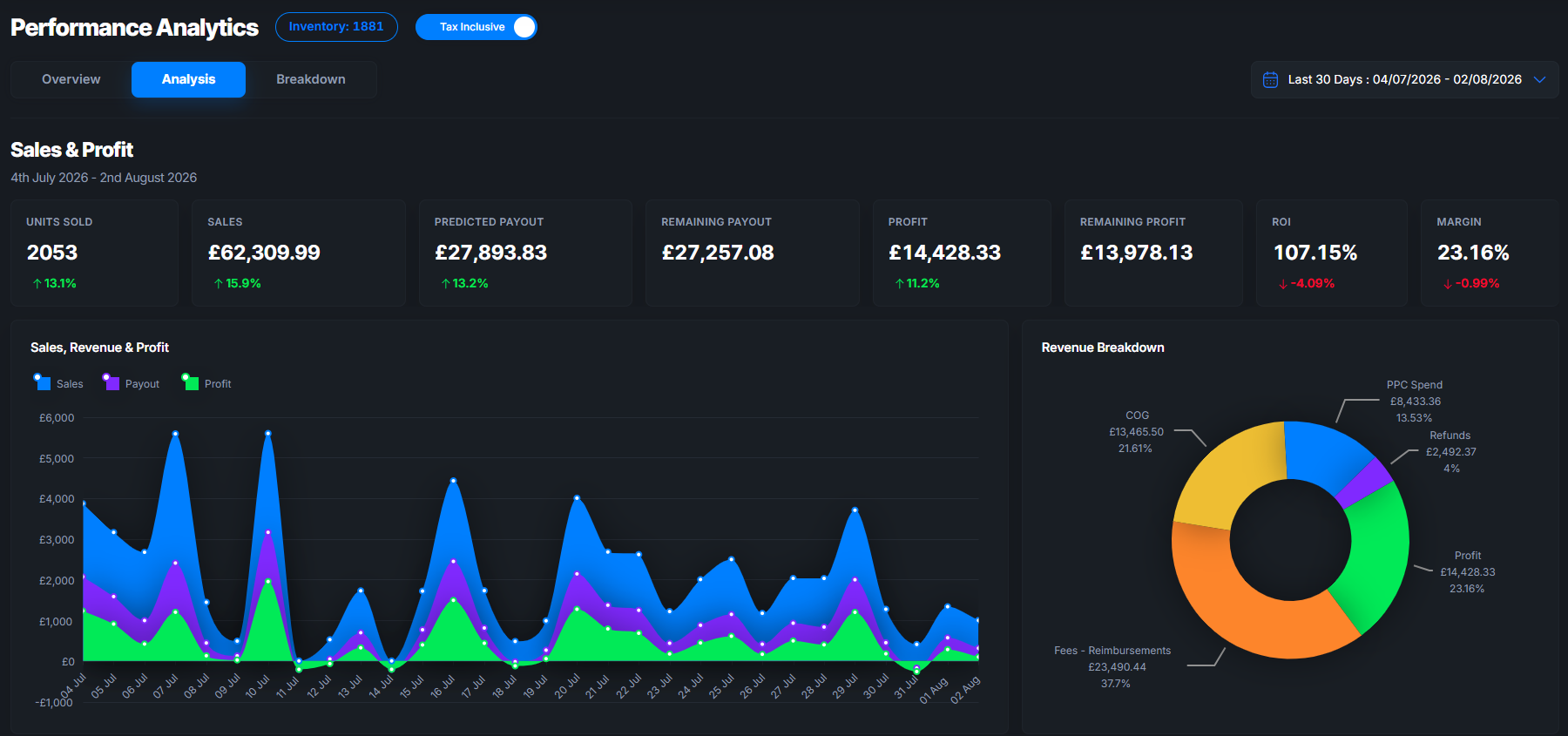
For UK sellers, the practical difference is speed. Osellpa’s automated reconciliation flags unfulfillable units and reimbursement opportunities without you having to run manual reports. Its profit tracking shows the real margin impact of storage fees on each SKU, so you can make removal and repricing decisions with accurate numbers rather than estimates.
If you are spending more than two hours a week on inventory reconciliation and reporting, that time has a cost. Start with Osellpa and see how much of that work can be automated within the first week.