
Amazon reimburses sellers for inventory lost or damaged while under Amazon’s care. Your first move is to open the Reimbursements report in Seller Central and check that your manufacturing cost entries are populated, because since March 2025, that figure determines your payout, not your sale price.
Reimbursements cover five broad categories:
- Lost in fulfilment centre — inventory Amazon cannot locate after a warehouse scan
- Inbound shortages — units recorded as shipped but not received at the fulfilment centre
- Customer return shortfalls — returned units that never arrive back in your inventory
- Removal losses — units lost or damaged during a removal order
- MCF caps — Multi-Channel Fulfilment losses, subject to marketplace-specific limits (£250 in the UK)
Pro Tip: Export the last 90 days of your Inventory Adjustment report alongside the Reimbursements report and cross-reference them in a spreadsheet. Any adjustment reason code that reduces your inventory without a matching reimbursement line is a candidate for a manual claim.
Key takeaways
Sellers who supply their own manufacturing cost data and reconcile inventory weekly recover significantly more in FBA reimbursements than those who rely on Amazon’s estimates and monthly reviews.
| Point | Details |
|---|---|
| Check the Reimbursements report first | Open it weekly in Seller Central and export the last 30 days to catch auto-credits and gaps. |
| Upload supplier invoices before a loss occurs | Amazon’s cost estimates are conservative; your invoice typically produces a higher payout. |
| Respect the 45–60 day windows | Inbound shortage claims must be filed within 45–60 days; missing the window forfeits the claim. |
| MCF items above £200 need insurance review | The UK MCF cap is £250, so high-value items face a shortfall against manufacturing cost. |
| Osellpa automates the reconciliation workload | Osellpa tracks reimbursement candidates, flags missing cost data, and integrates recoveries into your P&L. |
Table of Contents
- How Amazon calculates your FBA reimbursement amount
- Claim types and the filing windows you cannot afford to miss
- Where to find reimbursements and reports in Seller Central
- How to submit a manual reimbursement claim step by step
- How to contest a reimbursement decision and escalate
- Common mistakes that cost sellers reimbursement money
- Two worked examples showing reimbursement calculations in practice
- What changed in 2025 and how to adapt your process
- An operations-first perspective on where the real recovery sits
- How Osellpa supports your reimbursement tracking and profit visibility
- Sources
How Amazon calculates your FBA reimbursement amount
Since 10 March 2025, Amazon calculates reimbursements using the product’s manufacturing or sourcing cost, not its sale price. The FBA lost and damaged inventory reimbursement policy makes this explicit: sellers can supply their own cost data or accept Amazon’s estimate.
What counts as manufacturing cost:
- The price you paid your supplier for the unit
- Packaging costs directly tied to the product
What is excluded:
- Inbound shipping and freight
- Import duties and customs fees
- Handling and prep fees
When you do not provide cost data, Amazon estimates manufacturing cost by referencing comparable products sold by Amazon itself, third-party sellers, and wholesale channels. That estimate is typically conservative, which is why uploading your supplier invoices almost always produces a higher payout.
Here is a straightforward example of how the methodology changes the numbers:
| Scenario | Sale price | Supplier invoice cost | Amazon’s estimated cost | Reimbursement paid |
|---|---|---|---|---|
| No invoice supplied | £12.00 | £12.00 | £8.50 | £8.50 |
| Invoice uploaded | £12.00 | £12.00 | £8.50 | £12.00 |
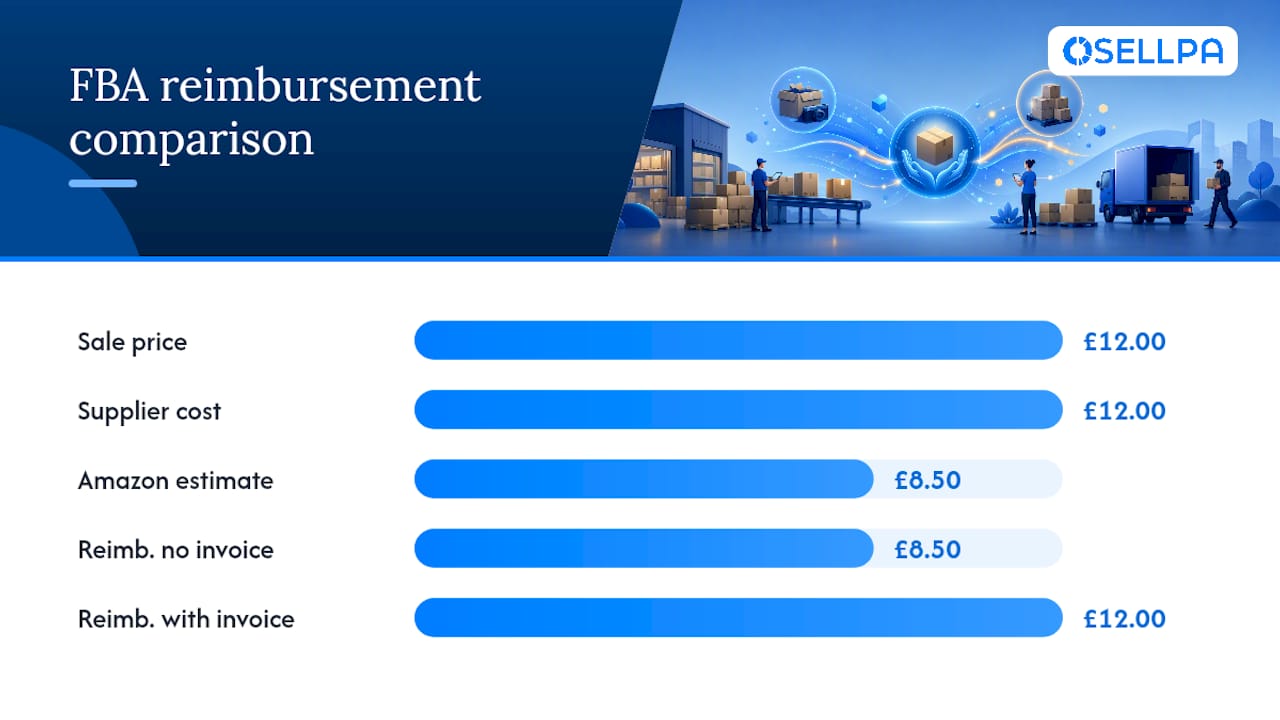
The gap between £8.50 and £12.00 may look small per unit, but across dozens of lost units per quarter it compounds quickly.
How to supply your cost data:
- Log in to Seller Central and navigate to Inventory → Manage FBA Inventory.
- Select the relevant ASIN and open the product detail page.
- Enter the cost of goods in the Cost of Goods field, or upload a bulk file via the Inventory Loader template.
- Alternatively, attach a supplier invoice directly when submitting a claim through the Inventory Defect and Reimbursement (IDR) portal.
Pro Tip: Set a recurring monthly reminder to audit your cost-of-goods fields. New ASINs added without a cost entry will receive Amazon’s conservative estimate by default if a loss occurs.
Claim types and the filing windows you cannot afford to miss
Most manual claims now carry short windows. Reconcile your reports promptly, because a missed deadline means the money is gone regardless of how clear-cut the discrepancy is. SPS Commerce’s analysis confirms that many manual claims now sit at roughly 60 days, with some exceptions.
Where to start when you have many SKUs:
- Prioritise inbound shortages first. The 45-day window is the tightest and the discrepancies are easiest to document with your shipment manifest.
- Run fee overcharge checks monthly. At 90 days you have more breathing room, but high-velocity SKUs accumulate errors fast.
- For warehouse losses, check the auto-reimbursement column in your Reimbursements report before filing manually. Duplicate claims trigger account scrutiny.
Where to find reimbursements and reports in Seller Central
The two primary locations are the Reimbursements report and the Inventory Defect and Reimbursement (IDR) portal. Both sit within Seller Central, and you should check them at least weekly.
-
Reimbursements report: Go to Reports → Fulfilment → Payments → Reimbursements. Set the date range to the last 30 days and download the CSV. Each row shows the reimbursement type, ASIN, quantity, and amount credited. Filter by
Reasonto separate auto-credits from manual case resolutions. -
IDR portal: Navigate to Inventory → Inventory Defect and Reimbursement. This portal surfaces open defects, pending reimbursements, and cases where Amazon has identified a discrepancy but not yet resolved it. Use the status filters to separate “Pending” from “Resolved” items.
-
Inventory Ledger: Go to Reports → Fulfilment → Inventory → Inventory Ledger. This is your ground truth for unit movements. Export the “Summary” view monthly and the “Detailed” view for any shipment you are actively reconciling.
-
Inventory Adjustments report: Under Reports → Fulfilment → Inventory → Inventory Adjustments. Filter by reason codes
M(misplaced),D(damaged), andE(found) to isolate movements that should trigger reimbursements. -
Returns report: Under Reports → Fulfilment → Customer Concessions → Returns. Cross-reference return quantities against units re-added to sellable inventory to catch shortfalls.
Pro Tip: Build a simple weekly tracker: paste the Reimbursements report CSV into one tab and the Inventory Adjustments CSV into another. A VLOOKUP or XLOOKUP on ASIN and date will surface adjustment lines with no matching reimbursement, giving you a ready-made claim list in under 20 minutes.
How to submit a manual reimbursement claim step by step
File via Seller Central → Help → Get Support → Selling on Amazon → FBA issue or reimbursement, selecting the correct claim type. Attaching a complete evidence packet on the first submission is the single biggest factor in avoiding denials.
-
Reconcile your reports. Compare the Inventory Ledger against your shipment manifest or removal order to confirm the exact unit count and date of the discrepancy.
-
Identify the correct claim type. Choosing the wrong category (for example, filing an inbound shortage as a warehouse loss) causes an immediate denial. Use the claim type table above as your reference.
-
Build your evidence packet. Gather:
- Supplier invoice showing unit cost and product description
- Shipment ID and carrier tracking confirmation
- ASIN and FNSKU for every affected unit
- Screenshot or CSV export of the relevant Inventory Adjustment or IDR line
- Photos of packaging or damage where applicable
-
Write a tight claim narrative. One paragraph is enough. State the shipment ID, the date, the unit count discrepancy, and the specific report line that shows the loss. Reference the exact reason code. Do not pad it with background about your business.
-
Submit and note the case number. Save the case number immediately. Amazon typically responds within 48–72 hours for straightforward claims.
-
Follow up if there is no response after 72 hours. Reply to the open case with “Following up on case [number]. Please advise on status.” Keep it brief.
Required documents by claim type:
- Inbound shortage: shipment manifest, carrier proof of delivery, box-level content list
- Warehouse lost/damaged: Inventory Adjustment CSV, ASIN details
- Customer return shortfall: Returns report export, original order ID
- Removal loss: removal order ID, carrier tracking, unit count from removal report
- Fee overcharge: product dimensions/weight from your supplier, ASIN, fee charge date
Pro Tip: Keep a shared folder (Google Drive or SharePoint) organised by ASIN with sub-folders for each shipment. Drop supplier invoices and carrier confirmations in as they arrive. When a loss occurs, your evidence packet is already assembled.
Guides such as Online Seller Solutions’ FBA reimbursement walkthrough confirm that reconciling the Inventory Ledger first, before opening a case, is the step most sellers skip and the one that most often causes denials.
How to contest a reimbursement decision and escalate
You can appeal a denial by submitting new evidence and a focused rebuttal within the same case. Escalate only if the case remains unresolved after two rounds of follow-up.
Escalation sequence:
- Round 1: Reply to the denial with a single paragraph that references the specific policy section Amazon cited, presents the new evidence, and states the exact discrepancy amount. Attach the document Amazon said was missing or insufficient.
- Round 2: If denied again, request escalation to a senior Seller Support agent within the same case thread. Do not open a new case for the same discrepancy.
- Round 3: Use the phone or chat option in Seller Central to reach a senior agent. Have your case number, ASIN, shipment ID, and evidence packet ready before you call.
Escalation template structure:
Case [number] — Reimbursement appeal for ASIN [X], Shipment [Y] Amazon denied this claim citing [reason]. I am providing [new document: supplier invoice / carrier POD / Inventory Adjustment CSV] which shows [specific discrepancy: X units shipped, Y units received, Z units reimbursed]. The outstanding balance is [£amount]. Please review under [policy reference, e.g. FBA lost and damaged inventory reimbursement policy G200213130].
When to stop escalating:
- The discrepancy amount is below the cost of your time to pursue it further.
- Amazon has denied the claim three times citing the same policy reason and you have no new evidence to add.
- The filing window has closed on a related claim type, making further escalation moot.
At that point, record the loss in your accounts and consider whether third-party cargo insurance is appropriate for high-value SKUs, particularly those affected by the £250 MCF cap.
Pro Tip: Never open duplicate cases for the same discrepancy. Amazon’s system flags duplicate submissions and it can delay resolution of the legitimate case or, in repeated instances, attract account-level scrutiny.
Common mistakes that cost sellers reimbursement money
The most frequent errors are missing supplier invoices, slow inbound reconciliation, wrong claim types, and duplicate submissions. Each one is avoidable with a short weekly routine.
Weekly audit checklist:
- Download the Reimbursements report and compare it against last week’s Inventory Adjustments
- Check the IDR portal for any new “Pending” items
- Confirm all inbound shipments delivered in the last 30 days have been fully reconciled
- Verify that cost-of-goods fields are populated for any ASIN that received a new shipment
Monthly audit checklist:
- Export the full Inventory Ledger for the month and reconcile against your purchase orders
- Run a fee overcharge check on your top 20 ASINs by FBA fee spend
- Review all open cases and close any that have been resolved
- Update supplier invoice files for any ASINs where the cost changed
According to SellerVault’s reimbursement guide, sellers who audit consistently recover roughly 1–3% of annual revenue through reimbursement claims. For a seller turning over £300,000 per year, that is £3,000–£9,000 sitting unclaimed.
Practices that trigger denials or account scrutiny:
- Filing the same discrepancy under two different claim types simultaneously
- Submitting invoices that show a cost inconsistent with the ASIN’s product category
- Using third-party automation tools that submit claims in bulk without verifying each discrepancy against the Inventory Ledger (check any tool’s terms against Amazon’s API use policy before deploying it)
- Claiming reimbursement for units that Amazon already auto-credited
AI-assisted workflow tools such as Streamline AI can help flag discrepancies and organise evidence packets, but always verify each candidate claim manually before submission to stay within Amazon’s acceptable use guidelines.
Two worked examples showing reimbursement calculations in practice
The sourcing-based model and MCF caps change the numbers in ways that are not always obvious until you run them.
Example A: Inbound shortage, no invoice supplied vs invoice supplied
A seller ships 50 units of a kitchen gadget. The fulfilment centre receives 44. Six units are short.
| Input | Value |
|---|---|
| Units short | 6 |
| Sale price per unit | £8.50 |
| Supplier invoice cost per unit | £11.00 |
| Amazon’s estimated manufacturing cost | £7.20 |
- Without invoice: Amazon reimburses 6 × £7.20 = £43.20
- With invoice uploaded: Amazon reimburses 6 × £11.00 = £66.00
- Difference: £22.80 recovered by supplying documentation
Example B: MCF loss, high-value item hitting the UK cap
A seller uses MCF to fulfil an order for a premium item. The unit is lost in transit.
- Amazon calculates reimbursement at manufacturing cost: £310.00
- The UK MCF cap of £250 applies, so the payout is £250.00
- The seller absorbs a £60.00 shortfall against cost, plus the lost margin
For items where the supplier cost regularly exceeds £250, third-party cargo or stock insurance is worth pricing up. The cap makes the maths straightforward.
Pro Tip: Run a quick filter on your MCF orders each month: any ASIN with a supplier cost above £200 is a candidate for insurance review, since a single loss will breach the cap.
What changed in 2025 and how to adapt your process
The headline change was the move to manufacturing-cost reimbursement, effective 10 March 2025. Two supporting changes arrived alongside it: expanded automated reimbursements for warehouse losses and generally shorter manual claim windows.
Key 2025 changes at a glance:
- Manufacturing cost replaces sale price as the reimbursement basis for pre-order losses (from 10 March 2025)
- Automated reimbursements now cover a wider range of warehouse loss scenarios, reducing but not eliminating manual claim volume
- Many manual claim windows tightened to 60 days; inbound shortage windows sit at 45–60 days
- MCF caps introduced per marketplace (UK: £250)
Timeline of changes:
| Date | Change |
|---|---|
| 2024 | MCF marketplace caps introduced |
| 10 March 2025 | Manufacturing-cost reimbursement basis takes effect |
| March 2025 onwards | Expanded automated warehouse reimbursements rolled out |
| Ongoing | Shorter manual claim windows enforced across most claim types |
Your action plan:
- File any backlog claims immediately where the window is still open. Check your Inventory Adjustments going back 60 days and cross-reference against the Reimbursements report.
- Upload supplier invoices for every active ASIN in Seller Central. Do this before a loss occurs, not after.
- Set a weekly reconciliation cadence. The tighter windows mean a monthly review is no longer sufficient for inbound claims.
- Review your MCF catalogue. Identify ASINs where supplier cost exceeds £200 and decide whether insurance is appropriate.
Pro Tip: Amazon publishes policy updates in the Seller Central news feed and in the help pages linked to the reimbursement policy. Bookmark the FBA reimbursement policy page and check it quarterly — policy language changes without a direct notification to sellers.
An operations-first perspective on where the real recovery sits
The sellers who recover the most are not the ones who file the most claims. They are the ones who make supplier invoice management a non-negotiable part of their inbound workflow.

Before March 2025, the reimbursement basis was sale price, so even sellers with no cost documentation received a meaningful payout. That cushion is gone. Across a catalogue of 50 SKUs with regular inbound activity, that gap compounds into thousands of pounds per year.
The priority order matters too. Inbound reconciliation should come first, because the windows are tightest and the evidence is clearest. Returns come next, since shortfalls are common and often missed. Removal and fee reviews are worth doing monthly but rarely urgent.
Track recovered reimbursement value as a percentage of revenue each month. Set a target. The 1–3% benchmark is achievable, but only with a weekly cadence and clean cost records.
How Osellpa supports your reimbursement tracking and profit visibility
Keeping supplier costs attached to every SKU, reconciling inventory weekly, and catching claim candidates before windows close is operationally demanding. Osellpa is built to handle exactly that workload, giving you reimbursement alerts, cost-of-goods tracking, and inventory reconciliation in one dashboard connected directly to Amazon’s API.
Where most sellers lose money is in the gap between a loss event and the moment they notice it. Osellpa surfaces reimbursement candidates automatically, flags ASINs with missing cost data, and tracks open cases so nothing falls through. The profit and loss reporting integrates your reimbursement recoveries directly into your margin view, so you can see what you are actually earning after losses and recoveries, not just after fees.
Start with a free trial at Osellpa to see what your current reconciliation process may be missing.
Sources
The sources below are the primary references used in this article. Bookmark the Seller Central pages, as Amazon updates policy language without direct seller notification.