
Creative testing on Amazon means showing shoppers two versions of an image, title, bullet set, A+ Content module or ad creative, then letting the data decide which one stays. Done well, it replaces opinion with evidence. Done badly, it produces false winners. The difference comes down to four things: testing one meaningful change at a time, giving the test enough traffic and time, judging it on the right metric, and checking that a win on clicks is also a win on profit. That last check is where our profit and loss tools come in, because a higher conversion rate only helps if margin survives it.
This guide is for sellers who want a repeatable testing routine without drowning in dashboards, whether you run three ASINs part-time or a large catalogue.
TL;DR
- Listing tests (images, titles, bullets, A+ Content) run in Amazon’s Manage Your Experiments tool. Ad creative is tested through your campaigns, with different rules.
- Test your highest-traffic product first, start with the main image, and make Version B clearly different from Version A.
- Let tests run to completion. Amazon says early results can be misleading, and peeking raises the chance of picking the wrong version.
- Judge a winner on conversion and profit, not clicks alone. A creative that attracts clicks but not orders is a messaging problem.
- Write down what you tested and what you learned, including inconclusive results.
Table of Contents
- What creative testing means for listings and for ads
- Check you are eligible for listing experiments
- What you can test, and what you cannot
- A sensible testing order
- How to set up a fair listing test
- How long, and how much traffic
- Testing ad creative
- Which metrics to judge on
- Reading the result without fooling yourself
- Building a cadence you can sustain
- Connecting creative results to sales
- Putting it into practice with Osellpa
- Our perspective
- FAQ
- Sources
What creative testing means for listings and for ads
The phrase covers two different activities, and mixing them up is the most common source of confusion.
Listing tests compare two versions of content on your product detail page. In Amazon’s Manage Your Experiments tool, shoppers viewing the page are randomly split into groups and shown different versions. Results arrive once the data is statistically significant, using metrics such as units sold, sales, conversion rate and units sold per unique visitor, plus a projected one-year impact of the winning content.
Ad creative tests compare images, headlines, video or copy inside Sponsored Brands, Sponsored Display or DSP campaigns. They are run with campaign structure rather than a single built-in splitter, so you control the fairness. That makes them easier to start and easier to get wrong.
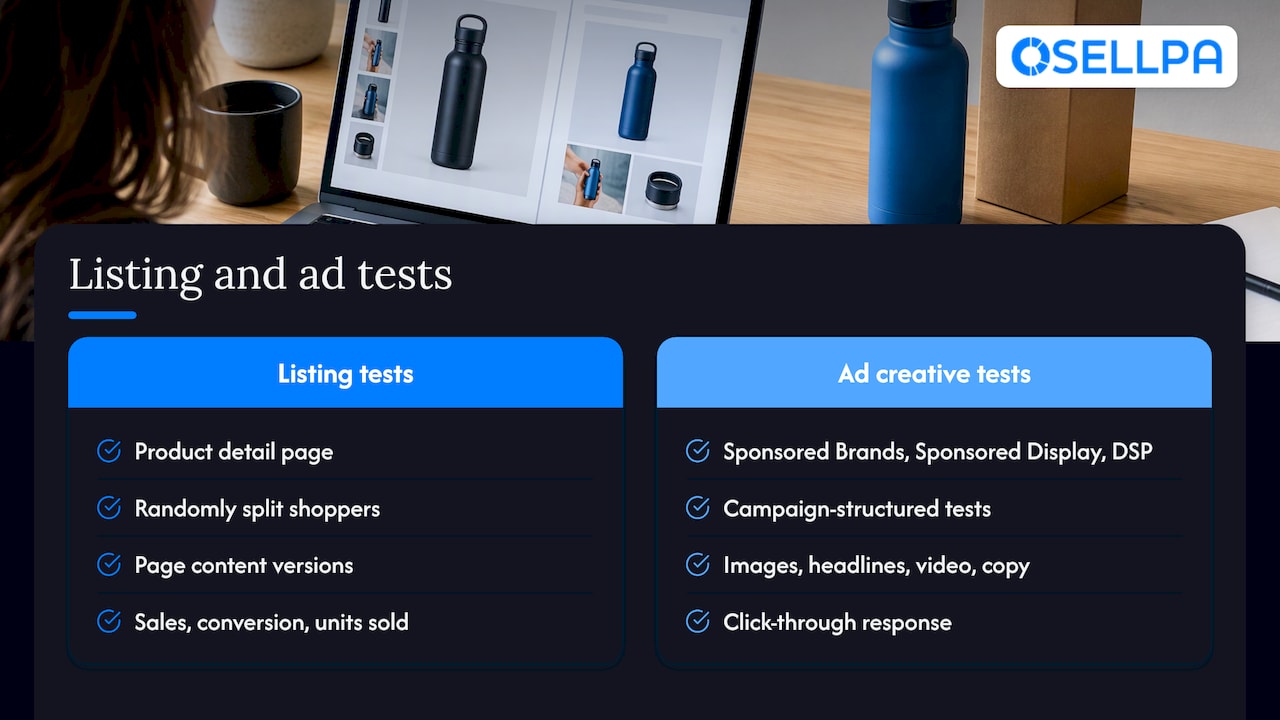
The two feed each other. A main image that lifts click-through on your listing is a strong candidate for your ads, and an ad headline that pulls strong click-through suggests a title angle worth testing on the page.
Check you are eligible for listing experiments
Before planning anything, confirm the basics. According to Amazon, you need a Professional selling account, you must be the Brand Representative for a brand enrolled in Amazon Brand Registry, and the product must belong to that brand and have had enough recent traffic to produce valid results. A+ Content or Brand Story tests also need that content to be published already.
If you are not yet brand-registered, you can still test ad creative, and you can still improve listings on evidence from your ad data and keyword rankings. Registration is worth pursuing because it unlocks the cleanest test environment Amazon offers.
Two more facts help you plan. Amazon states that experiments do not affect search rankings, and the test content appears wherever it normally would for that shopper group, so a test title shows in search results and on the product page. That is why title and main image tests capture both clicks and purchases.
What you can test, and what you cannot
In Manage Your Experiments you can test product images, titles, bullet points, descriptions and A+ Content, including Brand Story. Price and backend search terms are not on the list, and ad copy has its own tools. Price in particular can only be changed sequentially, which muddies any comparison, so do not treat a before-and-after price change as a clean test.
For advertising, the options depend on the ad type:
| Ad type | What you control | What to test |
|---|---|---|
| Sponsored Products | Mostly the listing itself | The main image and title on the product page |
| Sponsored Brands | Logo, custom headline, up to three ASINs | Headlines, value propositions, product selection |
| Sponsored Brands video | Video content | The opening frames, length, sound-on messaging |
| Sponsored Display | Mostly auto-generated from your listing | Image style on the listing; custom creative where offered |
The format descriptions come from Amazon’s UK advertising page. Amazon’s responsive e-commerce creatives go a step further: machine learning continuously tests combinations of images, headlines, titles and layouts for you, and Amazon’s own 2025 internal data study reported an average click-through lift of 14% for ads with AI optimisation opted in.
A sensible testing order
If you are new to experiments, sequence matters more than ambition. A workable order:
- Main image on your highest-traffic product. It is the first thing shoppers see in search, so it carries the most leverage for click-through. Change one clear thing: angle, background, pack-shot versus lifestyle, or the number of items shown.
- Title. Compare a benefit-led version against a specification-led one, and keep the search terms that already bring buyers in both versions so you are testing framing, not discoverability.
- The first two secondary images. These are the ones most shoppers actually swipe to.
- A+ Content. Test it once you have a genuinely different version, not a light rewording.
This order follows the practical sequence set out in this UK guide to experiment eligibility and results, and it fits how shoppers move down the page. Avoid starting a test that straddles a major sales event such as Black Friday or Prime Day unless the event itself is what you want to learn about. Demand, traffic mix and conversion all shift during promotions, and the test will measure the event as much as your creative.
When you need fresh Version B ideas for titles and bullets, our listing optimisation tools are built for AI-driven listing enhancement, so you can draft alternatives from your current content rather than starting from a blank page.
How to set up a fair listing test
Amazon’s own workflow is short: pick an eligible product, pick an attribute, create Version B, schedule, then review results and publish the winner. Auto-publish can push the alternate content live if it performs significantly better. The quality of the test depends on how you handle each step.
1. Pick the product on traffic, not sentiment
Your favourite ASIN is rarely the right one. Choose the listing with the most visitors that also matters to your revenue. A low-traffic product may never reach a result, however good your idea.
2. Change one attribute
Test images or the title, not both at once. If you change both and conversion moves, you will not know which did the work.
3. Make Version B clearly different
Amazon’s best-practice guide warns that content too similar to the original is less likely to affect customer behaviour, and the tool notifies you if the versions are too close. A different crop of the same photo rarely moves anything. A different story does: lifestyle in use against a clean pack-shot, a size comparison against a feature callout.
4. Decide your success metric before launch
For a main image, the question is whether it earns more clicks and orders. For a title, the question is the same, but also whether it keeps the right traffic. Write the metric down first, so you cannot pick the flattering one afterwards.
5. Leave it alone
Amazon advises that early results can be misleading and that every time you check and act on interim figures you raise the chance of overestimating the effect or even choosing the wrong version. Set a calendar reminder for the end date and close the dashboard.
How long, and how much traffic
Amazon offers two modes. A fixed duration is typically 8 to 10 weeks, and the Manage Your Experiments page recommends 8 to 10 weeks for self-selected lengths. The alternative is running “to significance”, where Amazon ends the test once results are statistically relevant, sometimes in as little as four weeks. The tool also needs enough recent traffic on the product to produce valid results at all.
Traffic is the real constraint, and the arithmetic is unforgiving. A UK worked example on A/B testing shows that at a 3% baseline conversion rate, detecting a 20% relative improvement (3% to 3.6%) at 95% confidence and 80% power needs roughly 14,000 visitors per version, so 28,000 in total. With 1,000 visitors a day, that is four weeks. The same source explains why small changes are hard to prove: halving the effect you want to detect roughly quadruples the sample you need.
What this means in practice:
- High-traffic ASINs can detect modest lifts. Test the subtle things here.
- Low-traffic ASINs can only detect big swings. Make bold changes or fix obvious problems without testing.
- A low-converting listing needs more visitors than a high-converting one to prove the same relative lift.
If your product cannot reach a reliable result in a sensible window, treat anything it shows as direction, not proof.
Testing ad creative
Ad creative testing has no single button, so fairness is your job. Amazon’s holiday advertising guidance advises testing different images or ad copy while keeping targeting consistent, noting that a fresh approach can reinvigorate performance. Build on that with a few rules:
- Isolate one or two variables. Hold product, audience, budget and landing experience constant, as Amazon Ads’ UK expert advice recommends.
- Run variants at the same time, with the same keywords and bids, in separate campaigns or ad groups. Running them one after the other lets seasonality and promotions leak into the result.
- Watch for retail distortions. Stock-outs, price promotions and deal badges can swing conversion regardless of your creative.
- Choose a time window. The same guidance suggests tracking your chosen metric over 30 to 60 days for brand-level learning, while a campaign-level comparison can be shorter if the volume supports it.
Two active ads are not automatically a randomised experiment with equal exposure, so describe campaign comparisons as directional unless you have controlled for the obvious confounders. Amazon also has a separate survey-based Creative Testing feature in its DSP, which gathers shopper opinion on images, video or copy. It tells you about perception and preference, not observed purchases, so do not report it as sales evidence.
Which metrics to judge on
Click-through rate (CTR) tells you whether the creative attracts attention. Conversion rate (CVR) tells you whether the promise held up once the shopper arrived. Amazon’s holiday guidebook treats high CTR as a signal of creative and audience fit, and lists orders, unit sales and conversion rate as core metrics for revenue campaigns, with CVR connecting clicks to purchases.
Read them together:
| Result | Likely meaning | Action |
|---|---|---|
| CTR up, conversion up | Creative and message both work | Scale it |
| CTR up, conversion down | The ad promises something the listing does not deliver | Fix the mismatch, for example an image implying a larger pack than you sell |
| CTR flat, conversion up | Attention unchanged, page persuades better | Keep it, look at the main image next |
| Both flat | Change too small or ASIN underpowered | Try a bolder variant |
The mismatch pattern is common. An image that implies a bigger quantity than the offer includes can win clicks and lose orders, which is why CTR gains should be checked against conversion and contribution metrics before you scale.
For video, add the view-through diagnostics Amazon now provides: five-second views, quartile views and sound-on view rate show where viewers drop away. A weak five-second view rate points at the opening frames.
Reading the result without fooling yourself
Amazon reports a probability, and it is easy to misread. A “75% probability that Version A is better” means three quarters of the plausible range of outcomes show a lift from publishing A. It does not mean A is 75% better, and it leaves a one-in-four chance A is not better at all, as this explanation of the results sets out. Even 90% leaves a one-in-ten chance the other version wins. Decide in advance what level of confidence you will accept, and weigh it against how costly the change is to reverse.
For an inconclusive result, Amazon lists three possible causes: the change was too small to affect behaviour, traffic was insufficient, or both versions were similarly effective. The last one is useful in itself. It can show that a type of content is not worth further investment because shoppers do not respond to it.
Two habits protect you from false winners:
- Do not slice the data after the event. Break any result down by device, placement or day of the week and some segment will show a win by chance.
- Check the interval, not just the headline. A “+12%” result whose range runs from -2% to +26% is not a reliable win.
Then check profit. A conversion lift can come with a higher return rate, a more expensive pack or a heavier ad bill. Look at the result in your profit view, not only the conversion column.
Building a cadence you can sustain
The point of testing is the habit, not the single win. The Mercado’s 2026 Amazon UK report found that top-quartile UK sellers refreshed creative every 28 days against 94 days for the median seller, and it recommends a regular cycle of two variants over 14 days for ad creative, scaling the winner. That cadence suits ads. Listing experiments run longer, so stagger them: one live test per priority ASIN, and a short log of hypothesis, change, metric, duration and outcome.
A simple weekly routine:
- Review the ads data for the week: which creatives have enough impressions to judge.
- Check whether any listing experiment has finished.
- Publish winners, log inconclusive tests and queue the next idea.
- Review wasted spend. Our guide to auditing ads weekly and waiting for attribution explains why a 7 to 14 day wait matters before you judge a change.
If you want a deeper walkthrough of the listing side, our post on split testing listings with Manage Your Experiments covers it for UK sellers.
Connecting creative results to sales
A creative test that stops at engagement leaves the important question open: did the shoppers who clicked go on to buy? Amazon Ads’ UK guidance makes the same point, that upper-funnel creative should not be judged in isolation, because a display creative with modest engagement can still drive high-intent traffic that converts well. If you want to build your own reporting that links creative engagement to downstream customer actions, AI for ecommerce product pages is one place to see how that kind of automation is approached.
Putting it into practice with Osellpa
Creative testing generates a lot of numbers across listings, campaigns and time periods. Osellpa connects to Amazon’s API and brings profit tracking, PPC optimisation and AI-driven listing enhancement into one place, so you can see whether a winning creative lifted profit and not only conversion. Plans are £10 per month for Launch, £20 per month for Scale and £40 per month for Advanced, or £96, £192 and £384 per year respectively, with pricing based on your sales volume. See the pricing page for the plan that fits your catalogue, or start from the PPC optimisation tools if your first tests are on ads.
Our perspective
Most sellers do not fail at creative testing because their ideas are poor. They fail because the results are scattered. The image test lives in Seller Central, the ad results sit in a campaign report, and the profit figure is in a spreadsheet someone updates on Sundays.
We build Osellpa around the opposite idea: one view, connected to Amazon’s data, where a creative decision and its effect on profit sit side by side. That is why we push sellers to judge winners on contribution, not on click-through alone.
Our advice is to test less but test properly. Pick the product that matters, change one thing boldly, wait for the result, and write it down. Automation should take the reporting and the wasted ad spend off your plate so your time goes into the decisions only you can make.
Harry
FAQ
How long should an Amazon listing test run?
Amazon’s Manage Your Experiments page recommends 8 to 10 weeks when you choose the duration yourself. The “to significance” option can finish in as little as four weeks if the results are clear. Either way, let the test complete, because early readings can be misleading.
Do I need Brand Registry to test my listings?
For Manage Your Experiments, yes. Amazon requires a Professional selling account and Brand Representative status for a brand enrolled in Brand Registry, plus enough recent traffic on the product. Ad creative tests do not depend on this tool, so you can start those without it.
What should I test first?
Start with the main image on your highest-traffic product, with one clear change. It influences click-through in search, so it usually offers the biggest lever. Move on to the title, then the first two secondary images, then A+ Content.
Can I test price or backend keywords?
Not in Manage Your Experiments. Price can only be changed sequentially, which makes comparison unreliable, so leave it out of creative tests. Keep your proven search terms in both title versions so the test measures framing only.
What if my test is inconclusive?
That is a result. Amazon says it can mean the change was too small, traffic was too low, or both versions worked equally well. Log it, then try a bolder variant or move to a higher-traffic product.
Sources
- Test listing content with Manage Your Experiments, Sell on Amazon
- Optimize product content and increase sales with A/B testing, Sell on Amazon
- Manage Your Experiments Best Practice Guide, Amazon
- Amazon Ads, Sell on Amazon UK
- E-commerce display creatives: guidelines and ad specs, Amazon Ads UK
- Creative Testing in Amazon DSP, Amazon Ads
- How to use Amazon Ads as a creative testing engine, Amazon Ads UK
- Amazon Ads Holiday Advertising Guidebook 2025
- Amazon Manage Your Experiments: eligibility and results
- A/B testing: how to run a test you can trust
- 2026 Unlocked: Amazon UK Buyer Behaviour and Algorithm Shifts, The Mercado