
Brand defence on Amazon is advertising that keeps your own brand name, and your own product pages, from being picked off by rival sellers. It is separate from legal protection such as trademarks. You build a small set of dedicated campaigns on your brand terms, give them their own budget, keep them out of your other campaigns’ numbers, and judge them on profit rather than on a flattering ACoS. Done with accurate profit data, it is a cheap, high-converting part of your ad account. Done blind, it quietly pays for sales you would have made anyway.
TL;DR
- Brand defence is a paid response to competitors bidding on your brand name. Brand Registry is a separate, free programme for protecting your intellectual property.
- Build separate campaigns for your brand terms and your own ASINs, and add those terms as negatives in your other campaigns.
- Branded clicks are cheap and convert well, so start bids modestly and raise them only when a rival actually holds the top slot.
- Judge defence on profit and total sales, not on attributed ACoS alone, and review it on a fixed rhythm.
- Osellpa tracks profit and automates PPC for Amazon sellers, so you can see what defence really earns you.
Table of Contents
- What brand defence means in Amazon advertising
- Why it matters even if Amazon is not your main channel
- When to defend, and when to ease off
- The campaigns to build
- Setting bids without overpaying
- Measuring whether defence pays
- Common mistakes
- Perspective: why defence needs profit data
- Run defence with Osellpa
- FAQ
- Sources
What brand defence means in Amazon advertising
Amazon’s ad auction rewards relevance and bid. It does not check who owns the trademark. That means a competitor can bid on your brand name and show their product above or beside yours when a shopper types your name into the search bar. That shopper already wanted you. Brand defence is the set of campaigns that make sure your listing is the one they see.
It helps to keep two things apart:
- Brand protection is about rights. Amazon Brand Registry is a free programme for brand owners. It requires a pending or registered trademark and gives you tools such as automated counterfeit detection, a Report a Violation function and protection dashboards.
- Brand defence is about ad placement. It protects the traffic your marketing, reviews and off-Amazon activity have already earned.
The two work together. Registry helps you deal with hijackers and fakes. Defence campaigns deal with legitimate rivals who simply bid on your name.
Why it matters even if Amazon is not your main channel
Shoppers who search your brand name have usually decided what they want. If a competitor converts better on those searches, they can outrank you in the results even with a weaker or unrelated product. Search Engine Land warns that this applies to brands that do not treat Amazon as their primary channel too, because awareness built on other platforms can send shoppers to competing Amazon products.
That is the situation for most of our readers: a part-time seller whose social following arrives through a branded search, a new seller whose launch is starting to create demand, or a large seller whose best-known products attract conquest bidding. In each case the demand is yours. Defence is how you keep it.
When to defend, and when to ease off
Brand defence is a threat-based decision, not a habit. Before you spend, ask whether pausing your brand ads would hand the top spot to someone else.
Defend actively when:
- shoppers search your brand by name in meaningful numbers;
- you see rival sponsored listings when you search your own brand;
- you have just launched a product, entered peak season, or noticed a new competitor in your category.
Ease off when:
- nobody bids on your name and your organic listing already owns the page;
- the defence spend is large compared with the sales genuinely at risk.
The check is simple. Search your brand name in a logged-out browser a few times a week, at different times of day. Note who appears above you and how often. That is your evidence, and it is free.
The campaigns to build
Keep each campaign to one job. A sensible build, in order of priority:
- Sponsored Products, exact match on your brand terms. Include your brand name, common misspellings, product-line names and brand-plus-category combinations. Start with a short list and grow it from your search term report.
- Sponsored Products, product targeting on your own ASINs. This stops rivals appearing on your product detail pages. Use the exact targeting option rather than the expanded one, so ads show only where you intend.
- Sponsored Brands on branded keywords. This holds the banner at the top of the results. Sponsored Brands is a brand-owner format, so it is worth getting Brand Registry in place first. Our guide to Sponsored Brands vs Sponsored Products explains where each format earns its place, and the Sponsored Brands video guide covers the creative side.
- Sponsored Display on your own products. Useful once the first three are stable, and small accounts can leave it for later.
Amazon’s own UK advertising guidance recommends using both branded keywords and category keywords, with a mix of match types: broad for the widest exposure, phrase and exact for highly relevant traffic, and negative keywords in Sponsored Products to cut irrelevant spend. For defence, exact match is the workhorse, because you know precisely which searches you are protecting.
Keep the rest of your account clean
Once your branded terms have their own campaigns, add them as negatives to your other campaigns. Otherwise your generic and discovery campaigns keep serving on your brand name, and two of your own ads compete in the same auction. Take care with the match type. A negative phrase blocks any search containing the whole phrase, while a negative exact blocks only that search and close variations. A broad negative can remove far more traffic than you meant to. Our guide to negative keywords on Amazon walks through the options, and Lower ACOS in 30 Days: Negatives First shows how to apply them.
Setting bids without overpaying
On your own brand name you usually face one or two rivals, not a crowded field. The click is worth much more to you than to them, because the shopper came looking for you. That is why branded bids should not start high: pushing them up on day one raises your own cost per click with nothing to show for it.
A practical routine:
- Start at Amazon’s suggested bid. Branded auctions are thin, so you rarely need more.
- Check the placement report after about a week. If you are losing the top of search, raise the top-of-search placement adjustment before you touch the base bid.
- Spot-check the live results. If a rival holds the first slot when you search your name, raise bids in small steps, around 10 to 15% at a time, and look again.
- Give defence its own budget. A capped campaign that runs dry by mid-afternoon leaves the best shoppers of the day to a competitor. If it hits the cap, raise the cap or review why.
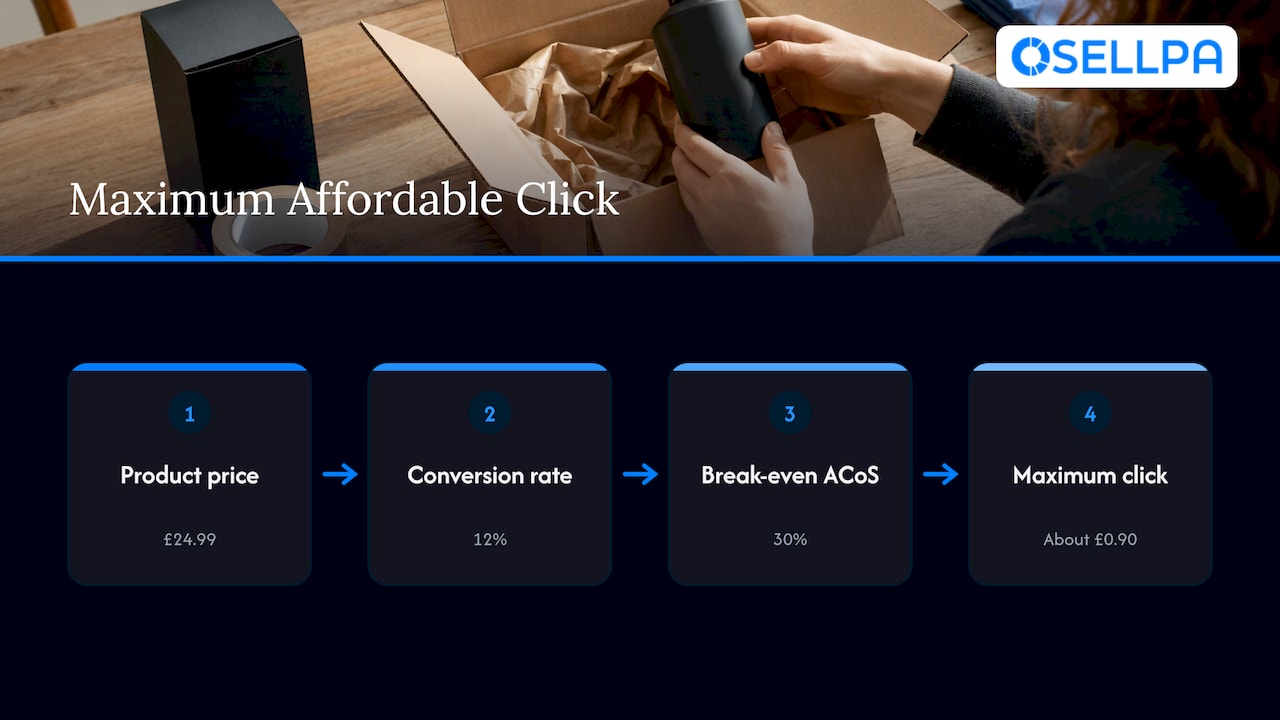
If you want a ceiling grounded in your own numbers, work it out from the product: selling price multiplied by conversion rate multiplied by your break-even ACoS gives the most you can pay per click and still break even. What ACoS means and how to set targets is a useful refresher if the term is new to you. Break-even ACoS depends on your margin, which is why accurate profit tracking comes before bid setting.
Worked example
Take a £24.99 product converting at 12% with a 30% break-even ACoS. The maximum click you can afford is £24.99 × 0.12 × 0.30, which is about £0.90. Because branded searches convert well and attract few bidders, you will often pay far less than that. If you do not, a bid near the ceiling is a sign to check whether you are overbidding against a single rival. Replace the example with your own price, conversion rate and margin: the formula is the useful part.
Measuring whether defence pays
Branded campaigns almost always show a low ACoS. That is flattering, not proof. Branded ROAS credits the ad for every purchase it touched, including shoppers who would have bought anyway. So judge defence on two questions.
Is it protecting something? Amazon’s UK guidance points to Campaign Manager reports: ACoS for Sponsored Products, and impressions and new-to-brand orders for Sponsored Brands, alongside clicks, click-through rate, cost per click, spend, sales and orders. Add a regular look at your Search Query Performance data to see how often shoppers search your brand and how much of that you capture. Our guide to search query performance shows how to turn that funnel data into action.
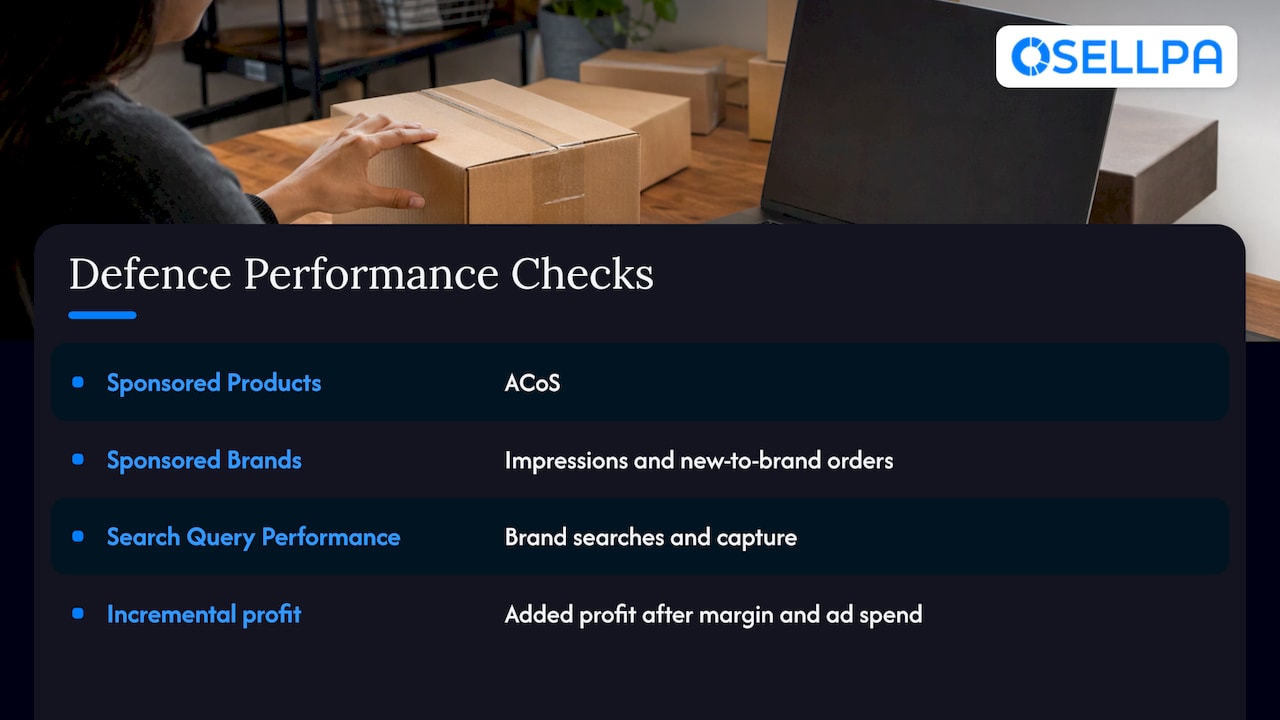
Is it profitable after everything? Incremental profit is what the ads added over what you would have earned without them, after margin and ad spend. Track total sales as well as ad-attributed sales. If you pause a defence campaign for a short period and total sales do not move, you were paying for sales you already had. If a rival takes the top slot and total branded sales fall, the spend was doing its job.
A review rhythm
- Weekly: read the search term report, move converting searches to exact match, add negatives for spend without sales, check that budgets are not exhausted, and confirm stock levels. There is no point defending a listing you cannot ship.
- Monthly: compare ACoS with your break-even figure, check TACoS (total ad spend as a share of total sales), review placements, and set an end or review date for each defence campaign.
This is where spreadsheets give out. Profit per product depends on fees, returns, cost of goods and ad spend together, and it changes every day. Our guide to optimising PPC bids for profit and the notes on Amazon PPC automation show how to keep that review manageable as your catalogue grows.
Common mistakes
- Mixing branded and generic campaigns. Cheap branded sales hide weak generic performance. Keep them apart so the numbers stay honest.
- Defending when nobody is attacking. If your organic listing owns the page and no rival bids, defence can simply be a cost.
- Judging defence by ACoS alone. A 10% ACoS on sales you would have made for free is still spend.
- Forgetting your own ASINs. Rivals target your product pages as well as your keywords.
- Overusing broad negatives. A short negative phrase can strip out searches you wanted.
- Setting and forgetting. Competitors enter, seasons change and bids need a periodic look.
Perspective: why defence needs profit data
We build Osellpa for sellers who are tired of guessing, so here is our view on brand defence.
Defence is the easiest campaign type to run and the hardest to judge. The ACoS is low, the conversion rate is high, and every report says it is working. The real question is what it adds to your profit, and you can only answer that with accurate numbers: fees, returns, cost of goods and ad spend in one place, matched to the same products.
That is why we put profit tracking and PPC optimisation in the same toolkit. Our integration with Amazon’s API pulls your data in directly, so you are not rebuilding the picture in spreadsheets each week. Our automatic and manual PPC optimisation is designed to cut wasted ad spend, and alerts help you notice when something changes on a product.
For a new seller, that means fewer reports to decode. For a part-time seller, it means a clear view of profit in minutes. For a large seller, it means defence and growth campaigns managed side by side without one flattering the other. Our own users report up to a 20% increase in sales after adopting the tools.
Harry
Run defence with Osellpa
Osellpa gives Amazon sellers profit tracking, automatic and manual PPC optimisation, competitor keyword tracking and alerts in one place, connected to your Amazon data. You can see how branded campaigns affect your real margin on the profit and loss tools, and manage bids and negatives through PPC advertising and optimisation. If you want a starting point, the free PPC bid optimisation report is available. Plans on the pricing page are Launch at £10 per month (£96 per year), Scale at £20 per month (£192 per year) and Advanced at £40 per month (£384 per year).
FAQ
Is brand defence the same as Brand Registry?
No. Brand Registry is Amazon’s free programme for protecting your intellectual property, and it needs a pending or registered trademark. Brand defence is paid advertising on your own brand terms and product pages. Most sellers benefit from both.
Do I need to bid on my own brand name?
It depends on whether anyone else is bidding on it. If rivals show above you when you search your brand, defending the top spot protects shoppers who were already looking for you. If no one competes and your organic listing owns the results, a smaller defence budget may be all you need.
How many branded campaigns should I run?
Start with Sponsored Products exact match on your brand terms and product targeting on your own ASINs. Add Sponsored Brands on branded keywords once you have Brand Registry. Add Sponsored Display later, when the first campaigns are stable.
How do I stop branded campaigns competing with my other ads?
Add your brand terms and ASINs as negatives to your generic, discovery and category campaigns, and keep defence in its own campaigns with its own budget. That way each campaign has one job and its results are easy to read.