
Amazon Virtual Product Bundles let you group 2–5 complementary FBA ASINs into a single listing without physically repackaging anything. The bundle gets its own ASIN, customers see one product page, and Amazon fulfils each component from your existing FBA stock. If you are brand-registered and your candidate products are already in FBA, you can start building today.
Before you do anything else:
- Confirm your brand is enrolled in Amazon Brand Registry
- Check that every ASIN you plan to include is fulfilled by Amazon (FBA) and listed as new condition
- Navigate to Brands → Virtual Bundles in UK Seller Central to verify the tool is live in your account
Key takeaways
Amazon Virtual Product Bundles are one of the most accessible AOV-lifting tools available to brand-registered FBA sellers, but inventory management and eligibility discipline determine whether they deliver consistent results.
| Point | Details |
|---|---|
| Eligibility is non-negotiable | Brand Registry enrolment and FBA fulfilment for every component are hard requirements with no workarounds. |
| AOV is the primary metric | Measure bundle AOV against the anchor ASIN’s standalone AOV to confirm the bundle is genuinely lifting basket size. |
| Inventory risk is the main threat | One out-of-stock component suppresses the entire bundle; maintain a safety stock buffer for every component. |
| Anchor ASIN selection drives discovery | Choose your best-ranking product as the anchor to give the bundle the strongest possible search visibility from launch. |
| Osellpa automates bundle P&L | Osellpa tracks per-bundle profit, flags inventory risk and manages ad bids automatically, removing the manual reporting burden. |
Table of Contents
- Who can use virtual bundles on Amazon?
- How virtual bundles actually work: fulfilment, listing anatomy and order flow
- How to create a virtual bundle in Seller Central
- Benefits and limitations: when virtual bundles make sense
- Optimising titles, images, pricing and promotions for your bundle
- How to measure bundle performance and run experiments
- UK-specific considerations for virtual bundles
- Common issues and how to fix them quickly
- Pre-launch checklist: what to verify before you publish
- A practitioner’s perspective on what actually moves the needle
- Osellpa gives you per-bundle profit visibility without the spreadsheet work
- Sources
Who can use virtual bundles on Amazon?
Eligibility is tighter than many sellers expect. Amazon’s official Virtual Product Bundles help page sets out the following hard requirements:
- Brand Registry: you must own the brand and be enrolled in Amazon Brand Registry. Resellers cannot create virtual bundles, even if they hold FBA stock.
- FBA fulfilment only: every component ASIN must be fulfilled by Amazon. Merchant-fulfilled (FBM) products are ineligible, no exceptions.
- New condition: all items must be listed as new. Renewed or used ASINs are excluded.
- Bundle size: a minimum of 2 and a maximum of 5 ASINs per bundle.
- Excluded product types: gift cards, digital products and certain restricted categories (such as hazardous goods) cannot be included.
- Account health: your account must be in good standing. Suspended or restricted accounts cannot access the tool.
- Inventory availability: if any single component goes out of stock, the entire bundle listing becomes unavailable until that ASIN is restocked.
Policy note from Seller Central: Virtual bundles are available to brand owners enrolled in Brand Registry who sell on Amazon using Fulfilment by Amazon. All products in the bundle must be FBA and in new condition. The bundle will be suppressed if any component ASIN runs out of stock.
Amazon’s Sell on Amazon growth resources confirm that virtual bundles are specifically designed for Brand Registry sellers using FBA, distinguishing them from physical bundles and cross-sell offers.
How virtual bundles actually work: fulfilment, listing anatomy and order flow
A virtual bundle is a listing layer, not a warehouse configuration. Here is what happens at each stage:
- The bundle ASIN: Amazon creates a new parent ASIN for the bundle. Each component retains its own individual ASIN and continues to sell independently.
- Order flow: when a customer purchases the bundle, Amazon picks each component separately from your FBA inventory and ships them. Depending on which fulfilment centres hold the stock, items may arrive in one shipment or separately.
- Inventory accounting: each sale deducts one unit from each component ASIN’s FBA inventory. Your stock levels update in real time across both the bundle listing and the individual product pages.
- Returns: a customer returning a bundle return triggers individual component returns. Each item is processed against its own ASIN, which can affect your return rate metrics per product.
- Bundle suppression: if any component drops to zero FBA units, Amazon suppresses the bundle listing automatically. It reactivates once stock is replenished.
Pro Tip: Choose your best-performing ASIN as the anchor product. Bundles can inherit visibility from a strong anchor ASIN, so leading with a product that already ranks well gives the bundle a head start in search.
How to create a virtual bundle in Seller Central
Confirm prerequisites first
Before opening the creation tool, verify that every candidate ASIN is FBA, in new condition, and belongs to your brand-registered catalogue. Attempting to add an ineligible ASIN mid-build will generate an error and halt the process.
Step-by-step creation process
- Log in to UK Seller Central and go to Brands → Virtual Bundles.
- Click Create a virtual bundle.
- Search for and select your anchor ASIN (the primary product that defines the bundle’s identity).
- Add 2–4 additional component ASINs using the search field. The tool will flag ineligible products immediately.
- Write the bundle title. Include the word “bundle” and the number of items (e.g. “Skincare Starter Bundle, 3-Piece Set”).
- Upload your hero image showing all components together, plus at least one lifestyle image.
- Write bullet points. The first bullet must include the word “bundle” and state the number of items included.
- Set the bundle price. It must be equal to or lower than the combined price of the individual items.
- Review the inventory check summary Amazon displays before publishing.
- Click Submit. The listing typically goes live within a few hours.
Spreadsheet import and third-party tooling
Amazon provides a flat-file template for bulk bundle creation, useful when you are building multiple bundles simultaneously. Common pitfalls include mismatched ASIN formats, missing required fields and incorrect price formatting. Validate the spreadsheet against the template column headers before uploading.
Third-party catalogue management tools can help when your FBA catalogue is large and cross-referencing eligibility manually is time-consuming. Verify that any tool you use connects via Amazon’s SP-API and does not write directly to listing fields in ways that conflict with bundle requirements.
Pre-publish checklist:
- Hero image shows all components clearly on a white background
- Title includes “bundle” and the item count
- First bullet states “bundle” and the number of items, per Amazon’s listing guidance
- Bundle price is at or below the sum of individual prices
- FBA stock confirmed for every component
- No restricted or excluded product types included
Benefits and limitations: when virtual bundles make sense
Where virtual bundles deliver real value
Virtual bundles increase discoverability and average order value by exposing customers to complementary products they would not find through a single-ASIN search. The core benefits are:
- Higher AOV: customers pay for multiple products in one transaction, lifting revenue per order without increasing your ad spend proportionally.
- Cross-sell lift: pairing a core product with accessories or consumables captures spend that would otherwise go to a competitor.
- Risk-free testing: because virtual bundles require no physical repackaging, you can test combinations and pricing without touching your warehouse configuration. If a bundle underperforms, you unpublish it and try a different pairing.
- Improved discoverability: the bundle listing creates an additional search entry point for each component ASIN.
- Promotional compatibility: virtual bundles work with Brand Analytics, Deals, coupons, Sponsored Brands and A+ Content, giving you the full suite of Brand Registry marketing tools.
Limitations to plan around
- Inventory dependency: one out-of-stock component disables the entire bundle. This is the single biggest operational risk.
- FBA and Brand Registry lock-in: sellers who use FBM for any product cannot include it, and non-registered brands are excluded entirely.
- Restricted categories: gift cards, digital products and hazardous goods cannot be bundled.
- Returns complexity: multi-item returns require tracking at the component level, which adds reporting overhead.
- Physical bundles remain superior when custom packaging, branded inserts or a single-unit unboxing experience matters to your customer. Virtual bundles suit starter kits, gift sets and accessory pairings; physical bundles suit premium gifting or products that genuinely need to ship as one unit.
Pro Tip: Mitigate inventory risk by setting a safety stock threshold for each component ASIN that accounts for bundle demand on top of individual product sales. Stagger FBA replenishment shipments so a single delayed delivery does not suppress the bundle during peak trading.
Optimising titles, images, pricing and promotions for your bundle
Title and bullet copy
Lead the title with your primary product keyword, then include “bundle” and the item count. Keep it readable: “Yoga Mat and Block Bundle, 2-Piece Set” outperforms a keyword-stuffed string. Your first bullet must state “bundle” and the number of items to meet Amazon’s content requirements and reduce the risk of listing rejection.
Images
Your hero image must show all components together on a white background. Add a lifestyle image that shows the products in use as a set. Amazon’s image requirements for bundles follow the same technical standards as standard listings (minimum 1,000 pixels on the longest side, JPEG or PNG), but the hero image must represent the complete bundle, not just the anchor product.
A practical guide to bundle image and pricing best practices recommends showing all components clearly in the hero shot and pricing the bundle below the sum of individual items to maintain Buy Box eligibility.
Pricing
The bundle price must be equal to or lower than the combined price of the individual ASINs. Test an introductory discount at launch to drive early velocity, then adjust once you have conversion rate data.
Promotions and advertising
- Coupons and Deals: apply directly to the bundle ASIN in the same way as any standard listing.
- Sponsored Brands: bundles are eligible for Sponsored Brand campaigns, making them well-suited to brand awareness and cross-sell campaigns.
- Sponsored Products: eligibility can vary; check your account’s campaign manager to confirm whether the bundle ASIN is available for SP targeting.
- A+ Content: apply A+ Content to the bundle listing to showcase each component with enhanced imagery and comparison modules.
Pro Tip: Run an introductory Sponsored Brand campaign for the first 30 days of a new bundle. Early traffic data gives you a conversion rate baseline and helps you decide whether to adjust pricing or swap a component.
How to measure bundle performance and run experiments
Primary KPIs to track
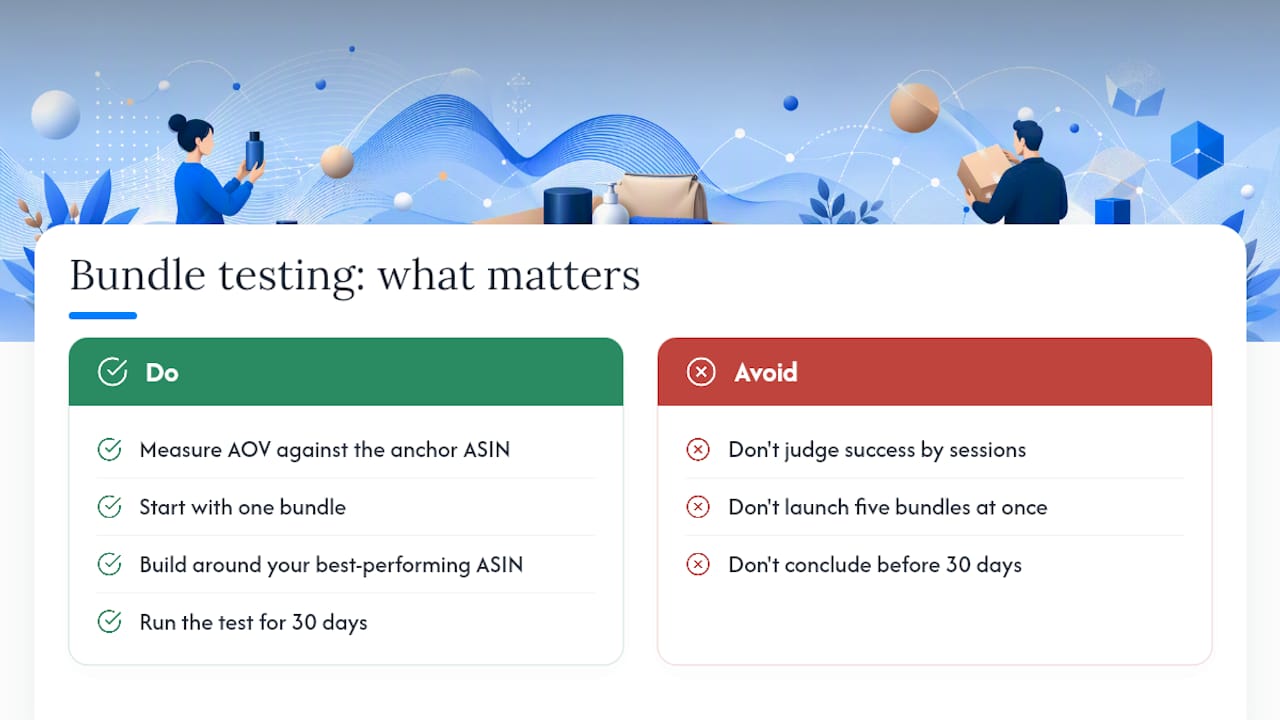
- Average order value (AOV): compare bundle AOV against the anchor ASIN’s standalone AOV to quantify the uplift.
- Bundle conversion rate: monitor in Seller Central’s Business Reports under the bundle ASIN.
- Per-order profit: calculate revenue minus FBA fees, cost of goods and ad spend for each bundle order.
- Return rate: track at both the bundle ASIN level and the component ASIN level to identify which product drives returns.
- Ad ROAS: measure return on ad spend for Sponsored Brand campaigns running against the bundle.
Experiment template
| Stage | Action |
|---|---|
| Hypothesis | “Bundling Product A with Product B will increase AOV by at least 15% versus Product A alone.” |
| Test metric | Bundle conversion rate and AOV over the test period |
| Test period | Minimum 30 days to account for traffic variance |
| Success criteria | AOV uplift confirmed; return rate does not increase materially |
| Rollback rule | Unpublish bundle if conversion rate falls below anchor ASIN’s standalone rate after 30 days |
Where to find data in Seller Central
- Business Reports → Detail Page Sales and Traffic: session data and conversion rate for the bundle ASIN
- Payments → Transaction View: per-order revenue breakdown
- Advertising → Campaign Manager: ROAS and spend for bundle ad campaigns
- Brand Analytics → Market Basket Analysis: which products customers buy together, useful for identifying new bundle candidates
Analytics platforms that connect directly to Amazon’s API can automate P&L calculation per bundle, flag inventory risk before a component goes out of stock and surface ROAS trends without manual exports.
Pro Tip: Use Market Basket Analysis in Brand Analytics to identify which products customers already buy together. These natural purchase pairs are your lowest-risk bundle candidates because demand for the combination is already proven.
UK-specific considerations for virtual bundles
Marketplace availability
The virtual bundles tool has been rolling out progressively across Amazon’s marketplaces. Seller forum discussions confirm that availability can vary and that UK sellers should verify the tool is present in their Seller Central account before planning a launch. Navigate to Brands → Virtual Bundles in your UK Seller Central dashboard to confirm access.

VAT and pricing
Bundle pricing interacts with VAT in a way that is worth discussing with your accountant before launch. If your bundle combines products with different VAT rates (for example, a zero-rated food item with a standard-rated accessory), the VAT treatment of the bundle price may not simply be the sum of the individual treatments. HMRC’s rules on mixed-supply bundles apply, and getting this wrong creates a compliance risk. Confirm the correct VAT treatment before you set the bundle price.
UK seller note: VAT on mixed-supply bundles is not automatically the blended rate of the components. HMRC distinguishes between composite and multiple supplies, and the classification affects how much VAT you must account for. Speak to a VAT-registered accountant before pricing a bundle that combines products with different VAT rates.
Localisation and copy
Write all bundle copy in British English. Use UK sizing conventions, metric units where appropriate and British spellings throughout. Align bundle launches with UK gift-buying seasons: Christmas, Valentine’s Day, Mother’s Day (March in the UK) and Father’s Day (June) are the highest-value windows for gift-set style bundles.
Cross-border selling
If you use Pan-EU FBA, a bundle sold to an EU buyer will be fulfilled from whichever EU fulfilment centre holds the stock. Inventory planning becomes more complex because you need sufficient stock of each component across multiple fulfilment networks. Review your Pan-EU FBA inventory allocation for each component ASIN before activating a bundle for cross-border sales.
Common issues and how to fix them quickly
ASIN ineligibility errors
- Verify each ASIN is FBA, new condition and brand-registered before adding it to the bundle builder.
- Check for category restrictions: gift cards and digital products will always be rejected.
Bundle suppression due to out-of-stock components
- Identify which component triggered the suppression in Seller Central’s inventory view.
- Send an FBA replenishment shipment for that ASIN and monitor until stock is confirmed received.
Display errors (missing images, incorrect title)
- Re-check that the hero image shows all components and meets Amazon’s technical image requirements.
- Confirm the title includes “bundle” and the item count, and that the first bullet states both.
- Re-submit corrected assets via the bundle editor; changes typically propagate within 24 hours.
Spreadsheet upload failures
- Download the current flat-file template directly from Seller Central rather than using a saved copy, as templates are updated periodically.
- Validate ASIN formats: they must be 10-character alphanumeric strings with no spaces.
- Check that the price column uses a decimal point (not a comma) and no currency symbol.
- Confirm all required fields are populated before uploading.
When to contact Seller Support
If a bundle remains suppressed after restocking all components, or if an eligible ASIN is being rejected without a clear error message, open a case with Seller Support. Include: the bundle ASIN, each component ASIN, screenshots of the error message and confirmation that all components are FBA and in new condition. A clear evidence pack reduces back-and-forth and speeds resolution.
Pre-launch checklist: what to verify before you publish
- Inventory: confirm FBA stock for every component with at least 14 days of cover based on your current sales velocity, plus additional buffer for bundle demand.
- Hero image: all components visible together on a white background, minimum 1,000 pixels on the longest side.
- Title: includes “bundle” and the number of items; leads with the primary keyword of the anchor ASIN.
- Bullets: first bullet states “bundle” and item count; remaining bullets describe the value of the combination, not just individual products.
- A+ Content: apply if available for the bundle ASIN to lift conversion rate from day one.
- Pricing: bundle price confirmed at or below the sum of individual prices; introductory discount set if testing early velocity.
- Advertising: Sponsored Brand campaign creative prepared and scheduled to go live on the same day as the bundle.
- Analytics: confirm your reporting setup so you can track bundle AOV, conversion rate and ROAS from day one.
- Compliance: no restricted product types included; Brand Registry status active and in good standing.
- VAT: VAT treatment confirmed with your accountant if the bundle combines products with different VAT rates.
Final check before hitting publish:
- Run through each component ASIN one more time in Seller Central to confirm FBA status and stock levels.
- Preview the bundle listing on Amazon.co.uk to check how the title, images and price display to customers.
A practitioner’s perspective on what actually moves the needle
Most sellers who try virtual bundles for the first time focus on the wrong metric. They watch the bundle’s session count and feel disappointed when it does not match a standalone hero product. The metric that actually tells you whether the bundle is working is AOV: are customers spending more per order than they would buying the anchor ASIN alone?
The most instructive bundle tests tend to involve an anchor product that already has strong organic rank paired with a lower-traffic accessory. The anchor brings the traffic; the accessory lifts the basket. When that pairing works, you see AOV increase without a proportional rise in ad spend, which is the clearest signal that the bundle is earning its place in your catalogue.
The practical lesson: start with one bundle, built around your best-performing ASIN, and measure AOV against the anchor’s standalone AOV for 30 days before drawing conclusions. Resist the temptation to build five bundles at once. One clean test gives you data you can act on; five simultaneous tests give you noise.
Osellpa gives you per-bundle profit visibility without the spreadsheet work
Tracking bundle performance manually across Business Reports, Campaign Manager and your own cost data is time-consuming and error-prone. Osellpa connects directly to Amazon’s API and calculates profit and loss at the ASIN level automatically, so you can see exactly what each bundle is contributing to your bottom line without building a spreadsheet from scratch every week.
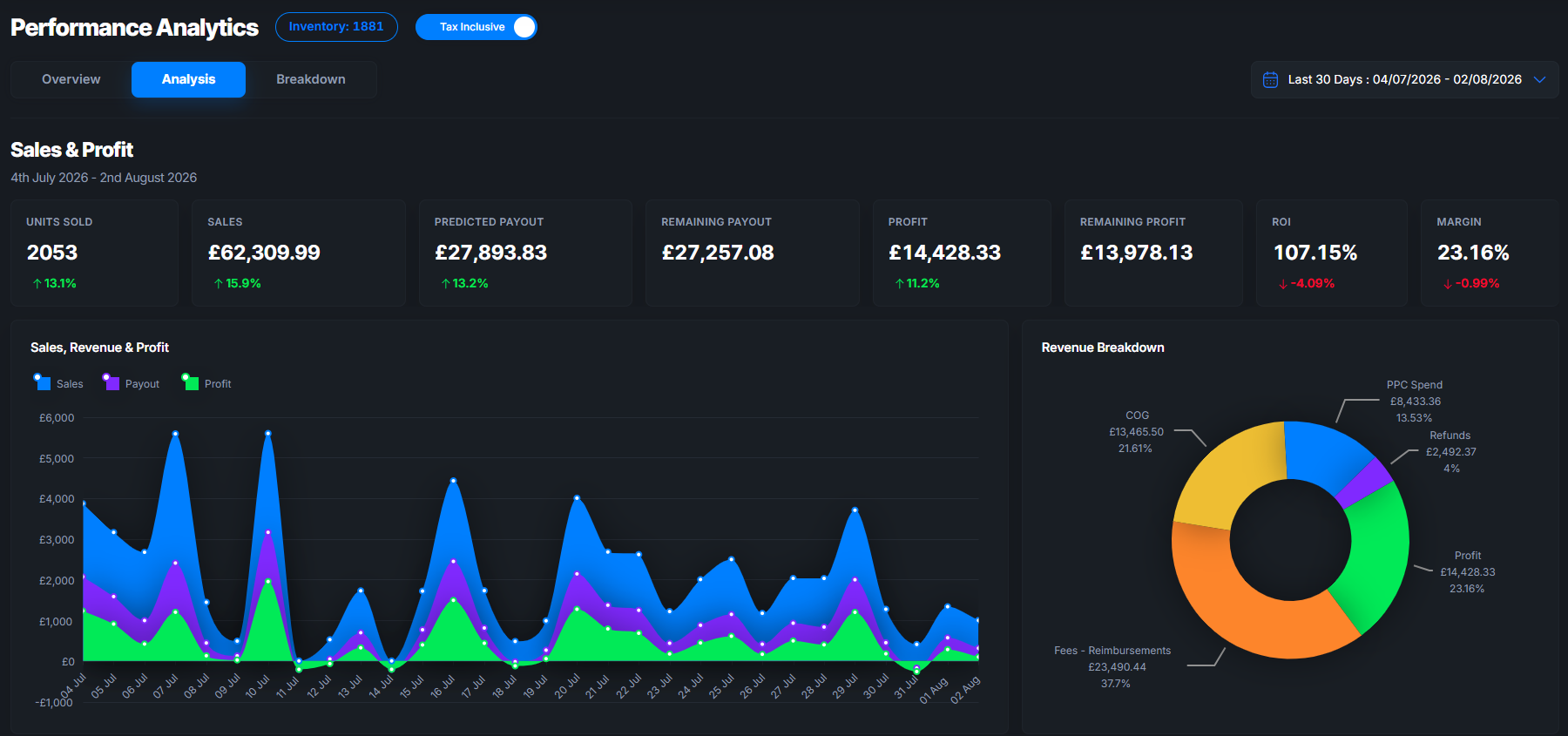
Beyond P&L, Osellpa’s automated PPC tools monitor your Sponsored Brand campaigns for bundles and adjust bids to protect margin, while inventory alerts flag when a component ASIN is approaching a stock level that would suppress your bundle. For UK sellers running multiple bundles across a growing catalogue, that combination of profit clarity and automated protection is where the real efficiency gain sits.
Start a trial at Osellpa to see how automated bundle-level reporting changes the way you make decisions.
Sources
The following resources are the most authoritative references for UK sellers working with virtual bundles:
- 5 product bundling tips to boost sales - Sell on Amazon
- Virtual product bundles
- Sell
- 15 Amazon Virtual Bundle Examples (2026) + How to Create Them
- Amazon Virtual Bundles: What It Is & How It Works
Amazon’s policies on virtual bundles are updated periodically. Always cross-reference the Seller Central help page above before making significant catalogue or pricing decisions based on third-party guides.