
Sponsored Products should be your conversion foundation; Sponsored Brands is the strategic layer you add once you have proven converting ASINs and keywords. Run Sponsored Products first because it needs no Brand Registry and converts existing demand into sales at the lowest cost per click. Add Sponsored Brands once you can see which keywords and listings already convert, because its job is discovery, new-to-brand acquisition, and defending your branded search terms from competitors.
Here’s the one-line allocation rule: spend follows proof, not ambition.
- Launch (weeks 1 to 12): 80 to 100% Sponsored Products, focused on seeding and keyword harvesting.
- Growth (months 3 to 6): 65 to 75% Sponsored Products, 25 to 35% Sponsored Brands, once converting terms exist.
- Scale/defend: 50 to 65% Sponsored Products, 25 to 35% Sponsored Brands, 10 to 15% Sponsored Display, once Store traffic and NTB volume justify a third layer.
Key Takeaways
Sponsored Products converts existing demand at lower cost, while Sponsored Brands builds new-to-brand demand at a justifiably higher ACoS once keyword and listing data prove it’s worth the spend.
| Point | Details |
|---|---|
| Start with Sponsored Products | Launch with no Brand Registry required and use it to harvest converting keywords for weeks 1 to 12. |
| Add Sponsored Brands after proof | Introduce it once you have converting ASINs, keyword data, and a Brand Registry-enabled Store. |
| Judge each format differently | Read Sponsored Brands ACoS against new-to-brand rate, not against Sponsored Products benchmarks. |
| Cross-negate to stop overlap | Prevent Sponsored Products and Sponsored Brands from bidding against each other on shared keywords. |
| Automate the reconciliation | Use integrated profit and PPC tracking to react to wasted spend before it compounds over weeks. |
Table of Contents
- Sponsored brands vs sponsored products: the quick comparison
- What are Sponsored Products and how do you run them effectively?
- What are Sponsored Brands and how should you use them strategically?
- When to run each type: sequencing and budget allocation
- Which metrics actually tell you if each ad type is working?
- Common pitfalls and a fast optimisation checklist
- How analytics and automation shorten the learning loop
- Why most sellers get the sequencing backwards
- Sources
Sponsored brands vs sponsored products: the quick comparison
The two formats do genuinely different jobs, and confusing them is the single most common reason sellers waste budget. Sponsored Products exists to capture demand that already exists, someone searches for a product like yours and you win the click. Sponsored Brands exists to create demand you don’t yet have, putting your brand and range in front of shoppers who weren’t necessarily looking for you.
That distinction drives everything else, from where the ads appear to who is even allowed to run them.
| Factor | Sponsored Products | Sponsored Brands |
|---|---|---|
| Primary job (funnel stage) | Capture: convert existing search demand | Discover/defend: build awareness, acquire new-to-brand customers |
| Placements | Search results, product detail pages | Top of search, product detail pages, Amazon Store |
| Creative | Single ASIN, standard listing image | Multi-ASIN, custom headline, video, Store Spotlight |
| Targeting | Keyword, product, automatic | Keyword, product; broader creative control |
| Eligibility | Any eligible professional seller | Brand Registry required |
| Typical CPC/ACoS behaviour | Lower CPC, higher conversion rate | Higher CPC and ACoS, higher NTB rate |
| Best use case | Proven listings, harvested keywords | Brand launches, defending branded terms, cross-sell |
A few things stand out once you sit these side by side. First, eligibility is a hard gate, not a preference. Without Brand Registry, Sponsored Brands simply isn’t available to you, which makes Sponsored Products the default starting point for every new seller regardless of strategy.
Second, the cost pattern is consistent enough to plan around. Sponsored Products typically runs lower average CPCs and delivers higher conversion rates, while Sponsored Brands tends to cost more per click but pulls in a larger share of new-to-brand customers on the very same keywords. That’s not a flaw in Sponsored Brands, it’s the price of reaching people who don’t already know your brand.
Third, the Featured Offer (Buy Box) matters more for Sponsored Products than most sellers realise. If you don’t hold the Featured Offer on a listing, your Sponsored Products ad often won’t serve at all, which is why third-party sellers competing on the same ASIN sometimes see erratic impression volumes with no obvious campaign change.
Quick stat: across recent benchmarking, Sponsored Brands consistently shows a higher new-to-brand percentage than Sponsored Products run against identical search terms, the acquisition premium you’re paying for with that higher CPC.
What are Sponsored Products and how do you run them effectively?
Sponsored Products are cost-per-click ads that promote a single listing at a time, appearing in search results, on product detail pages, and in a handful of other on-site placements. Any professional seller in good standing can launch them, no Brand Registry, no Store, no creative approval queue. That low barrier is exactly why it should be the first ad type you switch on.
Automatic vs manual: use auto as a research tool, not a strategy
Automatic targeting lets Amazon match your ad to relevant search terms based on your listing content. Treat this as a discovery mechanism rather than a permanent structure. Auto campaigns exist to surface the search terms real shoppers actually use, terms you’d never guess from a keyword tool alone, then you graduate the winners into manual campaigns where you control the bid.
Manual campaigns give you three targeting types: broad, phrase, and exact match keywords, plus product targeting against competitor or complementary ASINs. Most sellers structure this as a funnel, broad and phrase for discovery, exact match for the terms that have already proven themselves.
Budgeting and bidding basics
Daily budgets cap your spend, but the bid is what determines whether you win the auction at all. A few fundamentals worth locking in early:
- Start bids near the suggested range Amazon shows at campaign creation, then adjust based on actual auction data rather than gut feeling.
- Set placement modifiers deliberately. Top-of-search often converts differently to product-page placements, and bidding the same across both wastes budget on the weaker one.
- Cap your bid ceilings before scaling spend, an unchecked auto campaign can quietly burn through a daily budget on a handful of irrelevant broad matches.
- Review search term reports weekly, not monthly, in the first 90 days. Early data compounds fast.
- Move proven terms to exact match once you have enough clicks to trust the conversion rate, then negate them in the broader campaigns to stop internal competition.
The optimisation checklist
Once campaigns are live, the ongoing work is mostly about subtraction, cutting the terms and placements that don’t earn their keep.
- Audit search term reports for zero-conversion spend and add negatives promptly.
- Separate branded and non-branded terms into different campaigns so budgets don’t cannibalise each other.
- Watch ACoS by campaign, not just account-wide, a strong overall number can hide a leaking auto campaign underneath.
- Reassess bid ceilings monthly against actual cost-per-conversion, not the platform’s suggested bid.
Pro Tip: Run your auto campaign at a modest, capped daily budget indefinitely, even after your manual campaigns mature. It keeps surfacing new converting terms you’d otherwise miss, and the cost of running it is small compared to what a missed keyword opportunity costs over a year.
What are Sponsored Brands and how should you use them strategically?
Sponsored Brands puts your logo, a custom headline, and a curated set of products in front of shoppers, typically at the top of search results or within your Amazon Store. It comes in several formats, including product collection ads, Store Spotlight, and video, each suited to a different stage of building brand recognition.
Unlike Sponsored Products, creative here goes through Amazon’s moderation queue before it goes live. That review can take up to 72 hours, so factor lead time into any launch or seasonal campaign plan rather than assuming instant approval.
The eligibility gate that trips sellers up
Two things stand between you and running Sponsored Brands: Brand Registry enrolment, and typically a functioning Amazon Store. Sellers sometimes register their brand, launch a Sponsored Brands campaign the same afternoon, and wonder why performance is poor. The problem usually isn’t the ad, it’s that the Store page it points to hasn’t been built out yet, so paid traffic lands on a thin, unfinished page and bounces.
Why Sponsored Brands ACoS looks worse, and why that’s the wrong number to panic over
Sponsored Brands reports a new-to-brand metric showing what percentage of orders came from customers who hadn’t bought from your brand in the past 12 months. This is the number that actually tells you whether the format is working.
Judging Sponsored Brands purely on immediate ACoS is a mistake sellers make constantly, because Sponsored Brands ACoS runs meaningfully higher than Sponsored Products on the same keywords by design. You’re paying to introduce your brand to someone new, not to close a sale someone was already halfway through. Evaluate it against new-to-brand acquisition cost and what those customers are worth over 90 to 180 days, not the ACoS figure sitting in your dashboard on day one.
Tactics that actually move the needle
- Build custom landing pages for major Sponsored Brands campaigns rather than defaulting to your Store homepage, a page focused on the specific product collection you’re advertising converts better than a generic one.
- Run defensive campaigns against your own branded search terms, if you don’t bid on your brand name, a competitor’s Sponsored Products ad might sit above your organic listing.
- Feed Sponsored Brands targeting with the keyword list your Sponsored Products campaigns have already proven convert, rather than guessing at new terms.
- Refresh creative every few months; the same banner running for a year loses click-through rate as shoppers stop noticing it.
Quick stat: benchmarking across the format consistently shows Sponsored Brands pulling a higher share of new-to-brand orders than Sponsored Products run against identical terms, the trade sellers are making for that higher ACoS.
When to run each type: sequencing and budget allocation
The order you switch these on matters as much as the budget split. Get the sequencing wrong and you’ll spend on brand awareness before you know which products and keywords are worth being aware of.
The three phases
- Launch (roughly days 1 to 90). Run Sponsored Products almost exclusively, seeding a mix of automatic and manual campaigns to harvest converting search terms. Allocate 80 to 100% of ad budget here. This is data-gathering, not brand-building.
- Growth (roughly months 3 to 6). Once you have Brand Registry, a built-out Store, and a keyword list with genuine conversion history, introduce Sponsored Brands. Shift toward 65 to 75% Sponsored Products and 25 to 35% Sponsored Brands, weighted toward whichever categories are showing the strongest organic pull.
- Scale and defend. With stable ACoS and a Store pulling consistent traffic, tighten Sponsored Products around your best-converting exact-match terms, expand Sponsored Brands into adjacent keyword territory, and consider adding Sponsored Display for retargeting.
Cross-negation and the Sponsored Display trigger
Running Sponsored Products and Sponsored Brands on the same keyword without cross-negation means you’re bidding against yourself in the same auction, inflating your own CPC for no benefit. Negate your top Sponsored Products terms out of broad Sponsored Brands targeting once both are live, and vice versa where Sponsored Brands owns a term outright.
Sponsored Display deserves a specific trigger rather than a calendar date. Add it once Sponsored Products and Sponsored Brands together generate enough product page traffic to build a meaningful retargeting pool, launching it too early against a thin visitor pool makes views remarketing uneconomical.
Watch for these signals that it’s time to reallocate:
- ACoS on your core Sponsored Products campaigns has stabilised for at least four consecutive weeks.
- Conversion rate on your top keywords holds steady rather than swinging week to week.
- Your Store is generating organic and Sponsored Brands referral traffic worth measuring, not just a page nobody visits.
Which metrics actually tell you if each ad type is working?
Judging Sponsored Products and Sponsored Brands by the same yardstick is where most sellers go wrong. The metrics that matter shift depending on what job the format is doing.
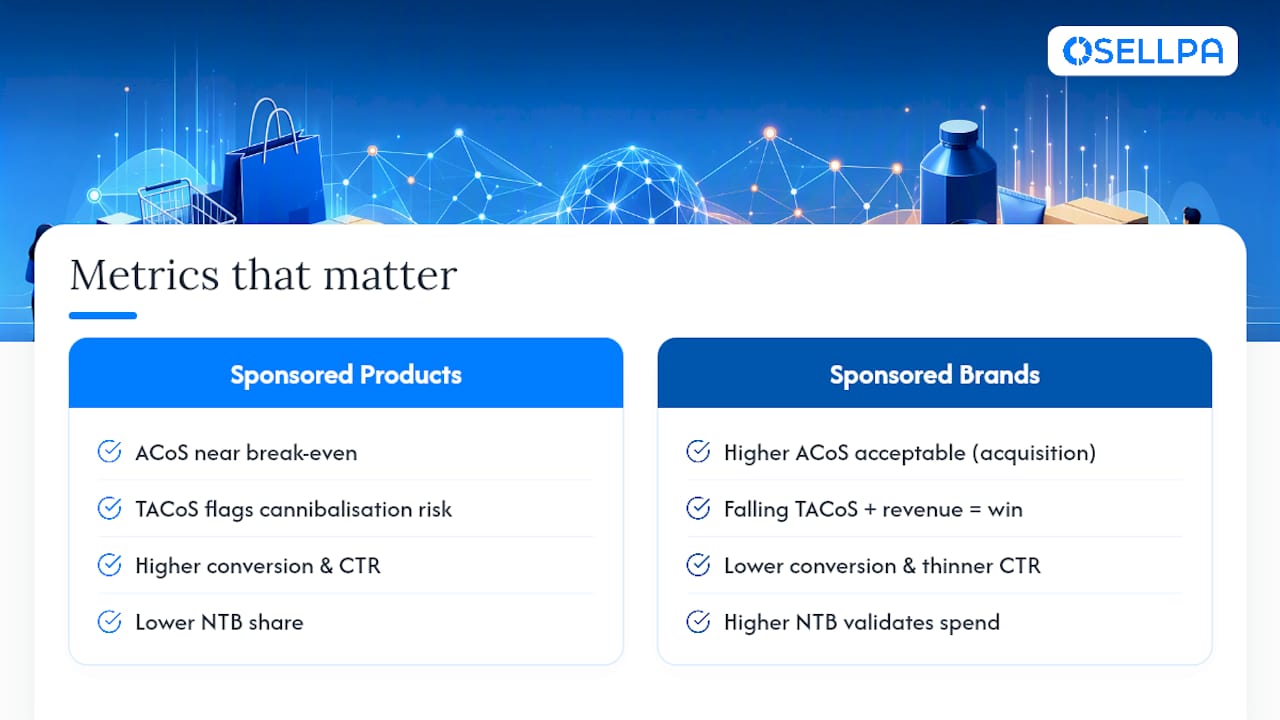
ACoS (Advertising Cost of Sale) tells you the immediate return on ad spend, but only within whatever attribution window Amazon’s Campaign Manager applies to that report, so comparing figures pulled on different dates can be misleading if the underlying window shifted. Sponsored Products ACoS should sit closer to your break-even threshold since it’s converting warm demand; Sponsored Brands ACoS running higher on the same term isn’t a red flag, it’s the acquisition cost of a shopper who didn’t know you existed.
TACoS (Total Advertising Cost of Sale) measures ad spend against total sales, organic included, and it’s the number that tells you whether your advertising is genuinely growing the business or just cannibalising sales you’d have made anyway. A falling TACoS alongside rising overall revenue is the clearest sign your Sponsored Brands spend on discovery is converting into organic momentum.
Conversion rate and CTR benchmarks differ by format almost by definition. Sponsored Products, showing a specific product to someone actively searching for it, should convert notably higher than Sponsored Brands, which is often introducing an unfamiliar brand to a browsing shopper. Sponsored Products generally posts the higher conversion rate of the two formats, don’t panic if Sponsored Brands CTR looks thinner by comparison, that’s the expected shape of the funnel.
New-to-brand (NTB) is the metric that actually validates Sponsored Brands spend. Track it alongside ACoS every reporting cycle, a campaign with high ACoS but strong NTB share is doing exactly its job.
Quick stat: Sponsored Brands tends to deliver a meaningfully higher new-to-brand rate than Sponsored Products on matching search terms, the number that should reframe how you read its ACoS.
Practically, this means feeding your Sponsored Products search term reports into Sponsored Brands targeting on a regular cadence, weekly in the first few months, then monthly once your account matures, so the keyword lists driving both formats stay current with what’s actually converting.
Common pitfalls and a fast optimisation checklist
Most wasted Sponsored Brands and Sponsored Products spend traces back to a handful of repeated mistakes, not bad luck or a difficult category.
- Launching Sponsored Brands before you have any converting keyword history, spending on brand awareness for a listing nobody has proven wants to buy.
- Leaving auto campaigns running unchecked with no negative keyword hygiene, letting broad match terms quietly drain budget.
- Pointing Sponsored Brands traffic at a bare or unfinished Store page instead of a purpose-built landing page for that campaign.
- Failing to cross-negate between Sponsored Products and Sponsored Brands, so you end up bidding against your own ads for the same click.
- Letting creative sit unchanged for months, watching click-through rate quietly decay without knowing why.
Your 20 minute account check
- Pull search term reports for your top three campaigns; add obvious zero-conversion negatives.
- Check whether Sponsored Products and Sponsored Brands share any keyword without a cross-negation in place.
- Click through to your Store or landing page as a shopper would; note anything unfinished or off-brand.
- Scan bid ceilings against last week’s actual cost-per-conversion, not the suggested bid.
- Confirm creative on active Sponsored Brands campaigns is under six months old.
Pro Tip: Set a recurring calendar reminder for this exact checklist every Monday morning. Twenty minutes, weekly, catches almost every one of these problems long before they’ve burned through a meaningful chunk of budget.
How analytics and automation shorten the learning loop
The gap between Sponsored Products and Sponsored Brands performance often isn’t strategy, it’s visibility. Sellers running both formats manually are usually reconciling ad spend against sales in a spreadsheet days after the money has already gone out the door, by which point the damage is done.

Unified profit tracking changes that equation. When ACoS and TACoS sit next to real margin data, not just revenue, the trade-off between a cheap Sponsored Products click and an expensive but valuable Sponsored Brands new-to-brand customer becomes obvious rather than guesswork. Osellpa builds this view directly from Amazon’s own API, pulling profit, PPC, and inventory data into one dashboard instead of a stitched-together set of exports.
Automated bid adjustments and search term harvesting do the repetitive work that otherwise eats a PPC manager’s week, flagging wasted spend and reallocating bids without someone manually re-checking reports every morning. That’s the mechanism behind the reported outcome:
Sellers using Osellpa’s automation and analytics tools report sales increases of up to 20% after implementation, driven largely by reduced wasted ad spend and faster reaction to underperforming keywords.
Before adopting any analytics tool for this workflow, ask it these questions:
- Does it integrate directly with Amazon’s API, or does it rely on manual CSV uploads?
- Can it apply automated bid rules across Sponsored Products and Sponsored Brands simultaneously?
- Does it report new-to-brand data natively, or only raw ACoS?
- Does profit tracking account for fees, refunds, and advertising cost together, not revenue alone?
Why most sellers get the sequencing backwards
The conventional advice treats Sponsored Brands as an upgrade you graduate to once you’re “ready”, as if readiness were a feeling rather than a data threshold. It isn’t. Readiness is a specific, checkable state: converting keywords, a Brand Registry-enabled Store, and enough Sponsored Products history to know what actually sells.
What gets underestimated is how much Sponsored Brands ACoS anxiety wrecks otherwise sound strategy. Sellers see a number twice their Sponsored Products ACoS and pull the plug, missing that new-to-brand acquisition was never supposed to look cheap on day one. The real failure isn’t running Sponsored Brands too early or too late, it’s judging it with the wrong metric entirely.
If you take one thing from this, prioritise building the feedback loop before you scale spend. Know your true margin per keyword, not just your ACoS, and let that number, not intuition, decide when budget moves from Sponsored Products into Sponsored Brands.
— Harry


