
A listing is retail ready when its product detail page (PDP), offer, fulfilment, and social proof are strong enough to receive paid or promotional traffic without obvious gaps that waste spend. Before you launch any Amazon Ads campaign, run through this core checklist:
- Title: keyword-first, under 80 characters visible on mobile, no keyword stuffing
- Main image: pure white background, product filling 85%+ of frame, high resolution
- Bullet points: top benefit in the first 200 characters, five bullets minimum
- A+ Content: live and using a comparison-chart module (Brand Registry required)
- Reviews: at least 15 recent reviews with a 4-star average or above
- Stock: FBA enrolled, sufficient inventory to cover 30+ days of projected demand
- Price / Featured Offer: competitive enough to hold the Buy Box
- Backend keywords: all 249 bytes used, no repetition of title terms
- Compliance: category documentation complete, no active policy flags
If any item above is missing, reduce your media budget and fix the listing first. Ads amplify what is already there — they do not repair a weak page.
Key takeaways
A listing is only retail ready when its PDP, offer, fulfilment, and social proof are all strong enough to convert paid traffic efficiently — fix any gap before scaling spend.
| Point | Details |
|---|---|
| Fix images and reviews first | Main image quality and a minimum of 15 reviews move conversion fastest for most UK categories. |
| Use FBA for the Prime badge | FBA enrolment gives you the Prime badge, which materially lifts conversion for UK shoppers expecting fast delivery. |
| Run a smoke test before scaling | A 7-day Sponsored Products test at £10–£20 per day reveals your CVR baseline before you commit larger budgets. |
| Automate monitoring tasks | Automating profit tracking, PPC bid rules, and inventory alerts reduces wasted spend and speeds time to a stable, ad-ready state. |
| Re-audit every 2–4 weeks | Retail readiness is not a one-time task; seasonal stock buffers and regular PDP checks protect your organic rank. |
Table of Contents
- What retail readiness on Amazon UK actually means for your ads
- The detailed PDP checklist: what ‘good’ looks like for UK sellers.
- Metrics and quick tests to run before you start an Amazon Ads campaign
- How to audit your listing for retail readiness in 30 minutes
- What to prioritise in the first 90 days after listing or relaunch
- How automation speeds up retail readiness: the Osellpa approach
- Practical lessons from working with UK sellers
- An honest perspective on retail readiness
- Sources
What retail readiness on Amazon UK actually means for your ads
Retail readiness is a commercial question, not a cosmetic one. A listing is ready when every element a shopper needs to make a confident purchase decision is present and strong enough to support the next promotional push. Promotions and ads frequently expose weak pages rather than fix them.
Amazon’s A9 algorithm uses conversion signals to rank listings organically. When your PDP converts well, your organic rank improves, which in turn reduces your reliance on paid traffic and lowers your advertising cost of sale (ACOS). The relationship runs in one direction: ad spend drives sessions to the page, the page either converts or it does not, and the conversion rate feeds back into ranking. A poorly prepared listing breaks that loop at the most expensive point.
Conversion rate optimisation on Amazon is an ongoing cycle. Listings with strong conversion signals rank better organically, which reduces reliance on paid advertising and lowers ACOS over time. A+ Content alone commonly produces a noticeable single-digit conversion lift when used correctly — a meaningful gain when you are paying for every click.
The detailed PDP checklist: what ‘good’ looks like for UK sellers.
Title
Write your title keyword-first and keep it under 200 characters total, but check how it renders on mobile. Amazon truncates titles at roughly 80 characters on the app, so your primary keyword and main benefit must appear in the first 70–80 characters. Test this by searching your own ASIN on a smartphone. If the truncated version reads as a fragment or loses the product category, rewrite the opening.
Main images
Use images two and three to show scale (a hand, a common object), package contents, and a key use-case shot. For UK listings, ensure images are at least 1,000 pixels on the longest side to enable zoom. Better product imagery also reduces returns — a point worth noting given that immersive visuals and accurate representation directly affect buyer confidence and post-purchase satisfaction.
Bullets and description
Front-load your highest-value claim into the first bullet. Shoppers on mobile often see only the first two bullets before they must tap to expand, so place your strongest benefit and your target customer fit there. Keep each bullet under 200 characters. The description field matters less when A+ Content is live, but it remains indexed by the A9 algorithm, so include secondary keywords and use-case language.
A+ Content
Amazon Brand Registry is the prerequisite for A+ Content (also called Enhanced Brand Content). Once enrolled, build a module that includes a comparison chart and a clear “what’s in the box” visual. These two modules typically drive the highest incremental add-to-cart rate. Decorative A+ with lifestyle photography but no structured comparison rarely delivers the same lift.
Reviews and social proof
Fewer than 15 reviews is a meaningful problem when you are running paid traffic. Shoppers use review count as a proxy for product legitimacy, and a low count suppresses conversion even when individual ratings are high. For Brand Registered sellers in the UK, Amazon Vine allows you to send units to trusted reviewers before or shortly after launch. Vine enrolment costs £170 per parent ASIN for up to 30 reviews. Review recency matters too — a cluster of old reviews with nothing recent signals a stale product.
Price and Featured Offer (Buy Box)
Winning the Featured Offer (formerly the Buy Box) is not purely about having the lowest price. Amazon weighs fulfilment method, seller metrics, and price competitiveness together. Use Amazon’s Automate Pricing tool to stay within a competitive range without manually monitoring rivals. Check your coupon and deal eligibility before planning promotions — eligibility rules are tied to rating thresholds and category requirements, and verifying eligibility early prevents last-minute disqualification.
Stock and fulfilment
FBA enrolment gives your listing the Prime badge, which materially lifts conversion for UK shoppers who expect next-day or two-day delivery. Aim to hold at least 30 days of projected demand in an Amazon fulfilment centre before launching any campaign. Running out of stock during a campaign resets your sales velocity and can take weeks to recover.

Backend keywords
You have 249 bytes in the backend search terms field. Use all of them. Do not repeat keywords already in your title, bullets, or description — Amazon indexes those separately. Include spelling variants, synonyms, and any terms that are common in UK English but differ from US English (e.g. “torch” not “flashlight”).
Compliance
Check that your product has all required documentation for its category — CE marking, UKCA marking, or safety data sheets where applicable. A single compliance flag can suppress a listing without warning.
Pro Tip: For most UK categories, the two elements that move the needle fastest are the main image and the review count. Fix those two before touching anything else.
Metrics and quick tests to run before you start an Amazon Ads campaign
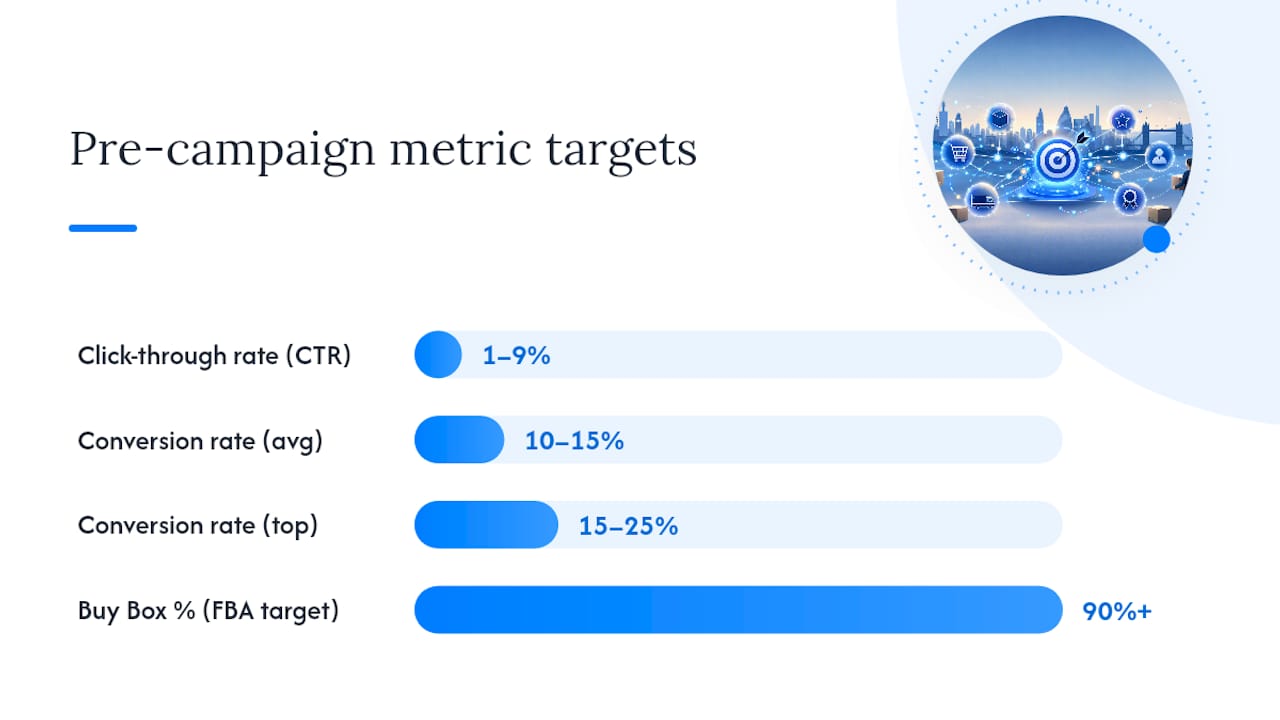
Before scaling spend, confirm your listing can convert paid traffic efficiently. The table below gives target ranges for UK sellers across the five metrics that matter most.
| Metric | Definition | Target range | Problem signal |
|---|---|---|---|
| Click-through rate (CTR) | Clicks ÷ impressions on Sponsored Products | Single-digit percentage range | Below 0.2% suggests weak main image or title |
| Conversion rate (CVR) | Orders ÷ sessions (unit session %) | 10%–15% platform average; 15%–25% top performers | Below 8% warrants a full PDP audit before scaling |
| ACOS | Ad spend ÷ ad revenue | Category-dependent; aim below your gross margin | Rising ACOS with flat CVR points to a PDP problem |
| Buy Box % | Share of page views where you hold the Featured Offer | 90%+ for FBA sellers | Below 80% suggests a pricing or metrics issue |
| Review threshold | Star rating and count | 4.0+ stars, 15+ reviews | Below 3.8 stars suppresses conversion regardless of traffic |
Small-budget smoke test: run a Sponsored Products auto-targeting campaign at £10–£20 per day for seven days. Look at your unit session percentage in the Business Reports section of Seller Central.
How to audit your listing for retail readiness in 30 minutes
Follow this sequence. It mirrors the diagnostic order that finds the real cause of poor conversion fastest — sessions and conversion first, then traffic quality.
- Pull your unit session percentage from Seller Central Business Reports (Detail Page Sales and Traffic). If CVR is below 8%, the PDP is the problem, not the traffic.
- Check your main image on a smartphone. Does it stand out in search results? Is the product clear and the background pure white?
- Read your title on mobile. Does the truncated version (roughly 80 characters) still communicate the product category and primary benefit?
- Review your price position. Search your main keyword and compare your price to the top five results. Are you within a competitive range?
- Count your reviews and check recency. Fewer than 15 reviews or nothing recent in the last 60 days is a flag.
- Open your listing on the Amazon shopping app. Scroll through the images, read the bullets as a shopper would, and check whether A+ Content loads correctly.
- Check your A+ Content modules. Is a comparison chart present? Does the “what’s in the box” section appear?
- Audit your backend keywords in Seller Central. Are all 249 bytes used? Are there obvious gaps (UK spelling variants, synonyms)?
- Check your Buy Box percentage in the Account Health or Inventory dashboards. Below 80% needs investigation.
- Run a 7-day smoke test at a small daily budget and record your CVR baseline before making any further changes.
For image testing, tools such as PickFu allow you to A/B test main images with a real panel before committing to a change. For keyword gap analysis, Seller Central’s Search Query Performance report (available to Brand Registered sellers) shows which terms drive impressions but not clicks.
What to prioritise in the first 90 days after listing or relaunch
The first 90 days after listing are critical for sales velocity. Amazon’s New Seller Guide programmes — Brand Registry, A+, Vine, FBA, Automate Pricing, and Sponsored Products — are specifically designed to build momentum in this window.
Days 0–7: Complete your PDP before a single ad runs. Enrol in FBA, set your opening price using Automate Pricing, and confirm your main image passes the mobile check. If you are Brand Registered, submit A+ Content now — it takes up to seven days to go live.
Days 7–30: Launch a Sponsored Products auto-targeting campaign at a controlled budget. Simultaneously, use Amazon’s Request a Review button (or an automated review request tool) to build your review count. Monitor your unit session percentage daily.
Days 30–90: Scale campaigns that are performing within your target ACOS. If you are Brand Registered, use Amazon’s Manage Your Experiments tool to A/B test your main image or title — run each test for at least four weeks to reach statistical significance. Invest in A+ Content upgrades if your CVR data shows the current version underperforming.
Ongoing: Re-audit every two to four weeks. Before peak UK trading periods (Black Friday, Christmas, Prime Day), build a stock buffer of at least 45 days of projected demand. Seasonal OOS events are one of the fastest ways to lose organic rank.
How automation speeds up retail readiness: the Osellpa approach
Sellers who automate the repetitive monitoring tasks that underpin retail readiness consistently reach a stable, ad-ready state faster than those managing everything manually.
The tasks to automate first are the ones with the highest cost of delay:
- Profit tracking: knowing your true margin per ASIN before you set bids prevents you from scaling a loss-making campaign.
- PPC rules: automated bid adjustments based on ACOS thresholds stop wasted spend without requiring daily manual intervention.
- Inventory alerts: an automated low-stock alert gives you time to reorder before you go out of stock and lose your sales velocity.
- Review request automation: consistent, policy-compliant review requests build your review count faster than manual requests.
For a seller with a small catalogue, the practical implementation sequence is: connect your Amazon account via API, map your cost of goods for each ASIN, set a target ACOS rule for each campaign, and configure a low-stock alert at your reorder lead time. That setup typically takes a few hours and immediately surfaces the data you need to make listing and bidding decisions.
This prevents runaway spend on underperforming terms while you investigate the root cause.*
Practical lessons from working with UK sellers
The most common mistake UK sellers make is launching Sponsored Products before their review count has stabilised. A listing with six reviews and a 3.9-star average will convert paid traffic at a fraction of the rate of one with 25 reviews and 4.3 stars — and every click you pay for during that period is largely wasted. The fix is straightforward: use Vine or the Request a Review tool first, set a minimum review threshold before scaling spend, and treat the smoke test as a gate, not a formality.
Mobile is the second area sellers consistently underestimate. A quick mobile audit often reveals that a title which looks fine on desktop truncates badly on the app, or that A+ Content modules stack in a way that buries the key benefit below the fold. Check your listing on the Amazon shopping app before any campaign goes live.
Price position is the third lever that sellers overlook. UK shoppers using Prime have high delivery expectations and are often comparing three or four listings simultaneously.
The quick wins that repeatedly produce measurable improvement within two to four weeks: rewriting the first bullet to lead with the primary benefit, adding a comparison-chart module to A+ Content, and enrolling in FBA if you have not already. Prime penetration in the UK is high, and the conversion difference between Prime and non-Prime listings is material.
An honest perspective on retail readiness
Most sellers treat retail readiness as a launch task they complete once and move on from. That framing is the root cause of most wasted ad spend on Amazon.
The checklist in this article is not a one-time gate. It is a recurring standard. A listing that was retail ready in March may not be retail ready in October if a competitor has undercut your price, your review recency has faded, or your FBA stock has dropped below a safe buffer ahead of a peak period. The sellers who consistently hold strong organic positions and low ACOS are not the ones who built the best listing at launch — they are the ones who re-audit regularly and respond to data quickly.
There is also a sequencing mistake that is far more common than sellers admit: spending on ads to “test” a listing that has not yet earned 15 reviews. The logic sounds reasonable — get some traffic, see what happens — but the conversion data from an under-reviewed listing is not representative. You are measuring the performance of a listing that shoppers do not yet trust, not the performance of your product. Fix the review floor first, then test.
The other underrated truth is that mobile optimisation is not a nice extra. The majority of Amazon UK traffic arrives via the app. A title that truncates badly, bullets that bury the key benefit, or A+ Content that stacks poorly on a small screen will suppress conversion regardless of how well the desktop version looks. The mobile check takes five minutes and consistently reveals problems that desktop-only audits miss.
Retail readiness is ultimately about respecting the shopper’s decision-making process. Every gap in your listing is a reason for them to click back and buy from someone else.
Sources
The sources below support the guidance in this article and are worth bookmarking for eligibility checks, policy updates, and tool documentation.
- Drive sales with the New Seller Guide
- Amazon Conversion Rate Optimization: Data Driven Strategies for 2026
- What does retail ready mean for an Amazon listing? | Standwell Resources
- Amazon Listing Conversion Rate Benchmarks 2026: From Sessions to Sales — EcomCalcTools Blog