
The fastest compliant way to increase Amazon reviews is to automate Amazon’s Request a Review feature, tighten your product experience, and seed early reviews with Amazon Vine when you’re eligible. From there, you back it up with owned-channel requests and steady monitoring. Nothing here relies on incentives or grey-area tactics.
- Automate Request a Review for eligible orders, scheduled 5–10 days after delivery
- Fix listing gaps and product experience issues that stop happy buyers from reviewing
- Enrol eligible new listings in Amazon Vine for unbiased early reviews
- Ask through email and package inserts, without asking for a positive rating
- Track review velocity weekly and step in fast when the trend turns negative
Even a handful of quality reviews can noticeably shift buyer behaviour on a listing, which is why sellers who treat this as routine maintenance, not a one off push, tend to see steadier ranking performance.
Key Takeaways
Compliant Amazon review growth depends on correct Request a Review timing, product fixes, Vine for new listings, and consistent monitoring, not incentives or shortcuts.
| Point | Details |
|---|---|
| Automate Request a Review | Schedule it 5 to 10 days post delivery and filter out refunds automatically. |
| Track velocity, not just count | Weekly new reviews predict ranking trouble earlier than average rating does. |
| Use Vine for new listings only | Vine suits cold start ASINs, not established listings already earning organic reviews. |
| Never incentivise reviews | Discounts, freebies, or “positive review” requests risk account suspension. |
| Scale with integrated automation | Osellpa connects to Amazon’s API to automate requests, filtering, and monitoring in one dashboard. |
Table of Contents
- Why reviews matter for Amazon visibility and conversion
- How do you get more reviews on Amazon safely?
- What does Amazon allow and forbid in review requests?
- Is Amazon Vine worth it for new listings?
- Which metrics actually tell you review growth is working?
- How automation helps you scale review requests
- How do you prioritise your next move this week?
- Automate your review growth with Osellpa
- Sources
Why reviews matter for Amazon visibility and conversion
Reviews do two jobs at once: they persuade the buyer looking at your listing right now, and they signal to Amazon’s search algorithm that your product is worth showing. Academic research into the value of online customer reviews found that even a small volume of quality reviews can meaningfully lift conversion, particularly for products with little existing social proof.
What actually moves the needle:
- Review velocity (fresh reviews arriving steadily) often matters more for maintaining search placement than your total review count, since it signals ongoing demand rather than a one-time spike
- A listing with zero reviews converts noticeably worse than one with even 10 to 20 recent, relevant reviews
- Consistent weekly review flow keeps a listing eligible for badges and placements that reward active, trusted products
Most established sellers aim for a steady trickle rather than a burst. A new listing gaining two or three genuine reviews a week, sustained over months, beats a one-off campaign that gets 50 reviews and then goes quiet.
How do you get more reviews on Amazon safely?
You get more Amazon reviews by asking at the right moment, through the right channel, without ever asking for a good review. Here’s the sequence that works.
- Turn on Request a Review and automate it. Amazon’s own Request a Review tool sends a neutral, Amazon-branded request asking for both a rating and a review. Manually clicking this for every order doesn’t scale past a handful of sales a day, so most sellers automate it through Seller Central’s API or a third-party tool, timed for the 5 to 10 day window after delivery when the buyer has actually used the product but hasn’t forgotten about it.
- Use package inserts correctly. A card that says “Thank you for your purchase, if you have any issues please contact us before leaving a review” is compliant. A card offering a discount code, free replacement, or gift for a review is not, and it’s one of the fastest routes to a suspended account.
- Ask through owned channels without steering sentiment. An email that says “We’d love your honest feedback” is fine. One that says “If you’re happy, please leave five stars” is not, regardless of how it’s phrased.
- Fix the product experience itself. Reviews often reflect unboxing quality, instructions, and whether the product matches the listing photos. Buyers who feel misled rarely review, they just return.
- Drive qualified traffic. More relevant buyers naturally produce more organic reviews over time, since review count follows sales velocity when everything else is equal.
Pro Tip: Segment your Request a Review automation by product category. A supplement brand and a kitchen gadget brand see wildly different response rates to the same timing window, so test 5, 7, and 10 days separately before settling on one schedule.
What does Amazon allow and forbid in review requests?
Amazon’s Seller Central policy on reviews and customer feedback is fairly blunt about where the line sits, but sellers still trip over it constantly.
- Never offer discounts, refunds, free products, or any compensation in exchange for a review, even a “review of any kind” offer counts as an incentive
- Never ask for positive reviews specifically, or attempt to filter out unhappy buyers before requesting feedback
- Do exclude refunded, returned, or cancelled orders from your request list. Sending a review request to someone who returned the product is a policy risk and a poor customer experience
- Do keep records of your request templates, timing logic, and any filtering rules, so you have something to show if Amazon queries your account
- Respect buyer privacy when collecting contact details for owned-channel requests, in line with general data handling guidance for businesses
Is Amazon Vine worth it for new listings?
Amazon Vine exists to solve the cold start problem: a brand new listing with zero reviews that buyers won’t trust. Eligible sellers enrol a product, and Vine reviewers receive it free in exchange for an honest, unbiased review, no positive sentiment guaranteed or expected.
- Eligibility generally requires enrolment in Amazon Brand Registry and a listing with fewer than a set number of existing reviews
- Expect reviews to arrive over several weeks rather than all at once, and expect a realistic average rating, Vine reviewers are notably candid
- Vine works best for genuinely new ASINs. For an established listing already earning organic reviews, the cost per unit given away rarely justifies it compared with tightening your Request a Review cadence
Think of Vine as a launch tool, not an ongoing review engine.
Which metrics actually tell you review growth is working?
Four numbers matter, and most sellers only track one of them.
- Review velocity: new reviews per week, not total count
- Average rating: watch the trend line, not the snapshot
- Conversion rate: does traffic to review count actually move sales
- Return rate: a rising return rate often predicts a rating drop before it shows up in reviews
Build a simple weekly dashboard tracking these four figures per ASIN. Even a two week dip in review velocity is often an earlier warning sign than a rating drop, because ratings lag behind the underlying problem by several weeks. If velocity drops, check your Request a Review automation first, it’s usually a filtering or timing fault, not a demand problem. If rating drops alongside a return rate increase, you have a product issue, not a review problem, and no amount of asking nicely fixes that.
How automation helps you scale review requests
Manually timing review requests across dozens of SKUs and hundreds of orders a week isn’t realistic past a certain volume, which is why automation has become standard practice rather than a nice extra.
- Timed Request a Review workflows that fire inside the 5 to 10 day window automatically, without you touching a spreadsheet
- Order filtering that excludes refunds, returns, and cancellations before a request ever goes out
- Monitoring dashboards that flag velocity drops or rating slides before they become a ranking problem
The two things worth checking in any automation tool: does it integrate directly with Amazon’s API rather than scraping data, and does it filter risky orders automatically rather than leaving that to you. Both of Amazon’s own guidance on Request a Review and independent practical guides on safe review growth point to the same conclusion: consistency beats intensity.
Pro Tip: If your automation tool can’t tell you which orders it skipped and why, you have no audit trail if Amazon ever asks questions about your review activity. That gap alone should rule out a tool.

How do you prioritise your next move this week?
Run this in under an hour before changing anything.
- Check traffic. If sessions are low, no review tactic fixes a demand problem, fix traffic first.
- Check conversion and review quality. If traffic is healthy but conversion lags, read your last 20 reviews for recurring complaints.
- Check request cadence. Confirm Request a Review is actually firing inside your 5 to 10 day window on every eligible order, not just some.
- Run a small test. Pick 3 to 5 SKUs, test a 5 day window against a 10 day window for four weeks, then scale whichever produces more reviews per hundred orders.
A note on realistic timelines
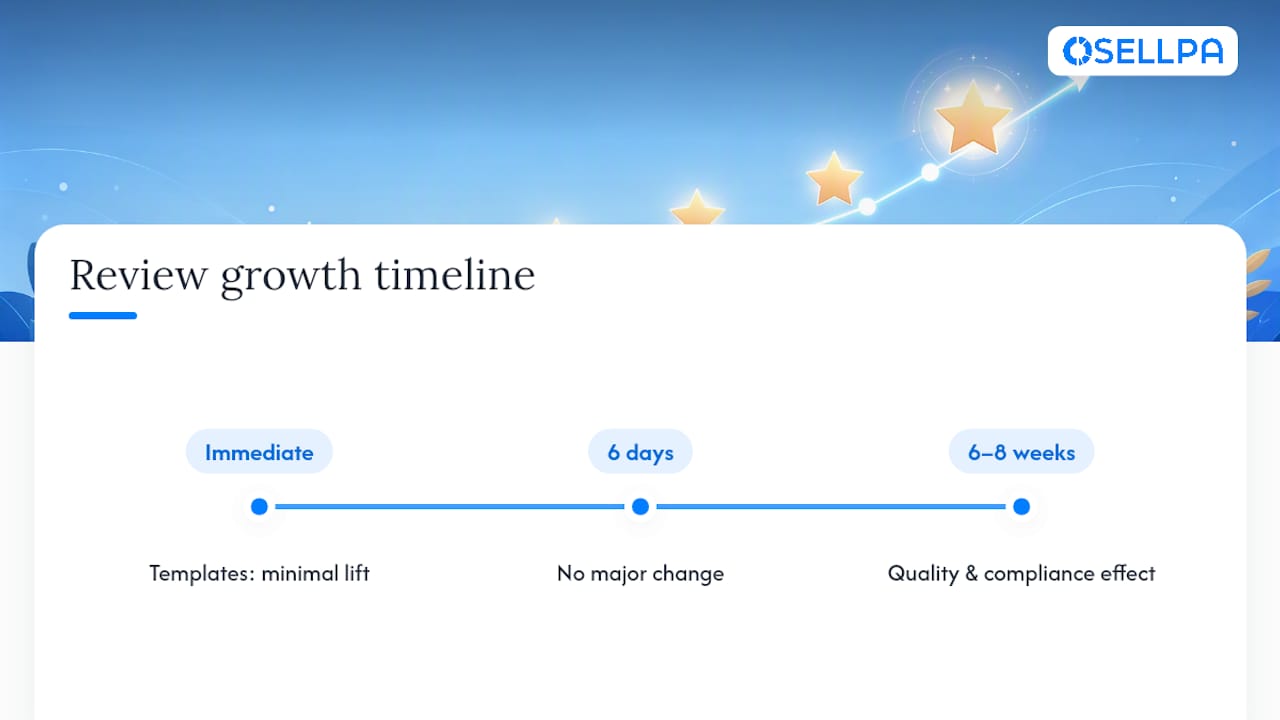
Sellers routinely over-invest in chasing review count and under-invest in fixing the product issue actually suppressing it. Compliance and product quality move ratings further than any request template ever will, and that shift usually takes six to eight weeks to show, not six days.
Harry has spent years writing about Amazon seller operations, translating policy detail into steps sellers can actually run without risking their account.
Automate your review growth with Osellpa

Running Request a Review manually, filtering out refunds by hand, and checking velocity in a spreadsheet works until your order volume doubles, then it quietly falls apart. Osellpa automates the whole loop: scheduled Request a Review workflows timed to your delivery data, automatic filtering of refunded and returned orders, and a dashboard that tracks velocity, rating, and conversion in one place instead of three separate reports. It connects directly to Amazon’s API, so there’s no manual export or guesswork about which orders actually qualify. If review velocity has been stalling and you’re not sure why, start a trial on the Osellpa landing page and see what your account is actually doing.


