
Backend keywords are the hidden search terms you enter in Amazon’s Search Terms field, invisible to shoppers but read by Amazon’s indexing system to decide which searches your listing can appear for. The field is capped at 250 bytes per marketplace, and that’s a byte limit, not a character limit — go over it and Amazon has been known to ignore the entire field rather than trimming the excess, leaving you silently de-indexed with no warning in Seller Central.
The single most important rule: never waste a byte repeating what’s already in your title or bullets. Use backend space only for terms shoppers actually type that your visible copy doesn’t already cover.
- Backend keywords affect indexing eligibility, not ranking directly
- The limit is 250 bytes, and multi-byte characters eat that allowance faster than you’d expect
- Duplicate, punctuated, or repeated words are wasted bytes you can’t get back
Key Takeaways
Backend keywords expand what a listing can be found for, but only within a strict 250-byte limit that silently disables the entire field if exceeded.
| Point | Details |
|---|---|
| Bytes, not characters | Stay under 250 bytes total, accounting for multi-byte symbols like £ or emoji that count as 2 to 4 bytes each. |
| No duplication | Never repeat words already indexed in your title, bullets, or description; it wastes limited backend space. |
| Prioritise converting terms | Pull winning queries from your Search Term Report before adding generic synonyms. |
| Verify manually | Search “ASIN + keyword” after 24 to 72 hours since Seller Central has no built-in indexed report. |
| Refresh every 60 to 90 days | Update backend terms on a fixed cycle and immediately after any strong PPC discovery. |
| Automate the checking | Tools like Osellpa pull PPC and search-term data automatically and flag byte issues before you save. |
Table of Contents
- What do backend keywords actually do for your listing?
- How many bytes can you actually use in backend search terms?
- What backend keywords should you include, and what should you cut?
- How do you build and save an optimised backend keyword string?
- How do you check if a backend keyword is actually indexed?
- How often should you refresh backend keywords?
- What are the most common backend keyword mistakes?
- How does automation reduce backend keyword errors?
- Why discipline beats keyword stuffing
- Let Osellpa handle the byte-counting for you
- Where to check official guidance and tools
- Sources
What do backend keywords actually do for your listing?
Backend keywords don’t push your listing higher in search results. They decide whether your listing is eligible to show up for a given search term at all. Think of indexing and ranking as two separate jobs: indexing gets you into the race, ranking decides where you finish. A perfectly optimised backend field with zero sales history won’t outrank a mediocre listing that’s converting well on the same terms.
That distinction changes how you should spend your 250 bytes. Amazon already indexes your title, bullet points, and description, so copying those phrases into the backend field achieves nothing beyond eating your limited space. The backend exists to expand coverage into territory your visible copy hasn’t reached.
Fields that get indexed include:
- Title, bullet points, and description (already covered by your front-end copy)
- The Search Terms (backend) field itself
- Certain structured attributes and subject-matter fields tied to your category, which is why generic keywords sometimes surface without ever appearing in your listing text
Understanding this relationship is what separates sellers who chase phantom ranking gains from those who use backend space to genuinely widen their search footprint. If a synonym, alternate spelling, or regional term isn’t in your visible copy, that’s exactly what belongs in the hidden field.
How many bytes can you actually use in backend search terms?
The limit is 250 bytes for most marketplaces, and Amazon treats this as a byte count, not a character count — a detail that trips up more sellers than any other rule in this field. Standard ASCII characters (a to z, spaces, numbers) each use 1 byte. Accented letters, currency symbols, and emoji use 2, 3, or even 4 bytes apiece.
| Character type | Example | Bytes used |
|---|---|---|
| Standard letter | a | 1 |
| Accented letter | é | 2 |
| Currency symbol | £ | 2 |
| Emoji | 🔥 | 4 |
A string built entirely from plain English words might use every one of its characters as a single byte. Slip in a few accented product names or a stray symbol, and you can burn through your allowance far faster than the visible character count suggests.
Pro Tip: Run your backend string through a free online byte counter before saving — never trust a plain word-count tool, since it will tell you a string is fine when it’s already over the limit in bytes.
Format rules matter just as much as the count itself:
- Separate terms with single spaces only, never commas or semicolons
- Use lowercase throughout; Amazon’s algorithm isn’t case-sensitive, so capitals just burn bytes
- Never repeat a word that already appears elsewhere in your backend string or your visible listing
- Skip all punctuation, including apostrophes and hyphens where a plain space will do
A single byte over the limit can cause Amazon to disregard the entire field rather than truncate it to fit. That’s not a minor ranking dent. It’s a listing that silently loses every keyword you’d added, with no error message telling you why.
What backend keywords should you include, and what should you cut?
Prioritisation matters here more than volume. With roughly 250 bytes to work with, every word competing for space needs to justify itself against the alternative uses of that same space.
What belongs in the backend field:
- Synonyms and alternate names for your product (e.g. “trainers” alongside “sneakers”)
- Common abbreviations customers actually search (e.g. “bt” for Bluetooth)
- Complementary use-cases that don’t fit naturally in your title or bullets
- Audience or occasion terms (gift, wedding, office, travel)
- Converting search terms pulled straight from your PPC Search Term Report that aren’t already in your visible copy
What has no business being there:
- Competitor brand names, which violate Amazon’s own policy and risk suppression
- ASINs, UPCs, or other identifiers that add no discovery value
- Promotional language like “best” or “on sale,” which Amazon’s guidance explicitly discourages
- Unsubstantiated medical or regulated claims
- Anything duplicated from your title, bullets, or elsewhere in the backend string itself
Many sellers pad their backend field with generic noun-stacking, listing every synonym they can think of regardless of search volume. That approach is losing ground; semantic modifier phrases that pair a use-case with a product type — something like “waterproof travel bottle for hiking” rather than four disconnected nouns — now tend to perform better as Amazon’s algorithm and AI-driven shopping assistants lean more on contextual intent than raw keyword matching.
The prioritisation rule is simple: convert your PPC winners first, then fill remaining space with unique modifiers your visible copy hasn’t touched. Anything that duplicates existing coverage goes last, or gets cut entirely.
How do you build and save an optimised backend keyword string?
Treat this as a repeatable process, not a one-off task you complete at launch and never revisit.
- Pull your converting search terms. Open your Search Term Report in Seller Central or your PPC dashboard and identify queries generating clicks and conversions that aren’t already reflected in your title, bullets, or description.
- Build a raw term list. Combine those converting queries with synonyms, abbreviations, alternate names, and use-case phrases you’ve identified through customer questions or reviews.
- Strip duplicates and stop words. Remove any word already indexed elsewhere in your listing, along with filler words (“the,” “and,” “for”) that add no search value.
- Order by priority. Place your highest-converting, most unique terms first, in case space runs tight before you reach the end of your list.
- Byte-check before saving. Run the final string through a byte counter to confirm you’re under 250 bytes, accounting for any accented characters or symbols.
- Navigate to Manage Inventory in Seller Central. Select Edit, then find the Keywords tab, where the Search Terms field sits separate from your customer-facing content.
- Paste, save, and note the change. Record what you changed and when, so you have a reference point if performance shifts afterwards.
Pro Tip: Save your byte-checked string in a spreadsheet before pasting it into Seller Central. If the field silently rejects your update, you’ll have the exact version to fall back on instead of reconstructing it from memory.
This workflow turns backend keyword management from guesswork into a repeatable five-minute task once you’ve built the habit.
How do you check if a backend keyword is actually indexed?
Seller Central doesn’t give you a report that says “indexed” or “not indexed,” which is why manual verification remains the standard method.
- Wait 24 to 72 hours after saving your updated Search Terms field before testing, since indexing isn’t instant.
- Search Amazon directly using the format “ASIN + keyword” (for example, searching your ASIN alongside the specific term you added).
- Check whether your listing appears in the results. If it does, that term is indexed; if not, something in your string is blocking it.
- Test a small sample first. Verify a handful of your highest-priority terms before assuming your entire string is live, rather than waiting to discover a problem across the whole field.
If a term isn’t showing up, work through the likely causes in order: a byte limit breach that nullified the whole field, a prohibited term (brand name, restricted claim), duplicate content that’s already indexed elsewhere, or simple processing delay. If none of those explain it after 72 hours, contact Seller Support with screenshots of your Search Terms field, your byte count, and the specific ASIN and keyword search showing no result. Specific evidence gets faster resolutions than a general complaint.
How often should you refresh backend keywords?
Backend keywords aren’t a set-and-forget field. Search behaviour shifts, new competitors enter your category, and PPC campaigns surface converting queries you hadn’t considered at launch. Refreshing every 60 to 90 days keeps your backend aligned with how customers are actually searching right now, not how they searched when you first wrote the listing.
Beyond the scheduled review, treat any strong PPC discovery as a trigger for an ad hoc update. If your Search Term Report surfaces a converting query that isn’t in your backend field or visible copy, don’t wait for the quarterly cycle. Add it and byte-check the revised string immediately.
A few habits keep this manageable:
- Pull a fresh Search Term Report every cycle and flag converting queries missing from your current backend string
- Keep a simple changelog recording each previous backend string, the date it changed, and why
- Track indexing results for any newly added term rather than assuming success
That changelog matters more than it sounds. Without it, you have no way to tell whether a sales dip followed a backend change or happened for unrelated reasons, and you’ll end up re-testing the same terms repeatedly instead of building on what you’ve already learned.
What are the most common backend keyword mistakes?
Most backend keyword failures trace back to one of a handful of repeat offenders. Run through this checklist whenever a term seems to be missing from search results:
- Byte-check the full string again; a single character over 250 bytes nullifies the entire field
- Scan for prohibited terms: competitor brands, ASINs, promotional language
- Remove any word duplicated from your title, bullets, or elsewhere in the backend string
- Wait the full 24 to 72 hours before concluding a term isn’t indexing
- Escalate to Seller Support with evidence if the issue persists past that window
Variation listings carry their own trap. Copying an identical backend string across every child ASIN in a parent-child structure wastes an opportunity, since each child can carry its own colour, size, or model-specific tokens that a shared master string can’t accommodate.
On misspellings: only include one with measurable search volume behind it. Adding every plausible typo you can imagine burns bytes on terms nobody actually searches.
How does automation reduce backend keyword errors?
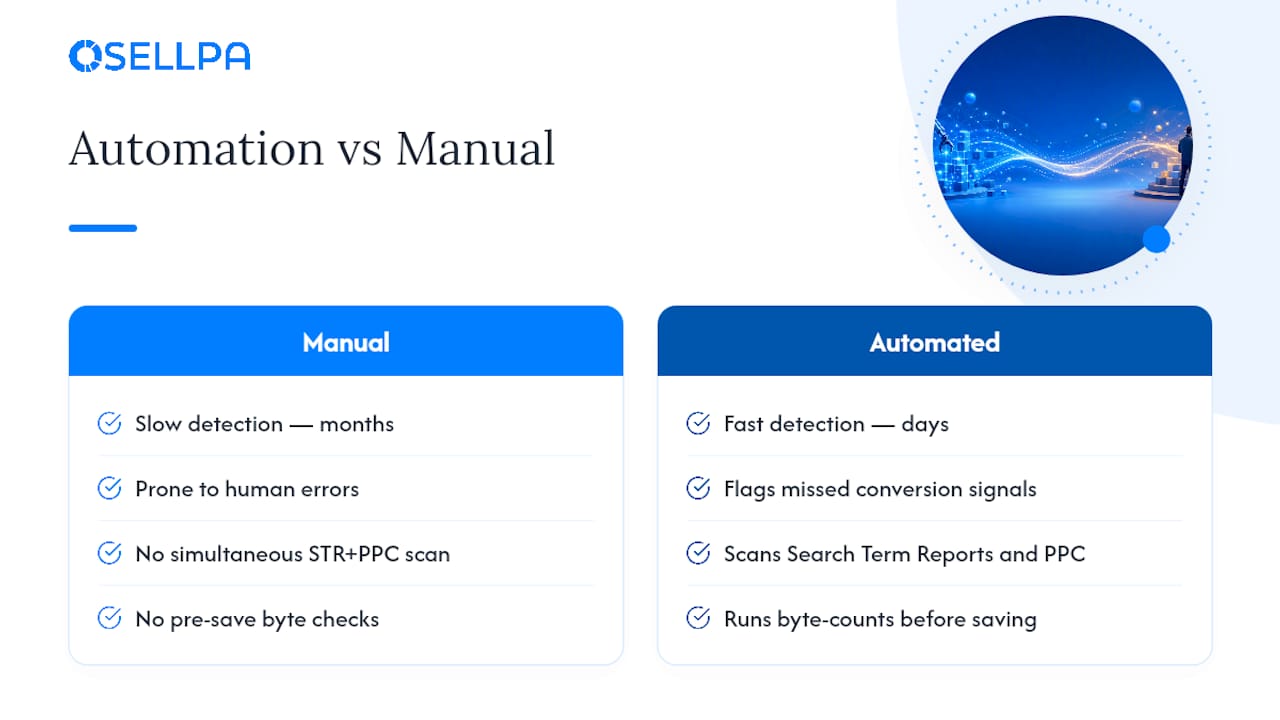
Manual backend keyword management works, but it’s slow and error-prone at scale. Counting bytes by hand across dozens of SKUs, cross-referencing PPC reports manually, and remembering which terms you’ve already tested is exactly the kind of repetitive, detail-heavy work that invites mistakes.
Automated systems that pull data directly from Amazon’s API can scan Search Term Reports and PPC performance simultaneously, flag high-converting queries missing from your backend field, and run byte counts before anything gets saved. That removes the two most common failure points in this article: missed conversion signals and silent byte-limit breaches.
Sellers using Osellpa’s automated listing and PPC tools have reported sales increases of up to 20% after implementing its optimisation and ad management features, a gain that reflects fewer wasted ad clicks and better-aligned backend coverage working together.
For sellers managing catalogues with dozens of variations, that kind of automated checking isn’t a convenience. It’s the difference between catching an indexing failure in days versus discovering it months later in a sales report.
Why discipline beats keyword stuffing
The temptation with 250 bytes is to cram in every synonym you can think of. Resist it. The sellers who get real value from backend keywords treat the field as a controlled experiment, not a dumping ground: test a handful of new terms, verify indexing, watch conversion data, then refine.
Byte-level discipline isn’t bureaucratic box-ticking. It’s the difference between a field that quietly works in the background and one that silently fails the moment you exceed the limit by a single character. Build the habit of checking before saving, and the rest of this workflow takes care of itself.
— Harry
Let Osellpa handle the byte-counting for you
Building and maintaining backend keyword strings by hand across a growing catalogue eats hours you’d rather spend on sourcing or advertising strategy. Osellpa connects directly to Amazon’s API to pull your Search Term Reports and PPC data automatically, surfacing converting queries you haven’t added to your backend field yet and flagging byte-limit issues before you save a change that could silently de-index your listing.

Instead of manually cross-referencing spreadsheets and running strings through a byte counter one SKU at a time, you get suggested keyword candidates and automated policy checks built into the same dashboard where you’re already tracking profit and PPC performance. Sellers using Osellpa’s tools have reported sales gains of up to 20% after putting its automation to work across listings and campaigns. Visit Osellpa to see how the workflow applies to your own catalogue.
Where to check official guidance and tools
Before your next update, bookmark these references:
- Amazon’s own guidance on using search terms effectively, covering byte limits and prohibited content
- Practical indexing verification methods for the ASIN plus keyword search technique
- Detailed breakdown of the 249 to 250 byte limit and multi-byte character examples
- Amazon’s keyword research and Search Term Report guidance for identifying converting queries


