
Your title is your most valuable listing field. The single most important change you can make right now is to rewrite every product title as a clear, mobile-first headline containing your brand name, core product noun, and primary differentiator within 75 characters. Amazon enforced this limit from 27 July 2026 across every category except media, and titles that exceed it are subject to automatic AI rewrites you may not approve of.
Three things to do immediately:
- Audit: Export your ASINs from Seller Central and filter for titles over 75 characters.
- Rewrite: Prioritise your top-revenue SKUs first; a well-chosen 20% of your catalogue typically drives the majority of your sales.
- Add Item Highlights: Move secondary attributes, pack counts, and compatibility notes into the new 125-character Item Highlights field, which is indexed for search.
Pro Tip: If you are brand-registered, you have a 14-day window to review Amazon’s AI-suggested rewrites before they go live. Non-registered sellers receive the rewrite automatically, so act before Amazon acts for you.
Key takeaways
Effective Amazon title optimisation in 2026 means writing a 75-character mobile-first headline with brand, product noun, and primary differentiator at the front, then using Item Highlights to carry the rest.
| Point | Details |
|---|---|
| 75-character limit is live | Every category except media is subject to the cap from 27 July 2026; over-limit titles face automatic AI rewrites. |
| Audit top revenue SKUs first | Prioritise the top 20% of SKUs by revenue for manual rewrites; they carry the most risk and the most upside. |
| Item Highlights carries the overflow | The 125-character Item Highlights field is indexed for search; move secondary keywords, materials, and pack counts there. |
| Test one variable at a time | Change only the title, then monitor sessions, CTR, and CVR for at least 14 days before drawing conclusions. |
| Osellpa tracks the impact | Osellpa’s analytics and AI listing tools connect title changes to profit and session data, with clients reporting up to a 20% sales increase. |
Table of Contents
- What is the best formula for Amazon title optimisation?
- Amazon’s rules, enforcement changes, and UK policy considerations
- How to write a compliant, optimised title step by step
- Category examples and fill-in-the-blank templates for UK sellers
- Which tools help you research and validate titles quickly?
- How do you test title changes and measure their impact?
- Common title mistakes and how to fix them
- How data-driven title optimisation raised sales: an Osellpa case study
- A practical perspective for UK sellers in 2026
- Osellpa makes title optimisation measurable, not manual
- Sources
What is the best formula for Amazon title optimisation?
The most reliable title structure for UK listings follows this sequence:
[Brand] + [Product type] + [Primary differentiator] + [Size/Count/Variant]
That order is deliberate. Treating the title as a mobile-first headline means the words a ready-to-buy shopper scans first are the ones that matter most: your brand, what the product is, and why it beats the alternatives. Everything else belongs in Item Highlights or your bullet points.
Core formula examples (all under 75 characters)
Anker USB-C Hub 7-in-1 Aluminium 4K HDMI 100W PD— 50 charactersClarins Double Serum Anti-Ageing 30ml— 38 charactersOsprey Farpoint 40L Travel Backpack Grey— 41 characters
Alternate formulas for variants and bundles
For colour or size variants, keep the parent title tight and let the variant selector carry the specifics:
- Parent:
[Brand] [Product noun] [Key feature] - Child:
[Brand] [Product noun] [Key feature] [Colour/Size]
For bundled SKUs, lead with the primary item and note the bundle count:
[Brand] [Primary item] + [Secondary item] [Count]-Piece Set
Title case and abbreviation rules
Amazon requires title case: capitalise the first letter of every major word. Abbreviate measurements consistently: ml, cm, kg, W (watts), L (litres). Write numbers as numerals (4, 30, 100) rather than spelling them out. Avoid punctuation beyond hyphens in compound descriptors.
| Element | Do | Avoid |
|---|---|---|
| Brand | Always first | Omitting or abbreviating |
| Product noun | Second position | Vague descriptors (“item”, “product”) |
| Differentiator | Third position | Promotional claims (“best”, “top-rated”) |
| Size/Count | End of title | Mid-title placement |
| Punctuation | Hyphens in compounds | Commas, exclamation marks, pipes |
| Numbers | Numerals (30ml, 4K) | Spelled out (“thirty”) |
Amazon’s rules, enforcement changes, and UK policy considerations
The 75-character limit and Item Highlights
Amazon’s 75-character title cap applies to every product category except books, music, video, and DVDs. Alongside it, Amazon introduced Item Highlights: a 125-character searchable field that displays directly below the title on the product detail page. This field is indexed, meaning keywords placed there contribute to search visibility even when they no longer fit the title.
The byte limits across other listing fields are equally strict. Backend search terms in the UK, US, and EU are capped at 249 bytes; exceeding that limit silently de-indexes the entire backend field without any error message. Across your five bullet points, only the first 1,000 bytes are indexed for search.
What happens if your title is non-compliant?
Amazon will auto-generate a rewrite for any title that exceeds 75 characters. Brand-registered sellers receive a 14-day review window to accept or modify the suggestion; sellers without brand registration receive the rewrite immediately and automatically. Source: Amazon Product Title Rules July 27, 2026
The practical risk is real. An AI-generated title may drop your primary keyword, misrepresent a product specification, or create compliance issues in regulated categories such as health, cosmetics, or electrical goods. For UK sellers, this matters particularly in categories governed by the Consumer Protection from Unfair Trading Regulations, where inaccurate product descriptions carry legal exposure.
Practical do/don’t list
Do:
- Lead with your brand name and the precise product noun.
- Use Item Highlights for secondary modifiers, materials, and compatibility notes.
- Check your Seller Central Enhance Listings panel to preview AI suggestions before the deadline.
- Use compliance language first in regulated categories (e.g. “CE Certified” before marketing descriptors).
Don’t:
- Include promotional language: “best”, “top-rated”, “#1”, “sale”, “free shipping”.
- Use special characters:
!,?,$,*,~,{,}. - Repeat keywords. One clear instance of your primary keyword is enough.
- Add subjective claims that cannot be verified from the product itself.
How to write a compliant, optimised title step by step
Follow this workflow for each SKU you rewrite. It takes roughly 10–15 minutes per listing when you have your keyword data ready.
-
Audit your catalogue. Export all ASINs via Seller Central’s Manage All Inventory report. Filter for titles longer than 75 characters. Prioritise the top 20% of SKUs by revenue for manual rewrites; the remainder can follow in a second pass.
-
Research your primary keyword. Identify the single search phrase that best matches buyer intent for this product. Use Amazon’s own search bar autocomplete as a starting point, then validate with a keyword tool. Select up to three secondary terms for Item Highlights and bullets.
-
Count characters before you draft. Paste your proposed title into a character counter. For listings in non-ASCII markets (Japanese, Arabic), count bytes rather than characters, as multi-byte characters consume more of the limit. For UK English listings, character count and byte count are equivalent.
-
Draft using the formula. Fill in: Brand + Product noun + Primary differentiator + Size or Count. Check that the result is 75 characters or fewer. If it runs over, remove the least search-relevant element first, then move it to Item Highlights.
-
Validate compliance. Remove any banned characters or promotional claims. Read the title aloud: if it sounds like an advert rather than a product name, rewrite it. Preview the mobile display in Seller Central’s listing preview tool to confirm the full title is visible without truncation.
-
Deploy in a staggered rollout. Change no more than 20–30 titles per day if you are making bulk edits, so you can isolate the impact of each change. Note the date of every edit in a tracking spreadsheet.
-
Set a monitoring plan. Check sessions, click-through rate (CTR), and conversion rate (CVR) in Business Reports 7 and 14 days after each change. If a metric drops by more than 15% and does not recover within 14 days, roll back to the previous title and investigate.
Pro Tip: In regulated categories such as electrical goods or cosmetics, place any required compliance descriptor (e.g. “CE Certified”, “Dermatologically Tested”) within the first 40 characters of the title. Amazon’s AI rewrites tend to preserve early-position text, so compliance language placed at the front is less likely to be dropped.
Amazon’s announcement confirmed that the move to shorter titles was driven by mobile display requirements: titles must show fully on mobile screens and remain consistent with other retail channels. That context is worth keeping in mind as you draft: write for the shopper reading on a phone, not for a desktop search engine.
Category examples and fill-in-the-blank templates for UK sellers
The examples below show a before/after rewrite and the corresponding Item Highlights entry. Each original title was over 75 characters; the optimised version fits within the limit while preserving the primary search term.
| Category | Original title (over limit) | Optimised title (≤75 chars) | Item Highlights |
|---|---|---|---|
| Electronics | Anker USB-C Hub 7-in-1 Multiport Adapter with 4K HDMI, 100W Power Delivery, SD Card Reader, 3 USB-A Ports for MacBook Pro | Anker USB-C Hub 7-in-1 4K HDMI 100W PD MacBook Pro | SD card reader, 3 USB-A ports, aluminium casing, compatible with MacBook Air M2 |
| Clothing | Levi’s Men’s Straight Leg Jeans Dark Stonewash Blue Regular | Levi’s Men’s Straight Jeans Dark Stonewash | Original fit, 100% cotton, zip fly, available in 28W–40W, machine washable |
| Beauty | L’Oréal Paris Elvive Extraordinary Oil Nourishing Shampoo for Dry and Damaged Hair | L’Oréal Elvive Extraordinary Oil Shampoo | For dry and damaged hair, paraben-free, with camellia oil, suitable for colour-treated hair |
| Books | The Complete Guide to Sourdough Baking for Beginners: Recipes, Techniques and Troubleshooting Tips | Sourdough Baking for Beginners: Recipes & Techniques | Includes troubleshooting guide, 60 recipes, suitable for home bakers |
| Home | Silentnight Miracoil 3 Zone Orthopaedic Mattress Medium Firm King Size with Free Pillow Pair | Silentnight Miracoil Orthopaedic Mattress King Size | 3-zone support, medium-firm, includes 2 pillows, 5-year guarantee, UK-made |
Fill-in-the-blank templates by category
- Electronics:
[Brand] [Product noun] [Key spec] [Compatibility/Standard]— e.g.Samsung T7 Portable SSD 1TB USB-C Windows Mac - Clothing:
[Brand] [Product noun] [Fit/Style] [Colour] [Size]— e.g.Nike Air Max 90 Men's Trainers White UK 10 - Beauty:
[Brand] [Range] [Product noun] [Volume]— e.g.The Ordinary Niacinamide 10% Serum 30ml - Books:
[Title]: [Subtitle keyword phrase]— e.g.Keto for Beginners: 100 Easy Recipes - Home:
[Brand] [Product noun] [Key attribute] [Size/Dimension]— e.g.Dunelm Brushed Cotton Duvet Cover King Grey
A note on UK buyer behaviour: British shoppers expect metric measurements (cm, ml, kg, L) rather than imperial in most categories. Electronics are an exception where watts, volts, and screen sizes in inches remain standard. Match the unit to the category convention, and your title will read naturally to the UK shopper.
Which tools help you research and validate titles quickly?
Good title research combines keyword discovery, character/byte validation, and bulk editing. The tools you choose should integrate directly with Amazon’s API so that data flows without manual exports.
- Amazon Seller Central autocomplete: Free, real-time, and reflects actual UK buyer search behaviour. Type your product noun into the Amazon.co.uk search bar and note the top five autocomplete suggestions; these are your highest-priority keyword candidates.
- Amazon’s Enhance Listings panel: Available via Manage All Inventory > Edit > View enhancements. Amazon’s own AI generates title and Item Highlights suggestions you can review and accept or modify. Check these before making manual changes.
- Keyword research tools with API integration: Third-party listing tools that connect directly to Amazon’s API allow bulk title edits, character counting, and ranking tracking in one place. When evaluating any tool, prioritise API integration and bulk edit/reporting features over standalone browser add-ons that require manual copy-paste.
- Character and byte counters: A simple online character counter works for UK English titles. For multi-byte character sets, use a dedicated byte counter to avoid silent de-indexing.
- Bulk upload via flat files: Seller Central’s inventory file templates allow mass title edits without editing each listing individually. Download the category-specific template, update the item_name column, and re-upload.
Osellpa’s AI-driven listing enhancement tools sit directly within this workflow. The platform connects to Amazon’s API, tracks keyword rankings, and reports on the impact of title changes through its analytics dashboard. Sellers using Osellpa’s tools have reported up to a 20% increase in sales after implementing data-driven listing improvements. Source: Osellpa
Where Osellpa adds the most value is in connecting title changes to downstream metrics: profit per ASIN, PPC ACoS shifts, and session data. That connection is what turns a title rewrite from a one-time task into a measurable experiment.
How do you test title changes and measure their impact?
Testing titles as hypotheses, one variable at a time, protects you from chasing CTR gains that do not translate into sales. Here is a straightforward experiment design.
Before you change anything:
- Record your baseline metrics for the ASIN: sessions, CTR (from Search Term Report), CVR, units sold, and ACoS if the product runs PPC.
- Note the current title character count and the date.
Running the test:
- Change the title only. Do not simultaneously edit bullets, price, or images.
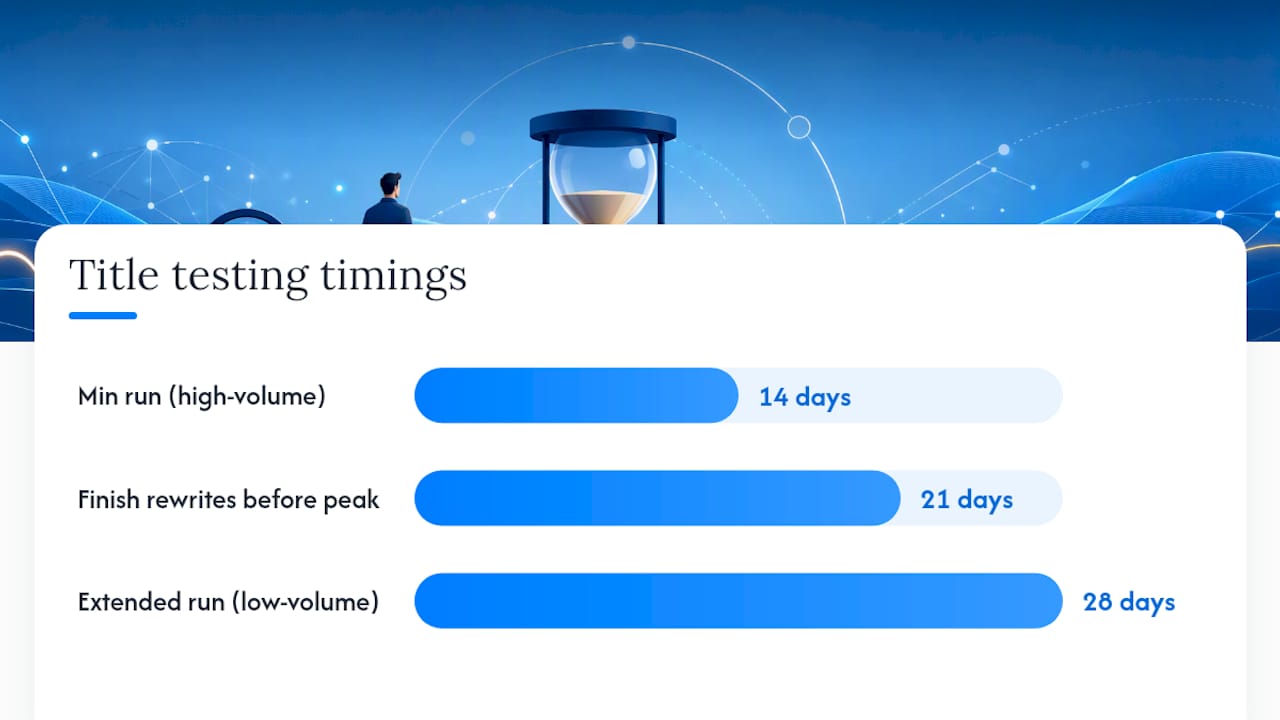
- Run the variation for a minimum of 14 days to allow Amazon’s index to update and traffic to stabilise.
- For high-volume SKUs, 14 days is usually sufficient. For lower-volume listings, extend to 28 days.
- Compare the post-change metrics against the same 14-day or 28-day period prior to the change.
Metrics to watch:
- Sessions: A drop in sessions after a title change usually means you removed a keyword that was driving traffic. If sessions fall by more than 15% and do not recover within 14 days, roll back.
- CTR: An increase in CTR with stable or rising sessions confirms the new title is more compelling to shoppers who see it.
- CVR: The conversion rate tells you whether the title is attracting the right buyers. A higher CTR with lower CVR often means the title is drawing clicks from shoppers who then find the product does not match their expectation.
- Units sold and ACoS: For PPC-supported listings, watch ACoS. A well-matched title reduces irrelevant clicks, which typically lowers ACoS over 2–4 weeks.
Decision rules:
- Keep the new title if sessions are stable or rising and CVR holds or improves after 14 days.
- Roll back if sessions drop more than 15% and do not recover, or if CVR falls more than 10%.
- Iterate if CTR improves but CVR drops: the title is attracting the wrong intent. Tighten the product descriptor.
Seasonal timing for UK sellers: Avoid making title changes in the two weeks before Black Friday (typically the third week of November) or Boxing Day. Amazon’s ranking algorithm takes time to re-index changes, and a mid-experiment traffic spike from a shopping event will distort your results. Complete your rewrites at least three weeks before peak periods, or wait until January to test.
Common title mistakes and how to fix them
Keyword stuffing
Before: Wireless Earbuds Bluetooth 5.3 Earphones In-Ear Headphones TWS Earbuds Noise Cancelling Sports Running Gym Waterproof
After: Sony WF-C700N Wireless Earbuds Noise Cancelling 27hr
The original title repeats synonyms (“earbuds”, “earphones”, “headphones”) and packs in use-case keywords that belong in bullets. The optimised version leads with brand, product noun, primary differentiator, and battery life — the four things a buyer scanning search results actually wants to know.
Promotional language
Titles containing “best”, “top-rated”, “#1 seller”, or “free gift” violate Amazon’s content policy and trigger suppression. Remove them entirely; they do not improve ranking and they create compliance risk.
Backend byte overruns
Exceeding the 249-byte backend search term limit in UK, US, and EU listings silently de-indexes the entire backend field. You will not receive an error message. The symptom is a gradual, unexplained drop in organic sessions on listings where you recently edited backend keywords. Fix: count bytes (not characters) before saving, and keep the field under 249 bytes. Source: Amazon Character Limits 2026
Inaccurate specifications
Listing a product as “1TB” when it is 1,000GB (931GiB formatted) is a common electronics error. UK consumer law requires accurate product descriptions; a title that overstates a specification creates both a policy violation and a legal exposure under the Consumer Rights Act 2015.
Validation checklist before publishing any title:
- Character count is 75 or fewer (use a counter, do not estimate).
- No promotional language or banned special characters.
- Brand name is first and spelled correctly.
- Product noun is specific (not “item” or “product”).
- Specifications match the product detail page and packaging.
- Backend search terms are under 249 bytes.
How data-driven title optimisation raised sales: an Osellpa case study
A UK seller running a mid-sized home and kitchen catalogue used Osellpa’s analytics and listing tools to address a specific problem: a cluster of 40 ASINs with titles averaging 110 characters, all at risk of auto-rewrite under the July 2026 enforcement change.

The baseline problem: Titles were long, keyword-heavy, and written for desktop search rather than mobile display. Several contained promotional phrases (“award-winning”, “premium quality”) that violated Amazon’s content policy.
Actions taken:
- Exported the full catalogue and filtered for titles over 75 characters.
- Prioritised the top 20% of SKUs by revenue (8 ASINs) for manual rewrites using the Brand + Product + Differentiator formula.
- Moved secondary attributes (materials, pack counts, compatibility) into Item Highlights.
- Used Osellpa’s keyword tracking to confirm that primary keywords were preserved in the new, shorter titles.
- Monitored sessions, CTR, and CVR for 28 days post-change.
Outcome:
The seller reported a measurable uplift in both sessions and conversion rate across the rewritten ASINs, consistent with the up to 20% sales increase that Osellpa clients report after implementing data-driven listing improvements. The compliance risk from auto-rewrites was eliminated before the enforcement deadline.
Replicable checklist:
- Audit by revenue, not alphabetically.
- Rewrite the title first; update Item Highlights in the same session.
- Track metrics for a minimum of 28 days before drawing conclusions.
- Use keyword tracking to confirm primary terms are still indexed after the rewrite.
A practical perspective for UK sellers in 2026
The July 2026 title changes are the most significant structural shift to Amazon listings in several years, and the sellers who treat them as a compliance exercise rather than an optimisation opportunity will fall behind. The sellers who come out ahead are the ones who use the constraint productively: a 75-character limit forces you to decide what your product actually is, in plain language, for a mobile shopper with three seconds of attention.
My priority list for UK sellers right now: fix your top-revenue titles this week, not this quarter. The enforcement is live, and every day an over-limit title sits in your catalogue is a day Amazon’s AI could rewrite it on your behalf. After that, work through the next tier of SKUs systematically, using the audit-and-prioritise workflow. Reserve the bulk of your testing effort for Q3 and early Q4, well ahead of Black Friday, so your titles are indexed and stable before peak traffic arrives.
One caveat worth stating plainly: if you sell in regulated categories (health, cosmetics, electrical goods, food supplements), do not treat the title rewrite as a purely SEO exercise. The Consumer Rights Act 2015 and the Consumer Protection from Unfair Trading Regulations 2008 both apply to product descriptions on UK marketplaces. Compliance language belongs in the title, not just the bullets, and it belongs early in the title where Amazon’s AI is least likely to remove it.
Osellpa’s analytics dashboard gives you the visibility to run this process at scale: tracking which titles have been rewritten, monitoring the downstream impact on sessions and profit, and flagging ASINs where performance drops after a change. That kind of systematic oversight is difficult to maintain in a spreadsheet once your catalogue exceeds 50 SKUs.
Osellpa makes title optimisation measurable, not manual
Rewriting titles is straightforward for five SKUs. For fifty or five hundred, the challenge is tracking which changes worked, which need rolling back, and which listings are still at risk of auto-rewrite. That is where Osellpa’s platform changes the equation.
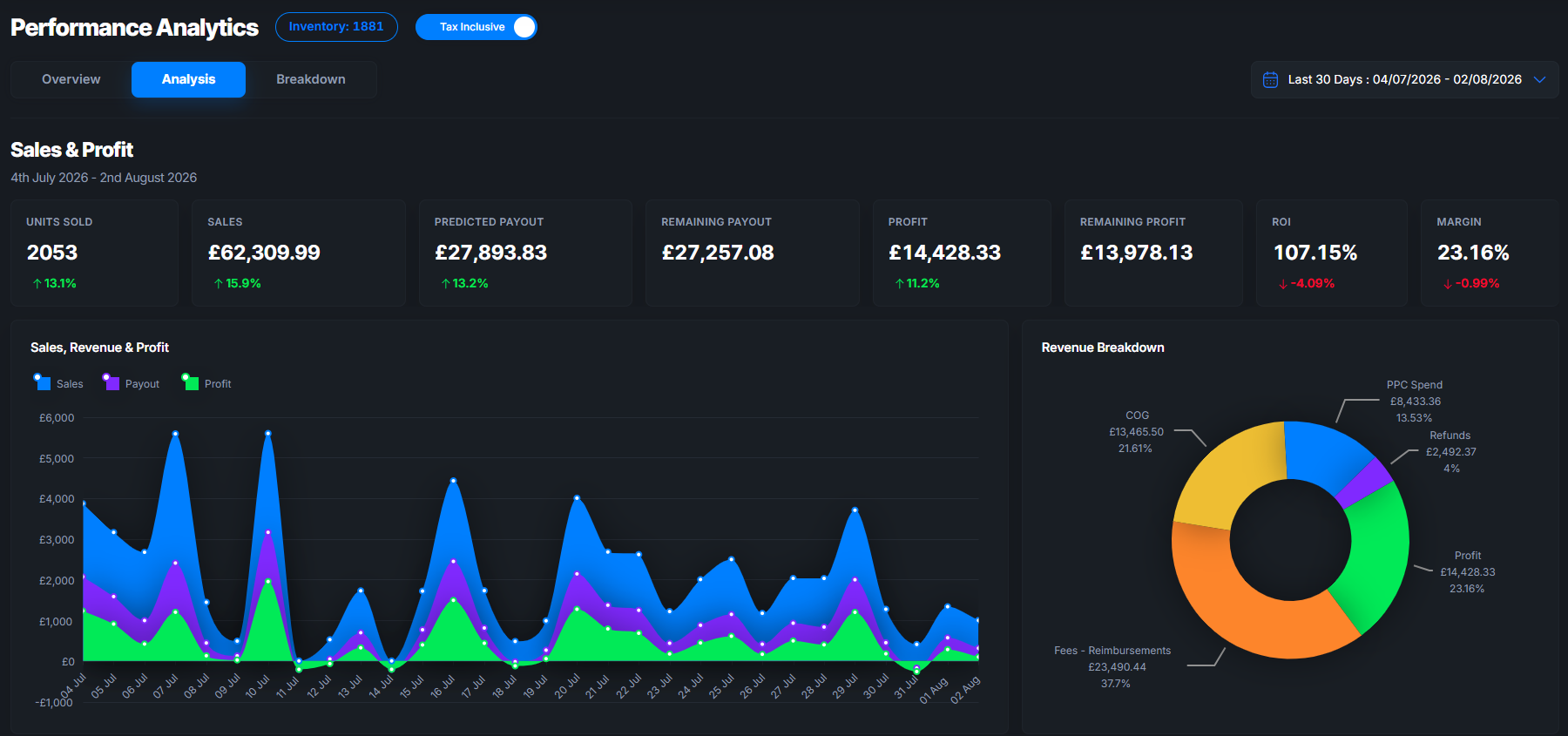
Osellpa connects directly to Amazon’s API and gives you a clear view of every listing’s performance: sessions, CVR, profit per ASIN, and PPC ACoS, all in one dashboard. Its AI-driven listing enhancement tools flag titles that need attention, suggest keyword-informed rewrites, and track ranking changes after you publish. The platform handles the measurement so you can focus on the decisions.
Start your Osellpa trial and bring your full catalogue into compliance before Amazon rewrites it for you.
Sources
The following references were used to verify the rules, limits, and procedures covered in this guide.